Web Design
7 Enhanced Conversions for Leads vs Offline Import Compared

Joshua Jackai
16 min

By Joshua Jackai, founder of Demand Designer · Published 18 October 2026 · Last updated and fact-checked 18 October 2026
Short answer: Pick by what your form captures and how long your sales cycle runs. Google's FAQ allows click ID uploads up to 90 days old and hashed-data uploads up to 63 days old. Capture an email or phone and qualify leads inside 63 days: use enhanced conversions for leads. Otherwise store the click ID, or send both.
Enhanced conversions for leads uploads hashed lead data such as an email. Offline conversion import uploads the Google Click ID (GCLID) saved from the ad click. B2B teams keep asking which to use, and Google's pages answer only part of it. I am Joshua Jackai, founder of Demand Designer, a US studio that builds B2B websites on Framer, HubSpot and WordPress. I read Google's own help pages for the day counts, the data each method needs and the 2026 changes, and I kept anything I could not find in Google's text out of the numbers. I have not tested the stage timings below across accounts. They are my starting point, not a benchmark. This guide gives seven rules, then a table to apply them to your sales cycle.
Key takeaways
Google keeps a Google Click ID (GCLID, the unique ID attached to each ad click) for 90 days, and a click ID upload can be no older than 90 days (Google Ads Help, offline conversion imports FAQs).
An upload matched on personal data such as a hashed email can be no older than 63 days, per the same FAQ.
Since 15 June 2026, both uploads go through Google's Data Manager API and are blocked in the Google Ads API (Google Ads Help, offline conversions).
Google says to start with enhanced conversions for leads if you have not yet used offline conversion import (Google Ads Help, GCLID setup).
Conversions can arrive up to a month after the impression, which in a display advertising study hindered conversion modelling (Chapelle, KDD 2014).
Rule | Question it answers | Google's number or setting | What I would do |
|---|---|---|---|
1. What each sends | What goes back to Google? | GCLID vs SHA256 hashed data | Know which one your CRM stores |
2. Time limit | How old can an upload be? | 90 days vs 63 days | Count from click to qualified lead |
3. Form capture | What must the form hold? | Hidden GCLID field vs email or phone | Capture both if you can |
4. Sales cycle | Which fits my cycle? | 63 and 90 day limits | Use the rule table below |
5. CRM path | Where does the data sit? | Upload at least daily | Fix the CRM stage first |
6. Both together | Must I choose? | Unified setting from April 2026 | Send both where you have them |
7. API move | Will my upload break? | 15 June 2026 | Check the integration owner |
1. What does each method send back to Google? Best for knowing what to store
Offline conversion import sends Google the click ID that came with the ad click, plus the conversion type and time. Enhanced conversions for leads sends hashed personal data from the lead, such as an email, so Google can match it to the ad. One sends an ID, the other sends a person's hashed details.

Click ID method: the GCLID Google adds to each ad click
Leads method: hashed first-party data from a lead form
Hashing: SHA256 in hex, after trimming spaces and lowercasing (Google Ads Help)
Phone format: E.164 (Google Ads Help)
Needs: auto-tagging on for the click ID route
Google's help page describes the leads method as one that "improves measurement of offline transactions that came from a website lead or visitor", using hashed, first-party data from lead forms (Google Ads Help, about enhanced conversions). The click ID page says Google Ads gives a unique ID for every click and tells you to save it with the lead details, then send it back with the conversion type and time (Google Ads Help, offline conversions).
The practical difference is where the match key lives. A click ID lives in the visitor's URL, then in your form, then in your CRM. Hashed data lives in what the person typed. If your CRM keeps neither, no method works, and that is the first thing I check. Open ten recent leads from paid search. Count how many carry a stored click ID, how many carry a work email, and how many carry both. Those three counts tell you which method you can run today, before any setting in Google Ads changes. Also check that the email was typed by the lead, not filled in by sales later, since the match relies on data collected at the form.
"If your CRM keeps neither, no method works, and that is the first thing I check," said Joshua Jackai, founder of Demand Designer.
2. How long after the click can you upload? Best for checking your cycle
Google's FAQ gives two limits. A conversion uploaded with a GCLID can be no older than 90 days. A conversion uploaded with personal data for enhanced conversions can be no older than 63 days. Google's FAQ does not say whether the 63 days count from the click, so I count from the click to stay safe.
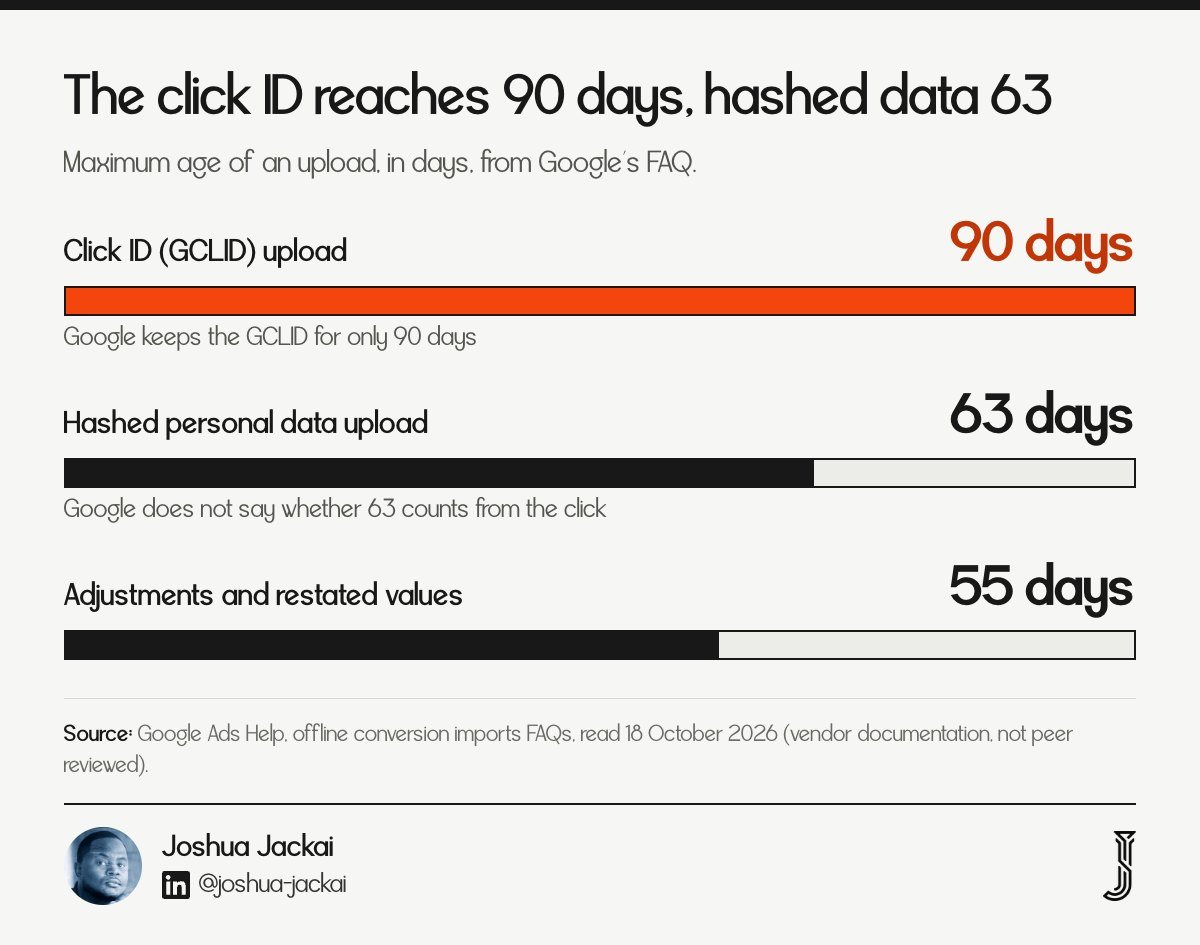
GCLID uploads: up to 90 days
Personal data uploads: up to 63 days
Adjustments and restated values: 55 days
Upload cadence for Smart Bidding: at least daily
Date error: "Conversion date precedes click date", where Google suggests adding one to two days
Google's FAQ states: "You can upload any conversion with GCLID so long as it's no longer than 90 days." It also says Google keeps the GCLID for only 90 days (Google Ads Help, offline conversion imports FAQs). For personal data the same page gives 63 days.
I took both numbers from Google's FAQ, not from forum or vendor posts. The part that is not stated is the starting point of the 63 days, and Google's FAQ lists 55 days as the window for adjustments and restated values (Google Ads Help). If your deals close in 40 days, both limits are fine. If they close in 75 days, only the click ID route can carry the final sale, and past 90 days neither can. Take your last twenty won deals, subtract the click date from the stage date you plan to upload, and sort the gaps. The median tells you the typical case. The longest tells you how many deals will fall outside a limit and never reach the bidder.
"The median confidence interval on return on investment is over 100 percentage points wide," wrote Lewis and Rao in The Quarterly Journal of Economics (2015)
That finding is about advertising experiments, not uploads. That paper is about advertising experiments, not uploads. I cite it only to show that returns on ad spend are hard to pin down even with clean data.
3. What must the form capture? Best for answering "nothing captured"
The form decides which method can work. The click ID route needs a hidden field that carries the GCLID into your CRM. The leads route needs an email or phone the person typed. If a lead arrives with neither, Google has nothing to match, and no setting fixes that.
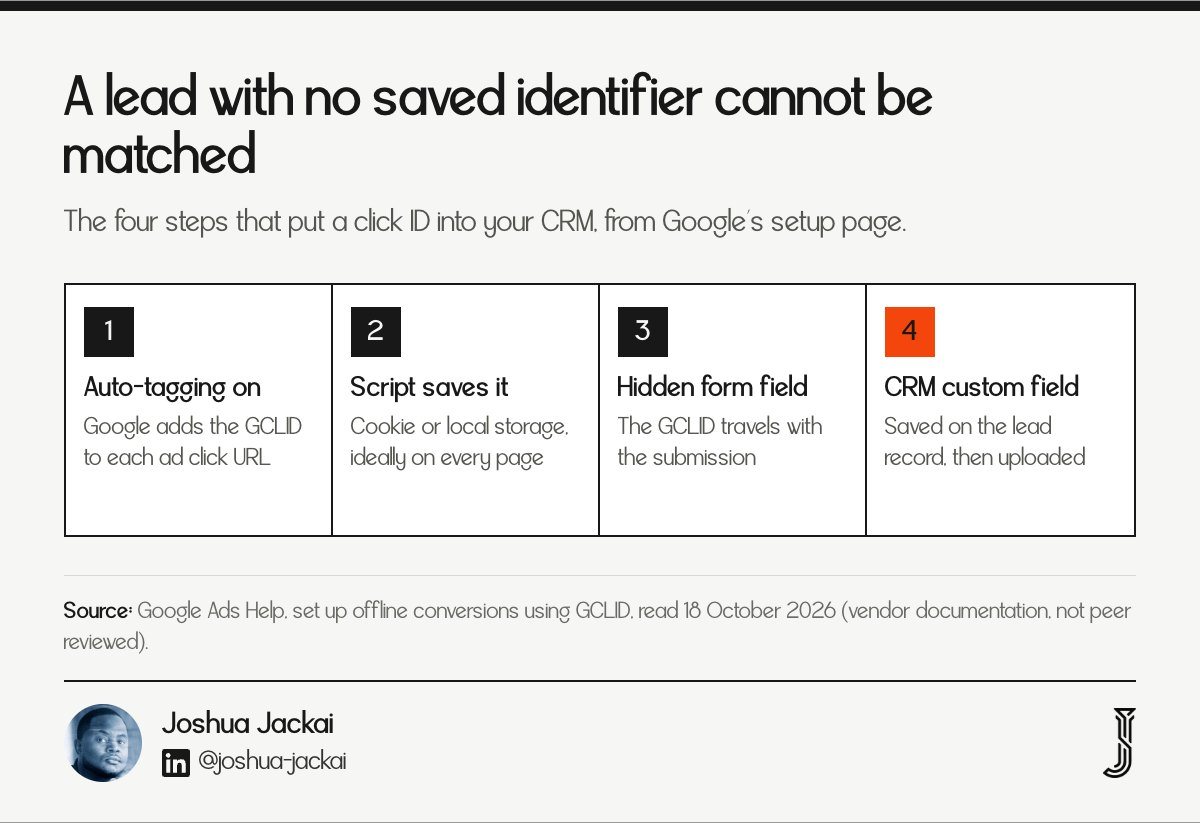
Click ID route: hidden GCLID field, a script that saves it from the URL to a cookie or local storage
Storage: a custom field on the lead record in your CRM
Leads route: at least one identifier such as email or phone
Case: the GCLID is case sensitive
After creating an action: wait 4 to 6 hours before uploading
Google's setup page tells you to add a hidden GCLID field to each form submission page, add a script that captures the GCLID from the URL into a cookie or local storage, and update your backend to save it with each prospect (Google Ads Help, GCLID setup). The suggested script's storage expires after 90 days, which matches the click ID limit.
A common question is whether the leads method works without capturing anything on the initial lead. From Google's description, it matches uploaded hashed data against data collected on your site and signed-in Google accounts that engaged with your ads. With no email, no phone and no GCLID saved, the upload has nothing to match. That is my reading, not a Google sentence.
For a B2B form that asks for a work email anyway, capture both. The cost is one hidden field. Test it end to end before you trust it: click one of your own ads in a private window, submit the form, and open the new lead in the CRM. The click ID should be there, in the same letter case Google issued, and the email should be there too. A lowercased click ID will fail to match, and Google's page warns that the GCLID is case sensitive (Google Ads Help, GCLID setup). The same page says to wait 4 to 6 hours after creating a conversion action before the first upload, or reports can take 2 days to show it.
"For a B2B form that asks for a work email anyway, capture both," said Joshua Jackai, founder of Demand Designer.
4. Which fits your sales cycle? Best for a clear decision rule
Use the days from ad click to the event you will upload. Up to 63 days with an email or phone captured, enhanced conversions for leads alone is enough. From 64 to 90 days, you need the click ID. Past 90 days, upload an earlier stage inside the window. This rule is my reading of Google's limits.
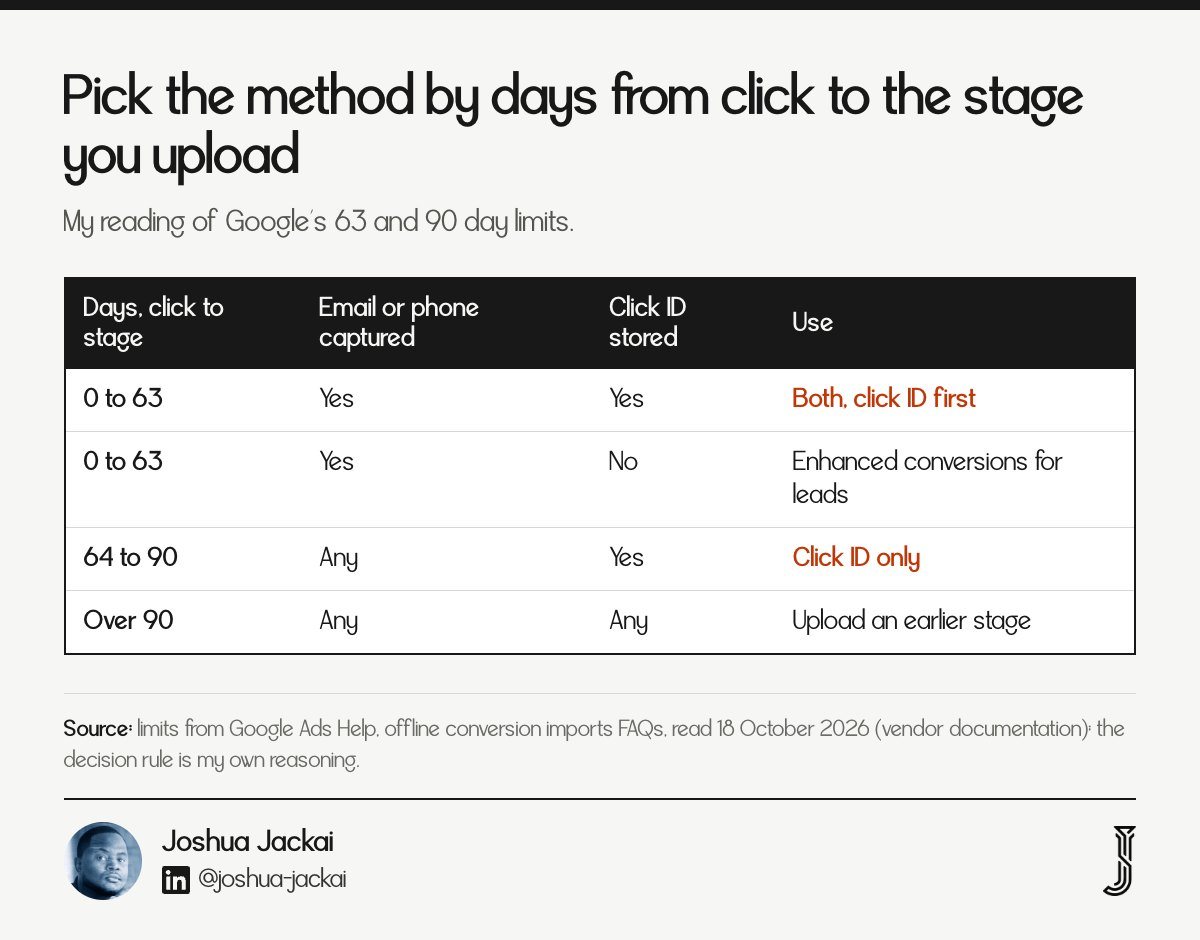
0 to 63 days: either method; Google advises new users to start with enhanced conversions for leads
64 to 90 days: click ID only
Over 90 days: upload an earlier qualified stage
Upload target: a stage sales agreed on, not a form fill
Value: send a value only if your team can defend it
Why not upload the closed deal every time? A model that learns from conversions needs them fast. Chapelle explains the problem: "conversions can take place long after the impression, up to a month, and this delayed feedback hinders the conversion modeling" (Chapelle, KDD 2014). A closed deal at day 120 is outside Google's limits. Chapelle's work covers display advertising, not Google's own bidders, but it shows why late conversions are hard to learn from.
For a 90 day B2B cycle I would upload "sales accepted lead" at about day 7 to 21 and "opportunity created" at about day 30 to 45. Both fit under 63 days, so both methods can carry them. The closed deal stays in your CRM and your board report, not in the bidding signal. Name each stage in one sentence that sales signs off on, and write down who moves a lead into it. If two reps use the word differently, the upload will carry that noise to Google, and you will not be able to see where it came from later.
"The closed deal stays in your CRM and your board report, not in the bidding signal," said Joshua Jackai, founder of Demand Designer.
5. Where does the data sit in your CRM? Best for HubSpot and Salesforce teams
Whichever method you choose, the upload is only as good as the CRM stage behind it. Google lists Salesforce and HubSpot as data sources and says each imports the last 14 days in its first successful run (Google Ads Help). Fix the stage definition and the stored click ID before you touch Google Ads.
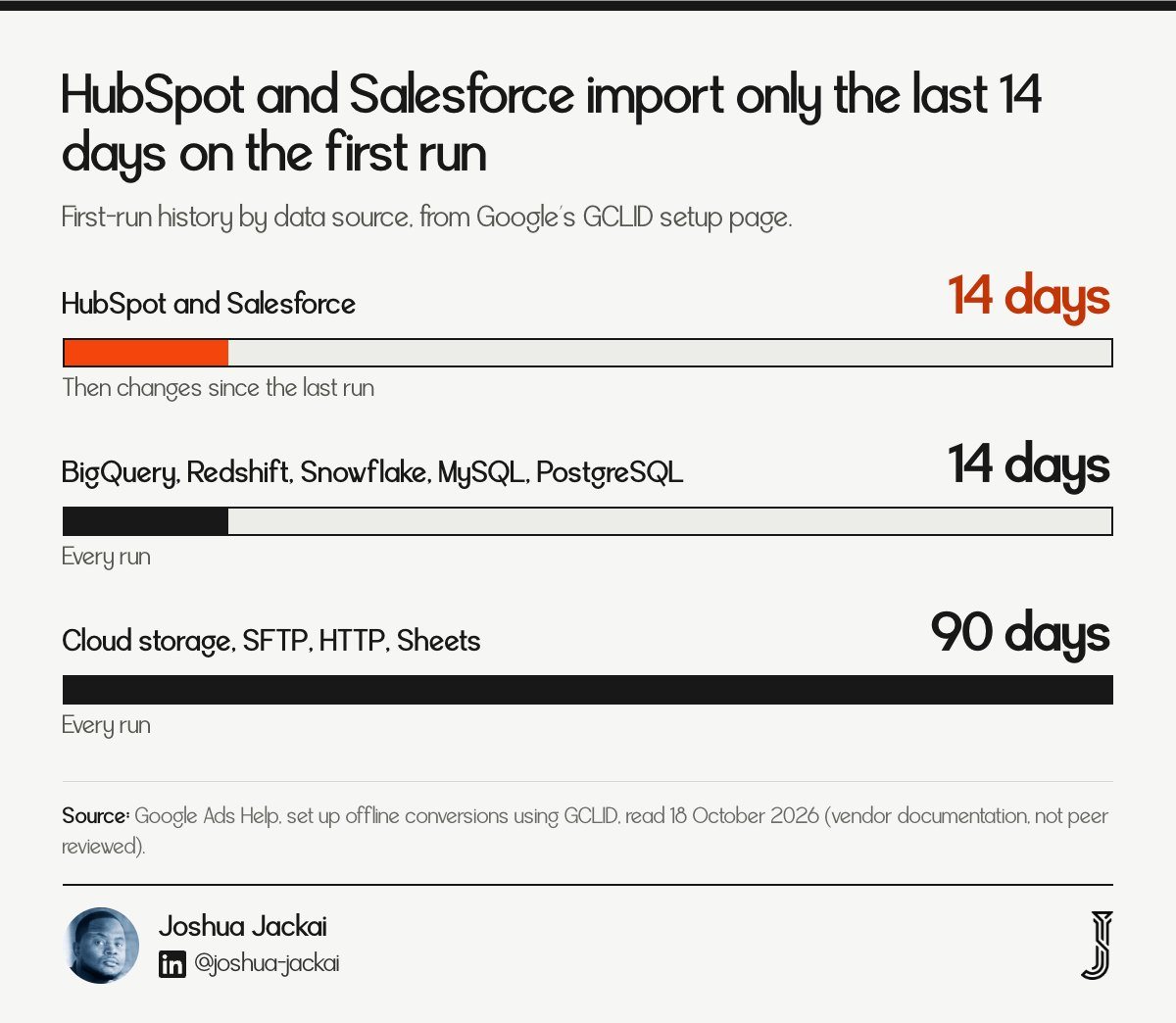
First run, HubSpot and Salesforce: last 14 days
First run, file and sheet sources: conversions from the last 90 days
After the first run: changes since the last run
Frequency: at least daily for Smart Bidding
Check: the same lead count in the CRM and in the upload
Google's setup page lists the import behaviour for each source, including the 14 day first run for Salesforce and HubSpot and the 90 day pull for file, sheet and storage sources (Google Ads Help, GCLID setup). That 14 day first run is easy to miss. A team that connects HubSpot and expects its older leads to appear will see only recent ones.
Vendor posts disagree on whether HubSpot's native sync sends only closed-won or earlier stages, so I do not state it as fact. Check it in your own account: open the conversion action, note which lifecycle stage fires it, and compare a week of HubSpot qualified leads with the conversions Google shows. If the counts differ, the stage mapping is the first suspect, not the method. Keep the comparison in a sheet with three columns: leads in the CRM, rows sent, conversions shown. A gap between the first two is a pipeline problem. A gap between the last two is a matching problem, and that is where the click ID and email checks from rule 3 apply.
"Fix the stage definition and the stored click ID before you touch Google Ads," said Joshua Jackai, founder of Demand Designer.
6. Do you have to choose one? Best for a combined setup
Since April 2026 you do not have to pick one implementation. Google's FAQ says Google Ads accepts user-provided data from website tags, Data Manager and API connections, and that you "will no longer need to choose between different implementation methods". Send the click ID where you have it and hashed data on every lead.
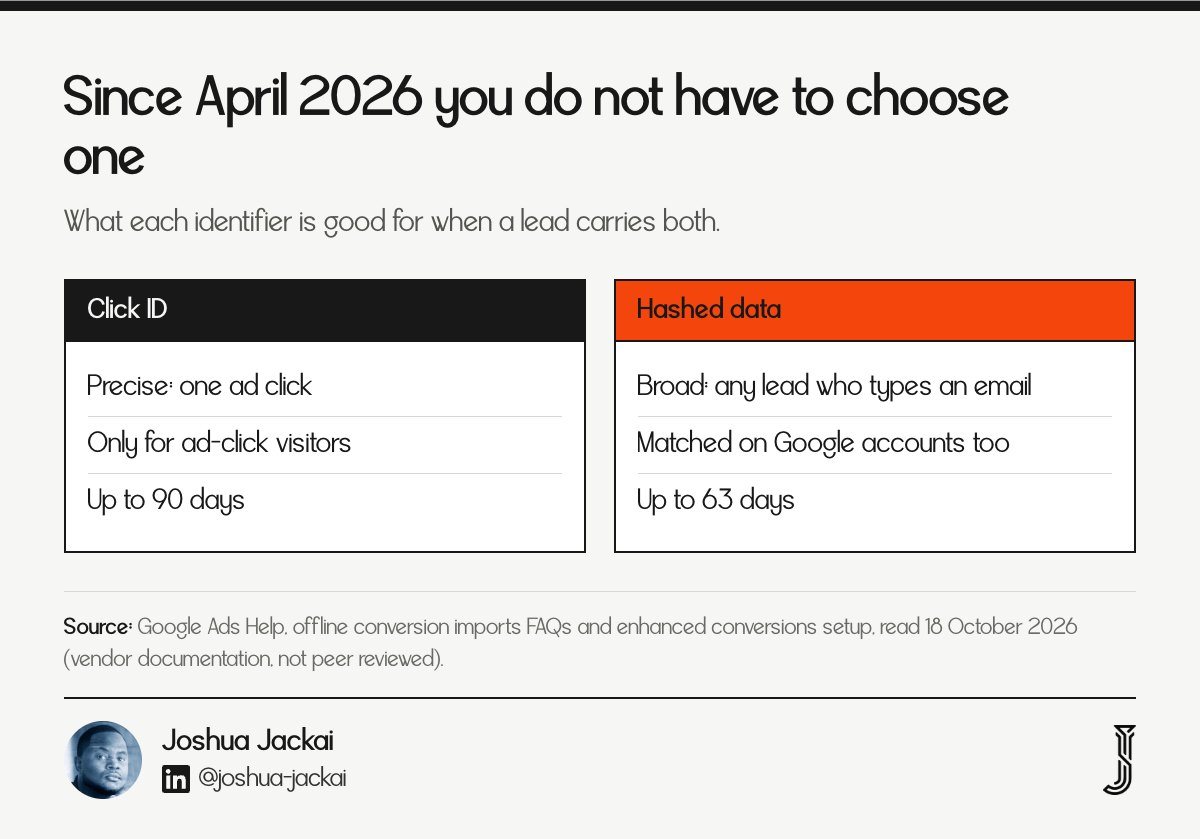
Click ID: precise, but only when the visitor arrived by an ad click with the ID intact
Hashed data: broader, since every lead who types an email can match
Setting: enhanced conversions for web and leads now share one on or off setting
Limits still differ: 90 days and 63 days
The enhanced conversions page confirms the merge: "Enhanced conversions for web and leads are now combined into a single on/off setting" (Google Ads Help, enhanced conversions setup). The FAQ makes the April 2026 point about accepting data from several connection types (Google Ads Help, FAQs). Neither page says how the two uploads are de-duplicated when a lead carries both a click ID and hashed data, so I do not claim they are. I would test it with one week of data and compare counts: leads sent, conversions shown, and how many carried both identifiers. In my practice, if the shown count is higher than the number of leads, I pause reporting and ask Google support.
The honest limit is measurement. Gordon, Zettelmeyer, Bhargava and Chapsky compared methods against randomized tests: "Observational methods often fail to accurately recover the treatment effects generated from randomized advertising experiments on Facebook." (Gordon et al., Marketing Science, 2019). Matched uploads improve what the bidder sees. They do not prove which ad caused the sale.
"The process of assigning conversion credit to the various channels is called attribution, and is a subject of intense interest in the industry." Dalessandro, Perlich, Stitelman and Provost wrote in the 2012 ADKDD proceedings, which is one more reason I keep the closed deal out of the bidding signal
7. What changed on 15 June 2026? Best for avoiding a silent upload failure
Google's offline conversions page says that from 15 June 2026 offline conversion import and enhanced conversions for leads uploads move to the Data Manager API and are blocked in the Google Ads API. If a developer or a CRM connector built your upload on the old API, ask who owns the migration.
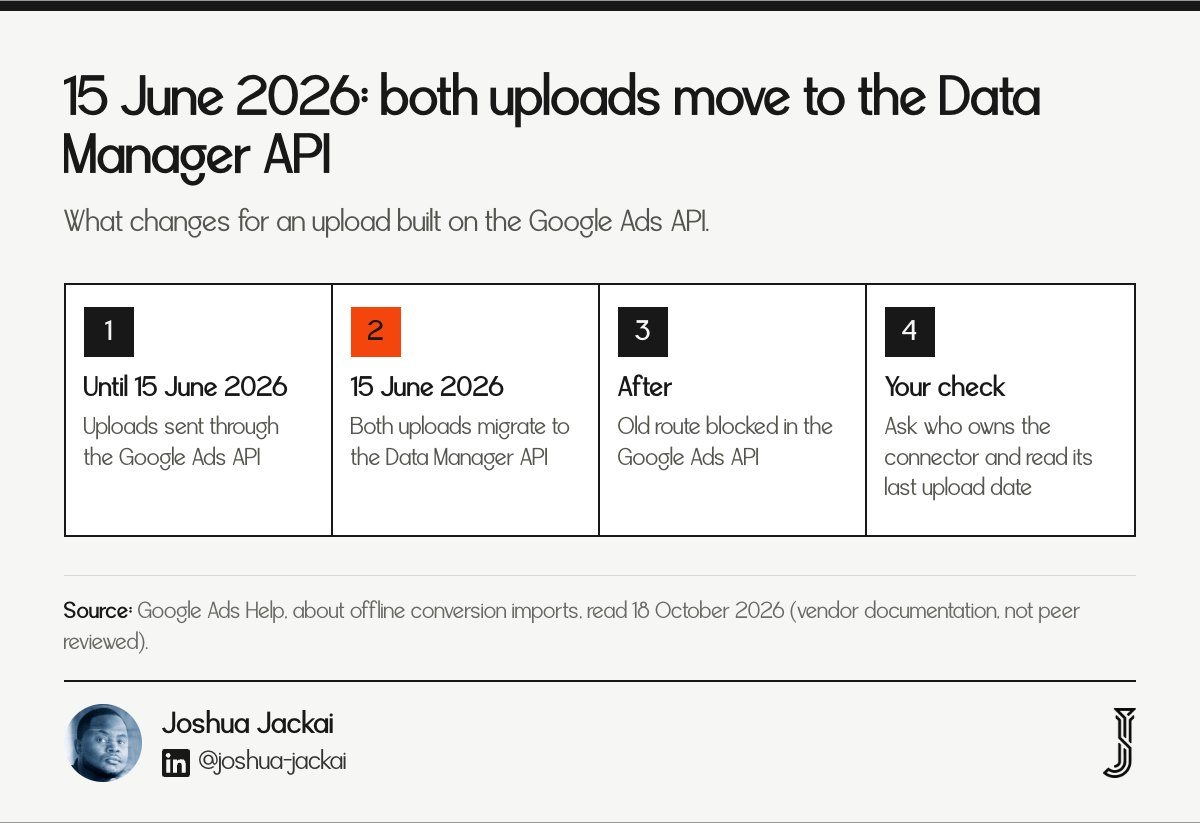
Date: 15 June 2026
Affected: both upload types
Old route: blocked in the Google Ads API
New route: Data Manager API
Ask: which connector sends my data and has it moved
The page's wording is that both uploads "will be migrated to the Data Manager API and blocked in the Google Ads API", and that you should use the Data Manager API for current and future uploads (Google Ads Help, offline conversions). The page also notes a developer token activity window from January through June 2026 for legacy access.
The 15 June 2026 date is already behind us. A reader who set up uploads in 2025 and has not looked since should check now. Open the data source or connector, read the last successful upload date, and compare it with the day the migration began. A silent gap there looks, in Google Ads, like leads that stopped converting. The campaign did not get worse. The signal stopped. Put the last upload date on a weekly checklist, next to spend, so a stalled feed shows up within seven days, not at the next quarterly review.
"The campaign did not get worse. The signal stopped," said Joshua Jackai, founder of Demand Designer.
If you use a HubSpot or Salesforce connection that Google hosts, ask the owner whether the connector updated. If a developer wrote the script, send them the Google page above.
Compare the seven rules and apply them to your cycle
This table sets the seven rules side by side. Count the days from ad click to the event you plan to upload, then read across to the limit that applies. The 63 and 90 day limits come from Google's offline conversion imports FAQ (Google Ads Help), and the 14 day first run comes from its GCLID setup page.
Rule | Type | Limit | Needs | Fails when |
|---|---|---|---|---|
Click ID upload | Time | 90 days | GCLID stored | ID not saved at the form |
Hashed data upload | Time | 63 days | Email or phone | Neither captured |
First CRM run | Setup | 14 days (HubSpot, Salesforce) | Connected source | Older leads expected |
Daily cadence | Setup | At least daily | Scheduled upload | Weekly uploads |
API move | Setup | 15 June 2026 | Data Manager API | Connector not updated |
Frequently asked questions about enhanced conversions for leads and offline import
Which should we use, enhanced conversions for leads or offline conversion import?
Google recommends enhanced conversions for leads if you have not yet adopted offline conversion import, and says existing import users can add user-provided data. In practice, capture a click ID and an email, then send both. Use the click ID alone for cycles between 63 and 90 days.
Does enhanced conversions for leads work if the form captures nothing?
In my reading, no. Google describes matching uploaded hashed data against data collected on your site, so a lead with no email, phone or saved click ID gives it nothing to match. Add an email or phone field, or a hidden click ID field, before choosing a method.
Do offline conversions show exactly which leads converted?
They show the conversions you upload and Google can match, not an audit of your pipeline. Compare the leads you sent with the conversions Google reports. Even then, a match does not prove an ad caused the sale: a Facebook field study found observational methods often failed.
How long should a sales cycle be before neither method works?
Past 90 days from the click, a click ID upload falls outside Google's limit, and past 63 days a hashed-data upload does. Upload an earlier stage that sits inside the window, such as a sales accepted lead, and keep the closed deal in your CRM for reporting.
How I set this up for B2B teams
I build B2B marketing sites on Framer and HubSpot at fixed prices from $3,250 to $14,999. When lead tracking is the problem, I start at the form: a hidden click ID field, a work email field, and the CRM stage that sales agreed to. The Pipeline Leak Scorecard walks through that check in about fifteen minutes and is free.
Sources
Peer reviewed
Chapelle, O. (2014). Modeling delayed feedback in display advertising. Proceedings of the 20th ACM SIGKDD International Conference on Knowledge Discovery and Data Mining. doi.org/10.1145/2623330.2623634
Dalessandro, B., Perlich, C., Stitelman, O. and Provost, F. (2012). Causally motivated attribution for online advertising. Proceedings of the Sixth International Workshop on Data Mining for Online Advertising and Internet Economy. doi.org/10.1145/2351356.2351363
Lewis, R. A. and Rao, J. M. (2015). The unfavorable economics of measuring the returns to advertising. The Quarterly Journal of Economics. doi.org/10.1093/qje/qjv023
Gordon, B. R., Zettelmeyer, F., Bhargava, N. and Chapsky, D. (2019). A comparison of approaches to advertising measurement: evidence from big field experiments at Facebook. Marketing Science. doi.org/10.1287/mksc.2018.1135
Industry and vendor
Google Ads Help. Offline conversion imports FAQs, read 18 October 2026. support.google.com/google-ads/answer/10029210. Vendor documentation, not peer reviewed.
Google Ads Help. Set up offline conversions using Google Click ID (GCLID), read 18 October 2026. support.google.com/google-ads/answer/7012522. Vendor documentation.
Google Ads Help. About offline conversion imports, read 18 October 2026. support.google.com/google-ads/answer/2998031. Vendor documentation.
Google Ads Help. About enhanced conversions, read 18 October 2026. support.google.com/google-ads/answer/9888656. Vendor documentation.
Google Ads Help. Set up enhanced conversions for web, read 18 October 2026. support.google.com/google-ads/answer/13258081. Vendor documentation.
The sales cycle rule in item 4, the stage timings and the no-capture reading in item 3 are my own reasoning from the limits above. Build prices are Demand Designer's fixed-price tiers, October 2026. First-party.
Free workbook
Pipeline Leak Scorecard
Find the leaks between your traffic and your pipeline. Score your site in about fifteen minutes, with it open in front of you.
12 questions, 8 pages, 15 minutes. Free.