Web Design
Website Lead Tracking: How to Trace Every Lead to Its Source and Its Deal

Joshua Jackai
14 min

By Joshua Jackai. I am the founder of Demand Designer, a US studio that designs and builds B2B websites on HubSpot, Framer and WordPress, and I wire the lead tracking into every site I ship. Published 12 October 2026. Vendor details were checked on 12 October 2026 and will date.
Website lead tracking is the record that follows one person from the click that brought them to your site, through the form they filled in, to the deal they did or did not sign. It answers one question a head of marketing gets asked every quarter: which of our channels produced revenue, not just form fills?
On the B2B sites I audit, it is common to find a monthly lead count with no source attached to the deals that closed. The gap is not a missing tool. It is five small handoffs, each of which drops a piece of the record, and nobody owns all five. This guide walks through those handoffs, the tools that cover each one, the legal side for US companies, and the follow-up habits that decide whether a tracked lead turns into a deal.
Key takeaways
Lead tracking connects three records that normally live apart: the ad or link, the form submission, and the CRM deal.
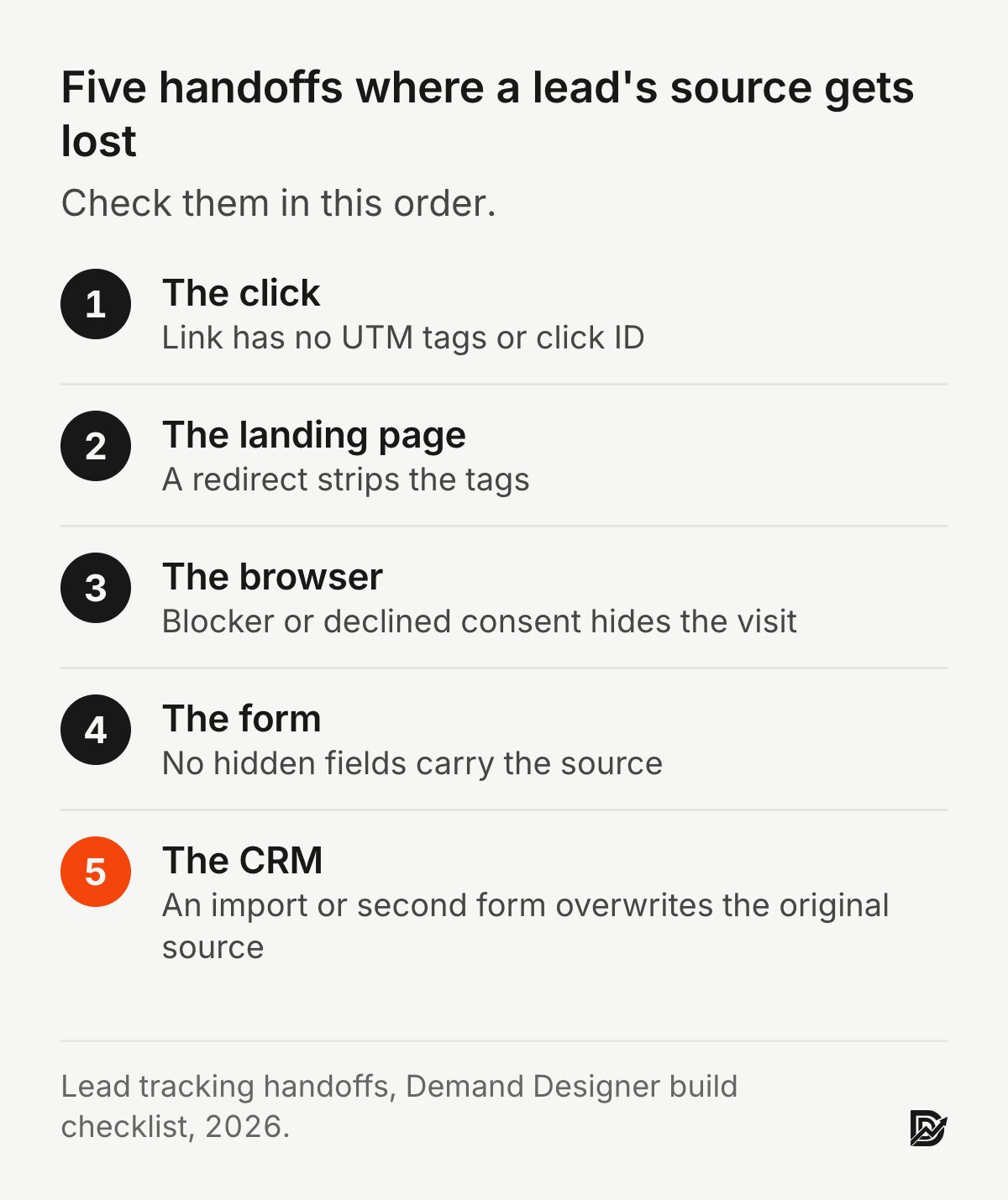
The source usually gets lost in one of five handoffs: the click, the landing page, the browser, the form and the CRM.
Analytics tools count visits. A CRM tracks people. You need both, and they answer different questions.
Peer-reviewed attribution research finds that last-click reports misstate what each channel contributes (Li and Kannan, Journal of Marketing Research, 2014).
Tracked leads still die in sales. Sabnis and colleagues (Journal of Marketing, 2013) describe the "sales lead black hole", in which sales reps leave most marketing leads unpursued.
What does lead tracking mean?
Lead tracking means recording where each lead came from and what happened to it next, so you can tie marketing spend to pipeline and revenue. A lead is a person who gave you their contact details. Tracking keeps their source, their pages and their sales outcome on one record.
Two things get called lead tracking, and it helps to keep them apart. The first is source tracking: which ad, search, email or referral brought this person in. The second is status tracking: whether sales called them, booked a meeting, opened a deal and won it. A spreadsheet of names with a "status" column does the second and not the first. Google Analytics does a version of the first and not the second. The value comes from joining them, because only the joined record can show you, for example, a channel that produces fewer leads than search but more closed revenue.
What is a lead tracking system?
A lead tracking system is the set of tools and fields that captures a lead's source when they arrive, carries it through the form, and stores it on the customer relationship management (CRM) record next to the deal. In practice it is a tracking script, hidden form fields, a CRM and an agreed list of source names. UTM parameters are short tags added to a link that name its source, medium and campaign.
The parts, in the order a lead meets them:
Tagged links. UTM parameters on every link you control, so the landing URL carries utm_source=linkedin, utm_medium=paid and utm_campaign=q4-demo.
Click IDs. Ad platforms add their own, such as Google's gclid, which lets you send closed deals back to Google Ads later.
First-party storage. A small script saves the first and latest source in the visitor's browser, because most B2B buyers do not convert on their first visit.
Hidden form fields. When the visitor submits, the script writes those saved values into hidden fields, so the source travels with the submission.
CRM properties. The CRM stores original source, latest source, campaign and landing page on the contact, and the deal inherits them.
A source list. A fixed set of values (paid search, organic search, paid social, email, referral, direct, event, partner) so reports do not split "LinkedIn", "linkedin" and "LI ads" into three channels.
How do you track leads from your website?
To track leads from your website, tag your links, save the source in the browser on the first visit, pass it into hidden fields on every form, and store it on the CRM contact and deal. Then check monthly that closed deals still carry a source.
Here is the order I set it up on a new B2B site:
Write the source list first. Eight to ten values, agreed with sales, before any tool is touched.
Tag every link you control. Ads, emails, social posts, partner links. Untagged traffic falls back to the referrer, which is fine for search and useless for most email.
Install the tracking script. HubSpot's tracking code does first and latest source on its own if your forms are HubSpot forms. On Framer or WordPress with another form tool, a short script that writes UTMs and the referrer into first-party storage does the same job.
Add hidden fields to every form. Contact, demo, pricing, newsletter and content downloads. The form you forgot is the one your best lead uses.
Map the fields into the CRM. Contact properties for first touch and last touch, copied onto the deal when it is created.
Send closed deals back to the ad platforms. Offline conversion imports use the stored click ID, so Google and LinkedIn bid toward customers instead of form fills.
Audit once a month. Pull last month's closed deals and count how many have a blank or "direct" source. That number is your leak rate.
In my builds, steps 3 to 5 are the quick, technical part. The source list and the monthly audit are the parts teams skip, and they are the parts that make the data usable.
Where does lead source data get lost?
Lead source data usually gets lost at one of five handoffs: the link has no tags, the landing page redirects and drops them, the browser blocks or clears storage, the form has no hidden fields, or the CRM overwrites the original source. Check each one in that order.
The browser handoff is the one teams underestimate. Merzdovnik and colleagues tested popular tracker-blocking tools in a large-scale study at the 2017 IEEE European Symposium on Security and Privacy and found that tracker-blocking tools differ widely in how many third-party trackers they stop (Merzdovnik et al., 2017). Any lead whose browser blocks your analytics script is invisible to your analytics, though not to your CRM if the form still submits. That is one reason I store the source on the form submission itself rather than trusting the analytics platform to join it later.
Consent rules shrink the data again. Goldberg, Johnson and Shriver studied 1,084 online firms on Adobe's analytics platform and found that EU users' recorded pageviews and recorded revenue each fell by about 12 percent after the GDPR took effect (Goldberg et al., American Economic Journal: Economic Policy, 2024). That is a European rule, so the size of the loss will differ on US sites. The direction is the same: consent choices and blockers remove some real visits from your reports, so treat analytics counts as a floor.
The CRM handoff fails quietly. A rep imports a list, or a lead fills in a second form a month later, and a badly mapped field overwrites "paid search" with "list import". Keep original source read-only after creation.
What is the best software for lead tracking?
The best lead tracking software is the CRM your sales team will actually update, paired with an analytics tool for visit data. For most US B2B teams under about 50 people, I set up HubSpot because its free CRM, forms and tracking code store first and latest source without extra work. HubSpot is the platform I build on most, so weigh that when you read this recommendation.
I build mostly on HubSpot, so that is the stack I can speak to from use. The pieces map like this:
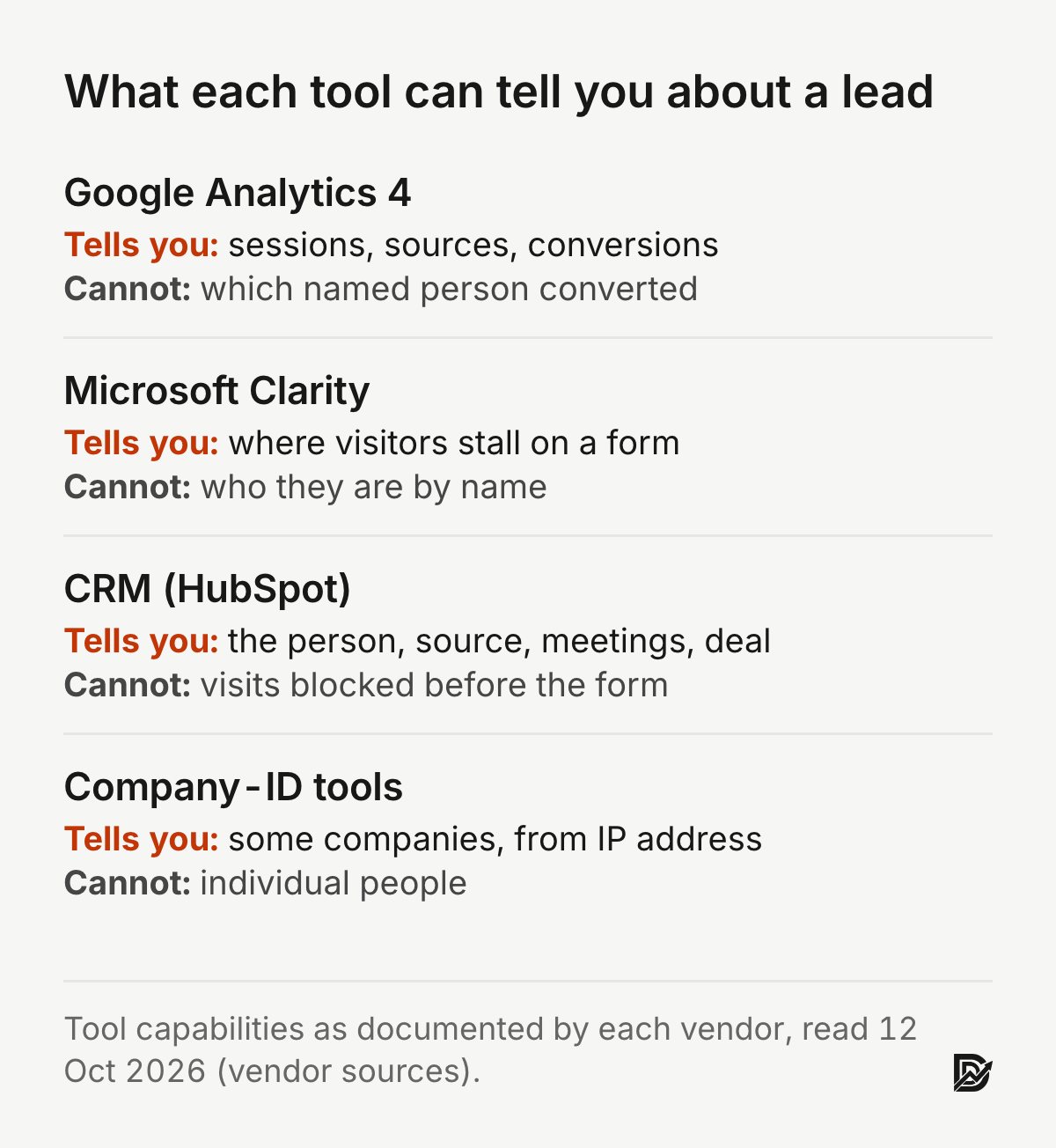
Google Analytics 4 counts sessions, sources and conversions in aggregate. It cannot tell you which named person filled in a form, and Google's policies prohibit sending personally identifiable information into it.
Microsoft Clarity records sessions and heatmaps for free, which shows where people stall on a form. It is not a lead record either.
A CRM holds the person, their source fields, their meetings and their deals. This is where lead tracking lives.
Company-identification tools match visitor IP addresses to companies. They name some companies, never individuals, and their match rates vary, so I treat them as prospecting hints, not lead records.
Whatever you pick, the test is the same: can you open a closed-won deal from last quarter and see the campaign that started it? If not, the software is not the problem yet.
What is the best free software for lead management?
The best free option for most small B2B teams is HubSpot's free CRM with its free forms and tracking code, plus Google Analytics 4 and Microsoft Clarity for visit data. Together they cover source capture, contact records and session behaviour at no software cost.
The free CRM tier has limits on automation and reporting, which matter once you have several reps and want deal-stage reports by source. A Google Sheet also works if a form tool writes the hidden fields into it, but a sheet does not stop two reps from editing the same row or overwriting the source.
Do you really need a CRM in 2026?
You need a CRM once more than one person follows up leads or once you get more leads than you can remember by name. Below that, a well-built spreadsheet with source columns works. Above it, the spreadsheet starts losing leads.
My rough line, from the B2B sites I work on: if you get fewer than about 20 inbound leads a month and one founder handles all of them, a sheet with date, name, company, source, campaign, status and deal value is enough. Past that, or the day a second person starts calling leads, move to a CRM, because lead tracking depends on every status change being recorded, and people do not keep shared sheets current.
Will AI replace the CRM? Not the record. AI features in CRMs now draft emails, summarise calls and score leads, but they all read from the same contact and deal records. If the source fields are empty, the AI has nothing to attribute.
What is the 5 minute rule for leads?
The 5 minute rule says sales should contact a new inbound lead within five minutes of the form submission, because response odds fall quickly with delay. The research most often cited for it measured hours, not minutes, so treat five minutes as a target, not a finding.
The best-known study is an industry audit published in Harvard Business Review in 2011, not a peer-reviewed journal. Oldroyd, McElheran and Elkington sent test web leads to 2,241 US companies. Of the 2,241 companies tested, 37 percent responded within an hour, 16 percent within one to 24 hours, 24 percent took longer than 24 hours, and 23 percent never responded. Companies that tried to reach the lead within an hour were nearly seven times as likely to qualify it as companies that tried to reach the lead even an hour later (Oldroyd, McElheran and Elkington, Harvard Business Review, 2011).

Lead tracking makes this measurable. Store the form submission time and the first logged call or email on the contact, and you can report median time to first touch by source. When I see that number above a day, the lead problem is in sales, not in marketing.
How many times is it acceptable to follow up with a lead?
There is no peer-reviewed number for follow-up attempts. In my experience with B2B inbound leads, five to eight touches over two to three weeks, mixing calls and short emails, is reasonable for a lead who asked to be contacted. Stop when they say no or stop opening.
The bigger risk is not too many follow-ups. It is none. Sabnis, Chatterjee, Grewal and Lilien studied how sales reps follow up marketing leads and frame the problem as a "sales lead black hole", in which most marketing leads are never pursued (Sabnis et al., Journal of Marketing, 2013). A tracking setup that records every touch on the contact shows you exactly which leads fell into that hole, by source and by rep.
Can I track visitors to my website?
Yes. Analytics tools track visits, pages and sources for all visitors in aggregate, and your CRM tracks named individuals once they submit a form or click a tracked email. Before that, you can see what anonymous visitors did, not who they are.
The related questions come up on almost every discovery call:
Can someone tell if you visited their website? Not by name, unless you were already a known contact in their CRM or clicked a tracked email. Analytics shows anonymous visits. Company-identification tools may name your employer from your IP address.
What is the best free website visitor tracker? Google Analytics 4 for sources and conversions, Microsoft Clarity for recordings and heatmaps, and the HubSpot tracking code if you use HubSpot forms. All three are free at the time of writing.
What are the top 5 web analytics tools? For B2B sites, the ones I see most are Google Analytics 4, Microsoft Clarity, HubSpot's analytics, PostHog and Plausible. Pick by question: GA4 for marketing sources, Clarity for form behaviour, the CRM for revenue.
Is Google Analytics still free?
Yes. The standard version of Google Analytics 4 is free. Google sells an enterprise version, Analytics 360, for larger sites that need higher limits and service agreements. Universal Analytics, the older version, stopped processing data on 1 July 2023 and GA4 replaced it.
The downsides of relying on GA4 alone for lead tracking are worth knowing. It reports aggregate sources, not people, so it cannot tell you which lead became a customer. It loses visits to blockers and declined consent, as the research above shows. And its attribution settings change how credit is shared between channels, which matters more than most teams realise.
Which attribution model should you use for lead tracking?
Use first-touch to see which channels create demand, last-touch to see which channels close it, and a multi-touch view only once both are clean. No single model is correct. Last-touch alone, which many reports default to, gives all the credit to the final channel, and the studies below show that misstates what each channel contributes.
Two peer-reviewed studies make that case with real data. Li and Kannan built an attribution model on multichannel online data from a firm and tested it with a field experiment; they found that channel contributions differed from what last-click metrics showed, with carryover and spillover effects between channels (Li and Kannan, Journal of Marketing Research, 2014). Anderl, Becker, von Wangenheim and Schumann applied a graph-based attribution model to customer journey data from several companies and found that channel roles differ by industry and that simple heuristics misallocate credit (Anderl et al., International Journal of Research in Marketing, 2016).
For a B2B site, I store both first and latest source on every contact and report closed revenue by each. When the two reports disagree sharply, that disagreement is the finding: one channel opens deals and another closes them, and cutting either one hurts.
Is web tracking legal in the US?
Web tracking is legal in the US when you disclose it and honour the rights your visitors have under the state laws that apply to you. There is no single federal privacy law for websites, but a growing list of states, including California, Colorado, Connecticut, Virginia and Texas, give residents rights over how their data is collected and shared. This is general information, not legal advice.
Three practical points I follow on US B2B builds:
Say what you track. A privacy policy that names the analytics, CRM and ad tools, and what each collects.
Honour opt-outs. California's rules give residents the right to opt out of the sale or sharing of their personal information, and some states require you to respect browser opt-out signals such as Global Privacy Control. Check with counsel which apply to your company.
Design the banner honestly. Nouwens and colleagues scraped consent pop-ups on 680 of the UK's top 10,000 websites and found only 11.8 percent met minimal requirements based on European law (Nouwens et al., CHI, 2020). In a 40-person experiment in the same paper, removing the opt-out button from the first page raised consent by 22 to 23 percentage points. A separate field study by Utz and colleagues found that banner position, nudging and preselected options changed how visitors responded to cookie notices (Utz et al., ACM CCS, 2019). Those design levers are exactly what regulators look at, so I do not use them to inflate consent.

Is lead generation illegal?
No. Generating leads from your own website, with forms people choose to fill in, is legal. What gets companies in trouble is how leads are bought, sold and contacted: calling or texting people without the prior consent the Telephone Consumer Protection Act requires, emailing without the unsubscribe option the CAN-SPAM Act requires, or selling personal data without the disclosures state privacy laws require.
Fake leads are a related headache. Bots and spam submissions inflate lead counts and pollute source reports. A hidden honeypot field, a server-side check for disposable email domains and a rule that flags submissions with no page views before the form catch most of them. Tracking helps here too: a source that sends 200 leads and zero meetings is either the wrong audience or not real people.
How do you qualify a lead once you are tracking it?
Qualify a tracked lead by combining what they told you on the form with what they did on the site. Two or three qualifying questions on the form, plus behaviour such as a pricing page visit, sort most B2B leads into sales-ready or nurture.
Monat's review of industrial lead conversion in Marketing Intelligence and Planning found 16 lead characteristics that stand in for 8 purchase factors, and concluded that no single scoring model fits every company (Monat, 2011). His model was not field tested, so I use it as a checklist for choosing qualifying questions, not as a formula. On a typical B2B build that means company size, timeline and role on the form, and the source fields doing the rest.
What I check on a B2B site's lead tracking
When I audit lead tracking on a client site, I open the CRM before the analytics, because the CRM is where revenue lives. On HubSpot builds such as Snappy Kraken, a US marketing platform for financial advisors whose site I moved from Figma to HubSpot in 21 days, the forms and contact properties ship with the pages rather than after them. My checks, in order:
Pick ten closed-won deals from last quarter. How many show an original source other than blank or "direct"?
Submit every form on the site with a tagged test URL. Does each submission arrive in the CRM with the UTM values intact?
Click a Google Ads link with a click ID, convert, and confirm the ID lands on the contact.
Open the source property history on a few older contacts. Has anything overwritten the original value?
Compare GA4 form conversions with CRM contacts created for the same month. In my experience, a gap above roughly a quarter often points to a form or consent setting losing data. There is no published threshold for this.
If you want a structured version of these checks, the Pipeline Leak Scorecard walks through them with your site open, and the B2B website conversion rate benchmarks guide covers what to compare the numbers against.
Sources
Peer reviewed
Anderl, E., Becker, I., von Wangenheim, F., and Schumann, J. H. (2016). Mapping the customer journey: Lessons learned from graph-based online attribution modeling. International Journal of Research in Marketing, 33(3). doi:10.1016/j.ijresmar.2016.03.001
Goldberg, S. G., Johnson, G. A., and Shriver, S. K. (2024). Regulating privacy online: An economic evaluation of the GDPR. American Economic Journal: Economic Policy, 16(1). doi:10.1257/pol.20210309
Li, H., and Kannan, P. K. (2014). Attributing conversions in a multichannel online marketing environment: An empirical model and a field experiment. Journal of Marketing Research, 51(1). doi:10.1509/jmr.13.0050
Merzdovnik, G., Huber, M., Buhov, D., Nikiforakis, N., Neuner, S., Schmiedecker, M., and Weippl, E. (2017). Block me if you can: A large-scale study of tracker-blocking tools. 2017 IEEE European Symposium on Security and Privacy. doi:10.1109/EuroSP.2017.26
Monat, J. P. (2011). Industrial sales lead conversion modeling. Marketing Intelligence and Planning, 29(2). doi:10.1108/02634501111117610
Nouwens, M., Liccardi, I., Veale, M., Karger, D., and Kagal, L. (2020). Dark patterns after the GDPR: Scraping consent pop-ups and demonstrating their influence. Proceedings of the 2020 CHI Conference on Human Factors in Computing Systems. doi:10.1145/3313831.3376321
Sabnis, G., Chatterjee, S. C., Grewal, R., and Lilien, G. L. (2013). The sales lead black hole: On sales reps' follow-up of marketing leads. Journal of Marketing, 77(1). doi:10.1509/jm.10.0047
Utz, C., Degeling, M., Fahl, S., Schaub, F., and Holz, T. (2019). (Un)informed consent: Studying GDPR consent notices in the field. Proceedings of the 2019 ACM SIGSAC Conference on Computer and Communications Security. doi:10.1145/3319535.3354212
Industry and vendor (not peer reviewed)
Oldroyd, J. B., McElheran, K., and Elkington, D. (2011). The short life of online sales leads. Harvard Business Review, 89(3). Industry audit of 2,241 US companies. https://hbr.org/2011/03/the-short-life-of-online-sales-leads
Google, Analytics Help: Universal Analytics sunset (data processing stopped 1 July 2023) and the policy against sending personally identifiable information. Read 12 October 2026.
Free workbook
Pipeline Leak Scorecard
Find the leaks between your traffic and your pipeline. Score your site in about fifteen minutes, with it open in front of you.
12 questions, 8 pages, 15 minutes. Free.


