Web Design
7 Website Maintenance Cost Per Month Facts: Full 2026 Guide

Joshua Jackai
16 min

By Joshua Jackai, founder of Demand Designer · Published 15 October 2026 · Last updated and fact-checked October 2026
Demand Designer is a fixed-price, conversion-focused B2B web design studio for US companies, run by Joshua Jackai, who designs and rebuilds B2B websites.
Short answer: In the 30 monthly plans I read from 13 sellers, website maintenance cost per month had a median of $274.50, from $44 to $2,700. The 19 plans that state their hours price an included hour at a median of $72, about 1.5 times the $47.85 median hourly pay the US Bureau of Labor Statistics reports for web developers.
The articles I found on website maintenance cost per month quote ranges from vendor pages and rarely show the plans behind them. So I did the unglamorous part. I opened 30 priced plans from 13 sellers on 15 October 2026, wrote down the price, the included hours, the stated response time and the exit terms, and turned each plan into one comparable number: dollars per included hour. If you pay a monthly fee for a B2B website, or you are about to sign for one, this guide gives you the numbers to test the fee against.
Key takeaways
The median of 30 published plans is $274.50 a month, and the range runs from $44 to $2,700, so one average hides more than it shows.
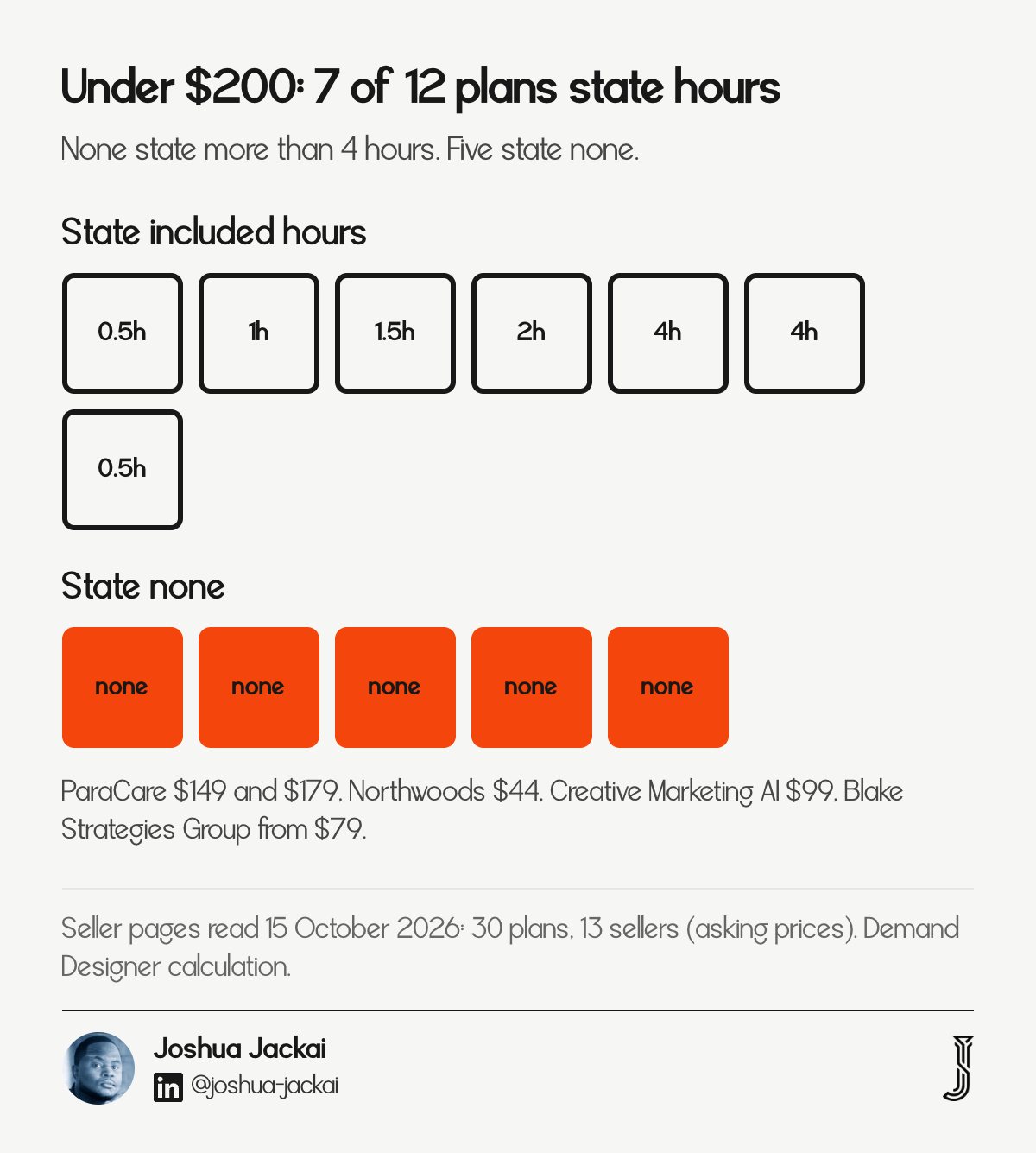
Of the 12 plans under $200, only 7 state any included hours, and none state more than 4 hours.
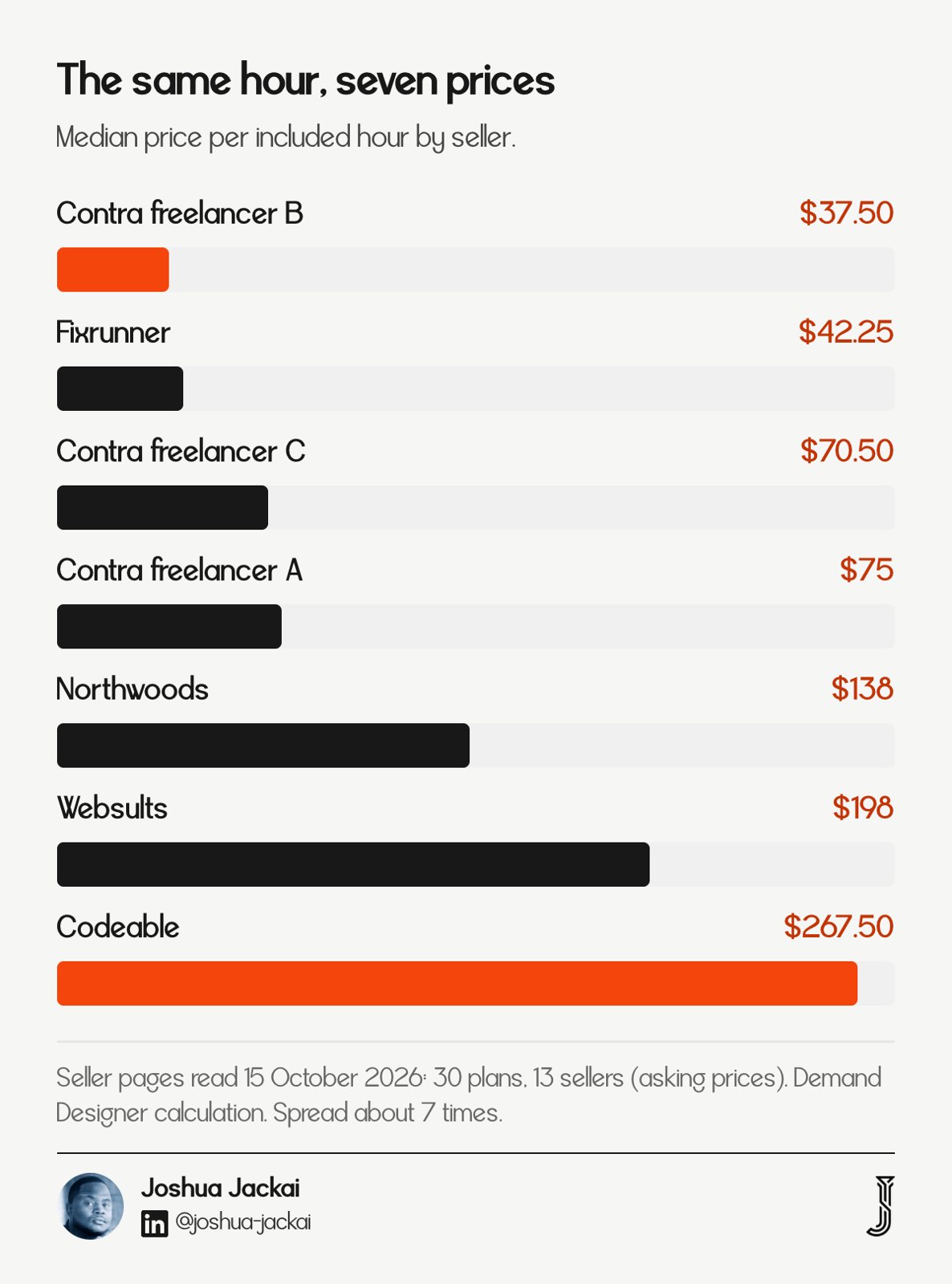
The 19 plans that state hours price an included hour at a median of $72, with seller medians from $37.50 to $267.50, a spread of about 7 times.
Only 8 of the 30 plans promise a response time; 9 give a typical turnaround, 2 say only "priority" and 11 say nothing.
WordPress plans in the sample have a median of $240 a month; Webflow and Framer plans have a median of $735, because they are sold as blocks of hours.
# | Fact | The number | Where it comes from |
|---|---|---|---|
1 | The median plan | $274.50 a month, $44 to $2,700 | 30 plans, 13 sellers |
2 | What a low price covers | 12 plans under $200, 7 state hours, none above 4 | The same 30 plans |
3 | Price per included hour | $72 median, 19 plans | Plans that state hours |
4 | The spread | $37.50 to $267.50 by seller, about 7 times | Seven sellers that state hours |
5 | Hosting under the fee | 7 of 30 plans include it; hosting lists from $2.99 (sign-up price) to $50 a month | Seller pages, Framer, Kinsta, WP Engine |
6 | Minimum terms | 6 of 13 sellers publish a term | Seller pages |
7 | A fair price test | $72 is 1.5 times the $47.85 BLS median wage | BLS, 2025 pay |
1. The median plan costs $274.50 a month: best for setting a first budget
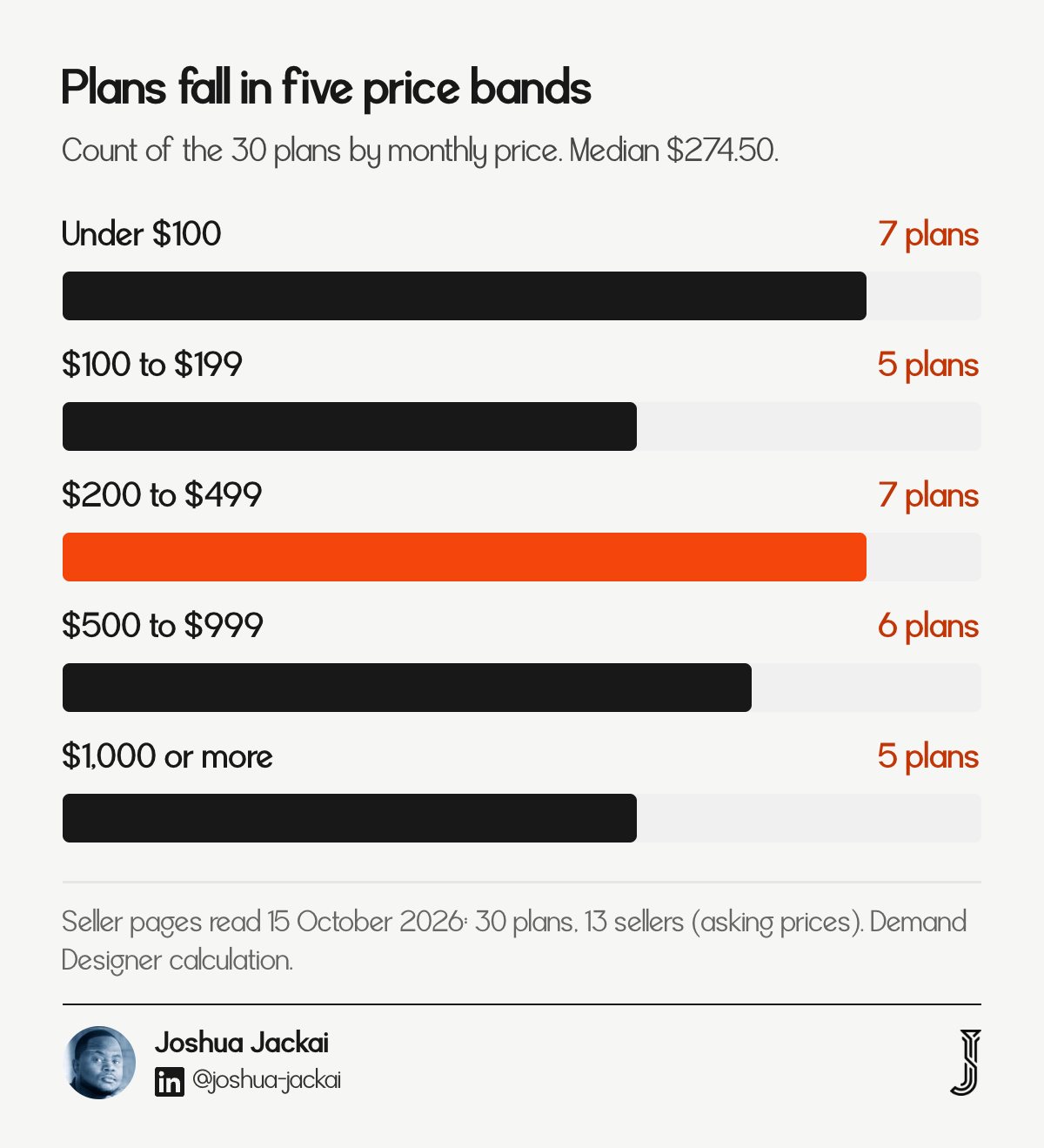
Across the 30 plans I read, the median price is $274.50 a month. The cheapest is $44 and the highest listed is $2,700. Plans fall into five bands, so a single average tells you little. Start with the median, then decide which band matches the work you need done each month.
Plans read: 30, from 13 sellers, on 15 October 2026
Median price: $274.50 a month
Range: $44 to $2,700 a month
WordPress plans: 15, median $240
Webflow and Framer plans: 10, median $735
Platform not stated: 5
The five bands hold 7 plans under $100, 5 from $100 to $199, 7 from $200 to $499, 6 from $500 to $999 and 5 at $1,000 or more. The platform split matters. WordPress sellers in this sample sell a package of updates, backups and scans, with a few minutes or an hour of human time on top. The Webflow and Framer listings I read come from sellers on Contra, a freelance marketplace, and they sell blocks of hours instead. Two plans at the same price can therefore buy different things. A $400 Webflow listing buys 5 hours of build time. Websults' $349 Advanced plan buys 3 hours, while a $400 Contra Webflow listing buys 5. Read the median as a midpoint, not a target. Half the plans cost more, and the three plans at $1,000 or more that state hours are blocks of 20 to 40 hours that suit a team shipping changes every week.
The wider market is wide too, and my sample sits inside the range Codeable, a WordPress developer network, reports:
"WordPress maintenance pricing ranges from $30 to $5,000+ per month," Codeable wrote (Codeable, 2026).
2. Under $200 buys updates and backups, not hours: best for judging what a low price covers
Twelve of the 30 plans cost less than $200 a month. Seven of those state included hours, from 30 minutes to 4 hours, and five state none. A low price usually buys scheduled updates, backups and scans. It rarely buys a person who looks at your site, so check what a problem costs.
Plans under $200: 12 of 30
State included hours: 7, from 0.5 to 4 hours
State no hours: 5 (ParaCare at $149 and $179, Northwoods at $44, Creative Marketing AI at $99, Blake Strategies Group from $79)
Promise a response time: 5 of the 12
Include hosting: 5 of the 12
Codeable states the difference plainly:
"The gap between $50/month and $240/month comes down to one thing: human involvement," Codeable wrote (Codeable, 2026).
Updates still matter at any price. A 2026 benchmark built from 1,757 real plugin vulnerabilities starts from the finding that
"WordPress plugins account for the large majority of disclosed CMS vulnerabilities," Tashenova and colleagues wrote (Big Data and Cognitive Computing, 2026).
But a patch schedule cannot catch a flaw nobody has reported yet. A 2024 study that tested 23 popular WordPress plugins found unknown, zero-day flaws in three of them (Mohideen and colleagues, Future Internet, 2024). So ask any low-priced plan one question: if the site breaks or is hacked, who fixes it, and is that inside the fee? Codeable quotes malware cleanup separately on its $240 plan.
That leaves three things to put to the seller in writing. First, whether a person reads the monitoring alerts, or whether the plan only runs automated updates. Second, whether a failed update is repaired inside the fee or billed as extra work. Third, whether the backup sits on a different server from the site, so one failure cannot take both. I did not find a published rule that sets the right answer for these, so I treat them as questions, not as grades.
3. Included hours cost a median $72 each: best for comparing plans on one unit
The 19 plans that state their hours price an included hour at a median of $72. For WordPress plans the median is $82.92, for Webflow plans $72.50 and for Framer plans $70.50. The Framer figure comes from one seller. Dollars per hour is the one number that lets you compare unlike plans.

Plans with stated hours: 19, from 7 sellers
Median per included hour: $72
WordPress: 10 plans, 3 sellers, median $82.92, range $37.50 to $295
Webflow: 4 plans, 2 sellers, median $72.50
Framer: 4 plans, 1 seller, median $70.50, range $67.50 to $75
Larger blocks get a small discount. One Framer freelancer charges $75 an hour for 4 hours a month and $67.50 an hour for 40 hours, a 10 percent drop. Websults, a WordPress seller, publishes add-on retainers at $80, $75 and $70 an hour for 10, 20 and 40 hours (Websults, 2026). Websults sells the same kind of hour two ways: $116 to $199 inside its plans and $70 to $80 as a retainer, so a plan price pays for more than the hour. Two different sellers, two different platforms, one pattern: past roughly 10 hours a month, an included hour lands between $67.50 and $80.
Hours also differ in how they are counted. Fixrunner tracks time to the minute:
"If a request takes only 5 minutes, only 5 minutes are deducted from your support hours," Fixrunner wrote (Fixrunner, 2026).
A seller that rounds every request up to 30 minutes would make the same plan worth less. Ask how the hours are counted. Treat the per-hour figure as a ruler, not a price tag: a plan at $42 an hour with 12 hours included is still a $500 plan, and a plan at $72 an hour with 1 hour included is a $72 plan.
4. An hour costs $37.50 to $295 depending on the plan: best for understanding what drives the spread
By seller, the median price of an included hour runs from $37.50 to $267.50. That is a spread of about 7 times. The hours are not the same product. Codeable's bundle includes staging tests, regression checks and a planning meeting. Fixrunner's lists backups, scans and reports. Both are bundles, so bundling alone does not explain the gap.
Lowest seller median: $37.50 (one Webflow freelancer, 1 plan)
Fixrunner: $42.25 across 5 plans
Two Contra freelancers: $70.50 and $75
Websults: $198 across 3 plans
Codeable: $267.50 across 2 plans
Codeable's $240 plan includes staging-tested updates, regression testing, daily offsite backups, malware scans, 1 hour of development and a 30-minute planning meeting each month (Codeable, 2026). That is a managed process wrapped around one hour. Fixrunner's $69 plan lists cloud backups, security scans and monthly reports around 90 minutes of support, and it promises a one-hour response. The bundles are similar. The prices per hour are $240 and $46.
I could not separate what the spread owes to the bundle, to the seller type and to the market the seller serves. Claiming that the expensive plans are better would go beyond the data. What the data supports is narrower: when you compare two quotes, convert both to dollars per included hour and then ask what else each one bundles. The most useful request is a list of what a typical month contained. A plan whose last three months you can read is worth more than one described only by tier names.
5. Hosting sits under 7 of the 30 fees: best for spotting a hidden markup
Seven of the 30 plans list hosting inside the monthly fee. Raw hosting is cheap to price: Framer lists $10 and $30 a month for its two paid site plans, Kinsta $35 and $50 for its first plans, and WP Engine $28 a month billed annually. If your plan includes hosting, subtract it before you judge the rest.

Plans that include hosting: 7 of 30
Framer Basic and Pro: $10 and $30 a month
Kinsta Single 35k and 65k: $35 and $50 a month
WP Engine Essential: $28 a month, billed annually ($336)
SiteGround entry plan: $2.99 a month at sign-up, $17.99 on renewal
The most direct comparison I can make is Northwoods Web Designs. Its $44 Essential plan lists hosting, an SSL certificate, monthly backups and scanning, and one minor edit. That sits near the $28 to $50 list prices for WordPress hosts (Framer's $10 and $30 are for a different platform), which suggests hosting is most of that fee. I cannot prove it, because Northwoods does not publish its hosting cost. For the other 23 plans the page does not put hosting inside the fee, so a plan that does not mention it can leave you paying twice if you also need a host.
Codeable advises budgeting an extra $30 to $100 a month for managed WordPress hosting on top of its plans (Codeable, 2026). Platform fees work the same way. None of the five Contra listings I read says the Webflow or Framer site plan is included, so assume it is a separate bill and ask. Creative Marketing AI, which does bundle hosting, argues the bundle is not mostly hosting:
"Hosting is the smallest part of it," Creative Marketing AI wrote (Creative Marketing AI, 2026).
6. Minimum terms and exit rules differ more than prices: best for avoiding lock-in
Six of the 13 sellers publish a term on the page I read. Fixrunner requires 3 months, and Websults requires 3 months for its retainers. Northwoods, Creative Marketing AI, Blake Strategies Group and one Contra freelancer say month to month. The other seven state none in the text I read. Read the exit terms before the price.

Fixrunner: minimum 3 months, and its FAQ states no cancellation fees
Websults retainers: 3-month minimum
Blake Strategies Group: month to month, 30 days notice
Creative Marketing AI: no minimum; the site cannot keep running on its infrastructure after cancellation
Northwoods Web Designs: billed monthly, no long-term contracts
The exit detail that matters most is what happens to the site. Creative Marketing AI states that if the plan is canceled while the site runs on its infrastructure, "the site cannot keep running here" and migration is arranged separately. That is an honest disclosure, and most pages I read said nothing either way. A plan that bundles hosting also bundles a switching cost. Minimum terms are not a defect. A 3-month minimum pays for setup work, and Fixrunner says it runs a health check, speed optimization and security setup at sign-up. What matters is that the term is written where you can find it.
Ask four things before you sign. Who owns the domain and the hosting account? Can I download a full backup myself? What do you charge to hand the site over? Is there a change log of what you did each month? A plan that answers all four in writing is easy to leave, which is also a sign it is confident you will stay.
"A quiet month is the product working, not the product idling," wrote Creative Marketing AI (Creative Marketing AI, 2026).
7. A fair price starts from your own hours: best for testing your current fee
A fair monthly fee is the one you can divide. Subtract any hosting you would pay anyway, divide the rest by the hours of real work you used last month, and compare the result with the $72 sample median. The BLS median pay for web developers is $47.85 an hour, so $72 is 1.5 times that wage.
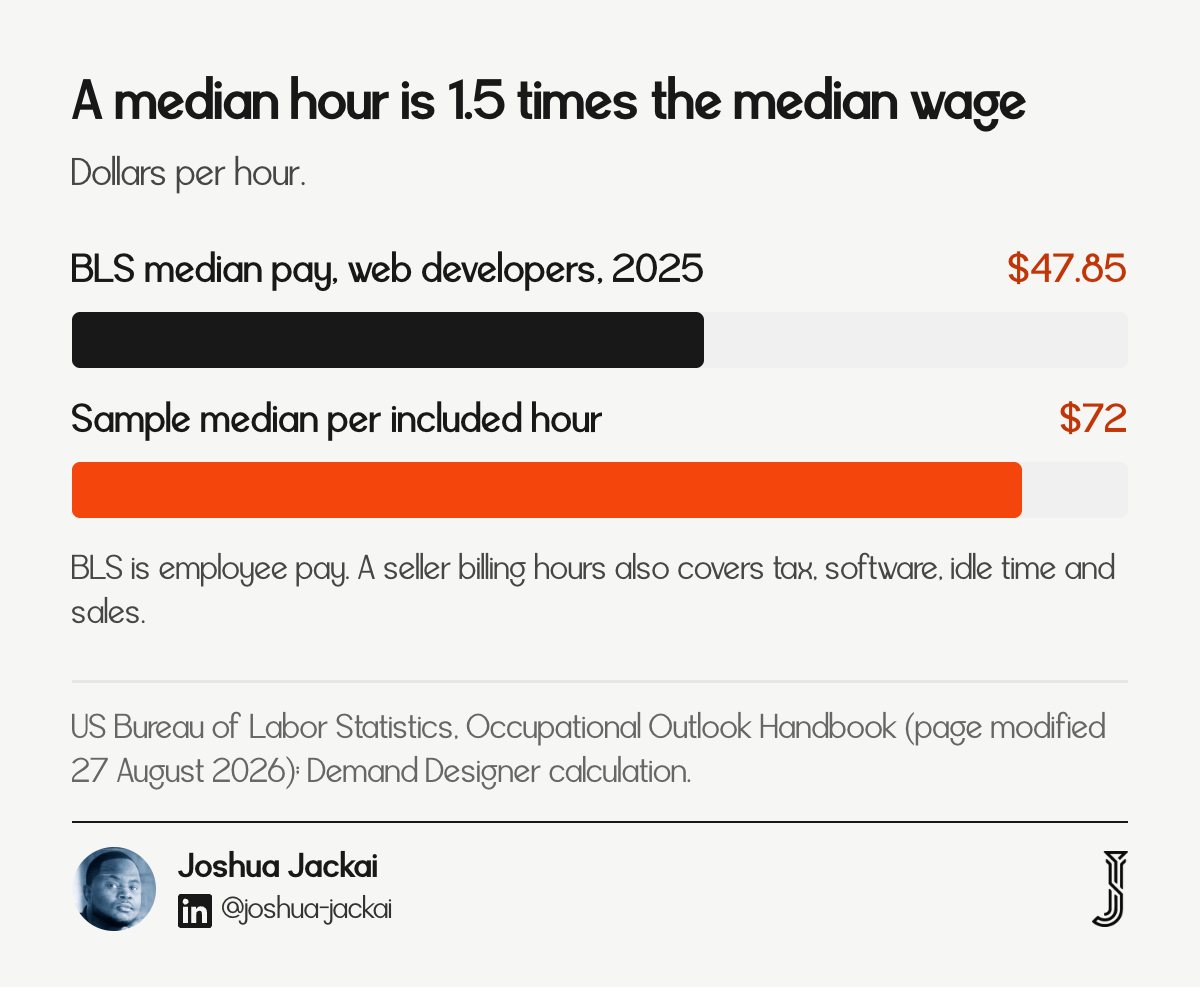
BLS median hourly pay, 2025: $47.85 for web developers and digital designers
Sample median per included hour: $72
Ratio: 1.5 times the median wage
Codeable freelancer range: $50 to $150 an hour; agencies $100 to $250
Fixrunner one-off fix: $49, no subscription
The ratio is a guide, not a verdict. The BLS figure is what an employee is paid, so a business that bills an hour must cover its own tax, software, idle time and sales. A ratio near 1.5 is therefore plausible, and Codeable states that freelancers typically charge $50 to $150 an hour (Codeable, 2026). The BLS page was last modified on 27 August 2026 (US Bureau of Labor Statistics).
Here is a worked example with made-up numbers. You pay $250 a month. You would pay $30 for hosting anyway. Last month you used 2 hours of requests. Your price per hour of real work is ($250 minus $30) divided by 2, which is $110. That is 1.5 times the sample median and inside the range for a plan with staging tests. If you used no hours for six months, you are paying for monitoring and backups, and a $49 one-off fix may fit you better.
"A plan whose last three months you can read is worth more than one described only by tier names," wrote Joshua Jackai, founder of Demand Designer.
How do the 30 plans compare?
The matrix lists every plan I read, with its monthly price, included hours, dollars per included hour and stated response time. Use it to find plans in your price band, then compare them on cost per hour and on what they promise. A dash means the page did not state the figure.
Seller | Platform | Plan | $ a month | Hours | $ per hour | Response stated |
|---|---|---|---|---|---|---|
Fixrunner | WordPress | Plan 1 | 69 | 1.5 | 46.00 | 1 hour |
Fixrunner | WordPress | Plan 2 | 99 | 2 | 49.50 | 1 hour |
Fixrunner | WordPress | Plan 3 | 169 | 4 | 42.25 | 1 hour |
Fixrunner | WordPress | Plan 4 | 300 | 8 | 37.50 | 1 hour |
Fixrunner | WordPress | Plan 5 | 500 | 12 | 41.67 | 1 hour |
Websults | WordPress | Essential | 99 | 0.5 | 198.00 | - |
Websults | WordPress | Standard | 199 | 1 | 199.00 | - |
Websults | WordPress | Advanced | 349 | 3 | 116.33 | priority email |
Codeable | WordPress | Basic | 240 | 1 | 240.00 | - |
Codeable | WordPress | Advanced | 590 | 2 | 295.00 | - |
Codeable | WordPress | Enterprise (from) | 1,000 | - | - | - |
ParaCare | WordPress | ParaCare | 149 | - | - | - |
ParaCare | WordPress | ParaCare Plus | 179 | - | - | 12 hours |
ParaCare | WordPress | ParaCare Pro | 249 | - | - | priority |
ParaCare | WordPress | ParaPrise | 500 | - | - | 12 hours |
Northwoods | Not stated | Essential | 44 | - | - | - |
Northwoods | Not stated | Business | 69 | 0.5 | 138.00 | - |
AZ Tech Ninja | Not stated | Care Plan | 249 | - | - | - |
Creative Marketing AI | Not stated | Managed Website Care | 99 | - | - | - |
Blake Strategies Group | Not stated | Care plan (from) | 79 | - | - | same business day |
Contra freelancer A | Webflow | 5 hours | 400 | 5 | 80.00 | 24 to 48 hours |
Contra freelancer A | Webflow | 10 hours | 750 | 10 | 75.00 | 24 to 48 hours |
Contra freelancer A | Webflow | 20 hours | 1,400 | 20 | 70.00 | 24 to 48 hours |
Contra freelancer B | Webflow | 4 hours | 150 | 4 | 37.50 | - |
Contra freelancer C | Framer | 4 hours | 300 | 4 | 75.00 | 48 hours |
Contra freelancer C | Framer | 10 hours | 720 | 10 | 72.00 | 48 hours |
Contra freelancer C | Framer | 24 hours | 1,656 | 24 | 69.00 | 48 hours |
Contra freelancer C | Framer | 40 hours | 2,700 | 40 | 67.50 | 48 hours |
Contra freelancer D | Webflow and Framer | Flat retainer | 1,000 | - | - | 24 to 48 hours |
Contra seller E | Framer | Care plan | 500 | - | - | 24 to 48 hours |
A plan that says only "priority" is not counted as a stated response time.
How do you work out your own cost per hour?
Take your monthly fee, subtract any hosting or platform fee you would pay anyway, and divide by the hours of real work you used last month. Compare the answer with the $72 sample median. The inputs here are placeholders, not advice, so replace them with your own invoice and your own request list.
Your fee | Hosting inside it | Hours used | Cost per hour of work | Against the $72 median |
|---|---|---|---|---|
$99 | $30 | 1 | $69 | Near the median |
$250 | $30 | 2 | $110 | 1.5 times the median |
$400 | $30 | 5 | $74 | Near the median |
$400 | $30 | 1 | $370 | 5 times the median |
$1,000 | $50 | 12 | $79 | Near the median |
If you cannot count hours because your seller does not report them, ask for a monthly list of what was done. That list is the first thing a fair plan can show you.
How I collected these 30 plans and what the data cannot tell you
I collected the data on 15 October 2026 by searching for care and maintenance plans on each platform and recording what each seller's pricing page stated. The sample is 13 sellers and 30 priced plans. It is not random, it is not specific to B2B sites, and it shows asking prices, not what clients pay.
Metric | Value | Source |
|---|---|---|
Plans read | 30 | Seller pages, 15 October 2026 |
Sellers | 13 | Seller pages |
Median monthly price | $274.50 | My calculation |
Median price per included hour | $72, 19 plans | My calculation |
Median hourly pay, web developers, 2025 | $47.85 | |
Framer Basic and Pro site plans | $10 and $30 a month | |
Kinsta Single 35k and 65k | $35 and $50 a month | |
WP Engine Essential | $28 a month, billed annually |
Limits: four sources left out of the price stats. Glaze Digital (£499 for 5 Shopify hours) and SO Websites (R499) price in other currencies. One hosting seller did not show its prices in the page text I could read. A marketplace listing from a Framer studio did not show an hourly figure. I could not extract Webflow site plan prices from its pricing page, so I make no hosting claim for Webflow. I name no individual freelancer; their listings are public, but the point is the pattern. Prices change, and a seller that reads a page like this one may change theirs. Treat everything here as true on 15 October 2026.
Frequently asked questions
How much does website maintenance cost per month?
Website maintenance cost per month has a median of $274.50 across 30 published plans from 13 sellers, read on 15 October 2026, with a range of $44 to $2,700. WordPress plans had a median of $240 and Webflow and Framer plans $735. Twelve of the 30 cost $100 to $499.
What does a website maintenance plan include?
Plans in the sample commonly list updates, backups and security scans; I did not count inclusions plan by plan. The clearest differences are included hours, which 19 of the 30 plans state, and response time, which 8 of 30 promise.
Is $400 a month too much for a website?
Divide it. Subtract hosting you would pay anyway, then divide by the hours you actually use. At $400 for 5 hours, one Webflow listing works out to $80 an hour, near the sample median of $72. At $400 with no stated hours, you cannot tell, and you should ask.
Do I need a monthly plan at all?
Not always. If you rarely change the site, a one-off fix may cost less: Fixrunner sells a single WordPress fix for $49 with no subscription. A plan makes sense when you want updates, backups and monitoring handled on a schedule, or when you will use the included hours.
How I decide what a maintenance plan should cost for B2B teams
I write fixed-price builds for US B2B companies, and I ask first who looks after the site and what that costs per hour. To check your fee against these numbers, start with the Pipeline Leak Scorecard, then book a free 15-minute call and send me your plan text.
Sources
Peer-reviewed
Tashenova, Z., Aitmagambetuly, A., Urynbassarova, A. and Zhetkerbay, A. (2026). A Real CVE-Backed Benchmark for WordPress Plugin Vulnerability Detection: Re-Evaluating Static and Learning-Based Detectors Under Leakage-Controlled Evaluation. Big Data and Cognitive Computing, 10(9), 303. doi:10.3390/bdcc10090303
Mohideen, M. A. M., Nadeem, M. S., Hardy, J. and Ali, H. (2024). Behind the Code: Identifying Zero-Day Exploits in WordPress. Future Internet, 16(7), 256. doi:10.3390/fi16070256
Industry and vendor (seller prices are asking prices, not independently verified; read 15 October 2026)
US Bureau of Labor Statistics, Occupational Outlook Handbook, Web Developers and Digital Designers (2025 median pay): https://www.bls.gov/ooh/computer-and-information-technology/web-developers.htm
Codeable, WordPress maintenance pricing: https://www.codeable.io/blog/wordpress-maintenance-pricing/
Fixrunner plans: https://www.fixrunner.com/plans/
Websults maintenance pricing: https://websults.com/?p=6849
ParaCare plans: https://paramountwp-282y0.kinsta.page/wordpress-maintenance-plans-pricing/
Northwoods Web Designs: https://northwoodswebdesigns.com/web-hosting.php
AZ Tech Ninja: https://aztechninja.com/websites/contracts/
Creative Marketing AI: https://creativemarketing.ai/services/managed-website-care-monthly
Blake Strategies Group: https://blakestrategiesgroup.com/services/website-care-plans
Contra listings: https://contra.com/s/YgcYZ62X-webflow-care-plan-monthly-retainer, https://contra.com/s/lOFvrqvO-webflow-care-plan-monthly-retainer, https://contra.com/s/UgmbobMF-monthly-website-retainer, https://contra.com/s/LmYFslsb-webflow-and-framer-maintenance-dollar1000month-retainer, https://contra.com/s/MlvXrbqq-framer-care-plan-monthly-website-maintenance
Framer pricing: https://www.framer.com/pricing
Kinsta pricing: https://kinsta.com/pricing/
WP Engine plans: https://wpengine.com/plans/
SiteGround WordPress hosting: https://www.siteground.com/wordpress-hosting.htm
Free workbook
Pipeline Leak Scorecard
Find the leaks between your traffic and your pipeline. Score your site in about fifteen minutes, with it open in front of you.
12 questions, 8 pages, 15 minutes. Free.


