Web Design
8 B2B Lead Generation Website Parts: 2026 Checklist

Joshua Jackai
16 min

By Joshua Jackai, founder of Demand Designer · Published 13 October 2026 · Last updated and fact-checked October 2026
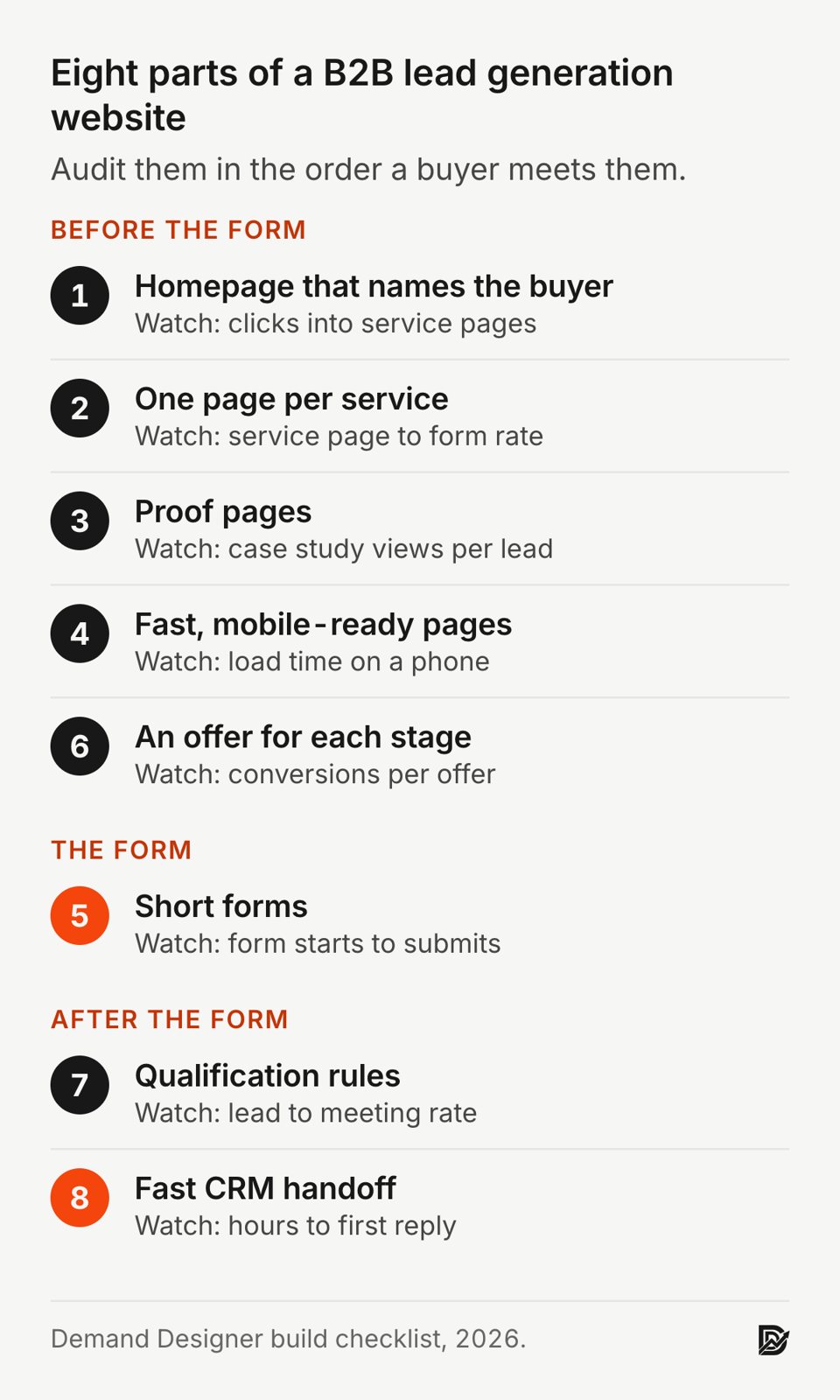
Short answer: A B2B lead generation website needs eight parts: a homepage that names the buyer, one page per service, proof pages, fast pages, short forms, an offer for each buying stage, qualification rules and a fast CRM handoff. In my audits, the handoff fails most. In a 2011 audit of 2,241 US companies, 23 percent never answered a web lead.
A B2B lead generation website is a company site built so the right buyers can find it, trust it, ask for a conversation and reach a salesperson quickly. I am Joshua Jackai, founder of Demand Designer, a US studio that designs and builds B2B websites on HubSpot, Framer and WordPress. This checklist is the order I audit a site in.
Key takeaways
People judge a web page's visual appeal within 50 milliseconds of seeing it (Lindgaard and colleagues, 2006), so I make the first screen name the buyer.
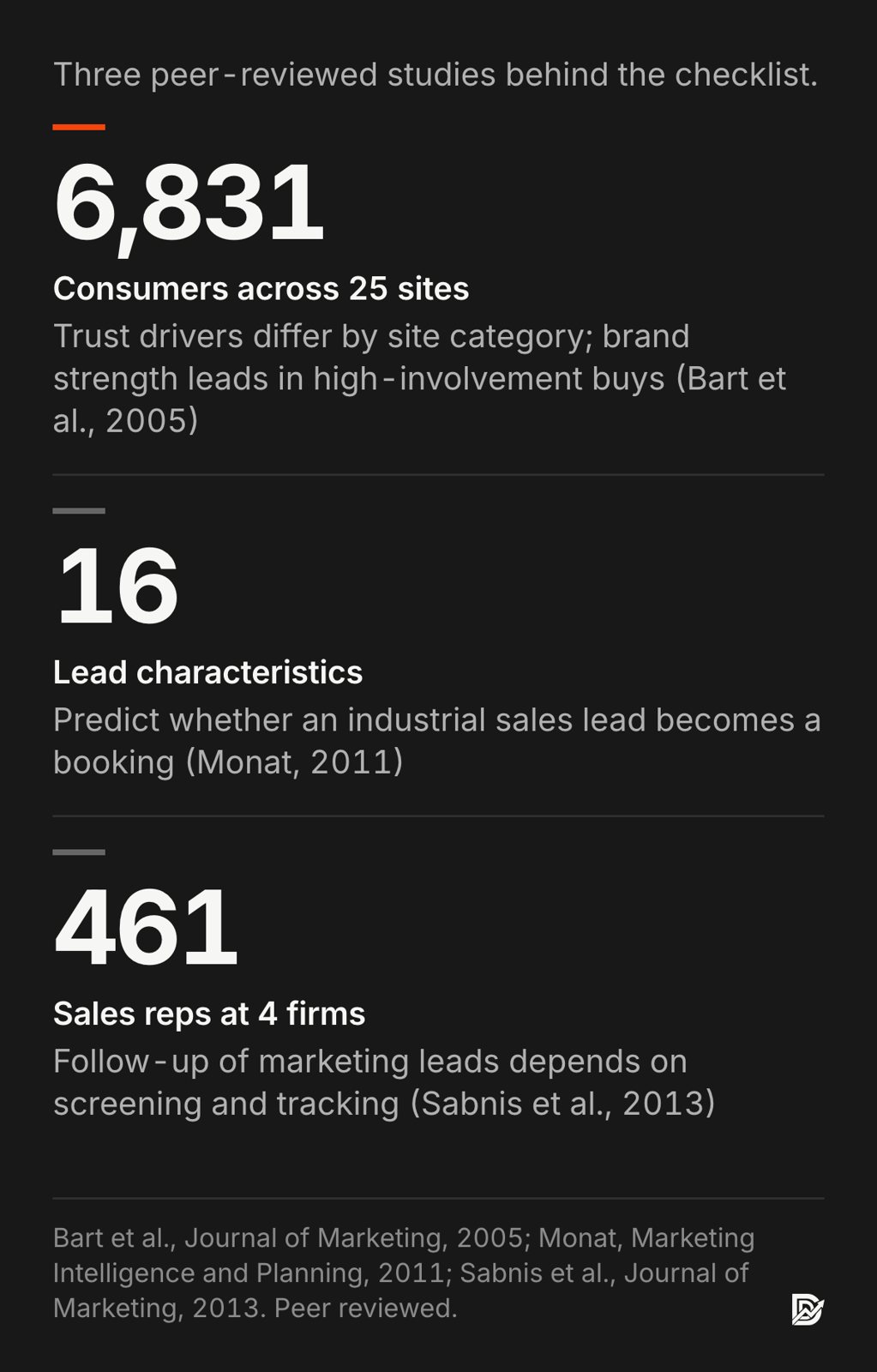
In a study of 6,831 consumers across 25 sites, brand strength was critical in high-involvement categories such as financial services (Bart and colleagues, Journal of Marketing, 2005).
Forms rebuilt to published usability guidelines produced fewer errors and faster completion (Seckler and colleagues, CHI, 2014).
Monat found 16 lead characteristics that predict whether an industrial lead becomes a booking (Marketing Intelligence and Planning, 2011).
Only 37 percent of 2,241 US companies answered a web lead within an hour (Harvard Business Review, 2011).
Part | Buying stage | Measure it by |
|---|---|---|
1. Homepage that names the buyer | First visit | Clicks into a service page |
2. One page per service | Research | Visits that reach a form |
3. Proof pages | Shortlist | Views of case studies before a form |
4. Fast, mobile-ready pages | Every stage | Load time on a phone |
5. Short forms | Ready to talk | Form starts to submits |
6. An offer for each stage | Research to ready | Conversions per offer |
7. Qualification rules | After the form | Lead to meeting rate |
8. Fast CRM handoff | After the form | Time to first reply |
1. A homepage that names the buyer: best for stopping wrong-fit visits
The homepage tells a visitor in one screen who the company serves, which problem it solves and what to do next. It suits every B2B site, and it matters most for companies selling more than one service. Lindgaard and colleagues found in 2006 that people judge a page's visual appeal after 50 milliseconds.
Above the fold: The buyer's title, the problem in their words, one call to action
Proof cue: One named client result or logo row near the top
Navigation: Five to seven labels that name destinations, not slogans
Avoid: A rotating carousel of four messages for four audiences
Lindgaard, Fernandes, Dudek and Brown showed people web pages for 50 milliseconds and found their ratings of visual appeal held close to the ratings they gave after longer viewing (Behaviour and Information Technology, 2006).
"Attention web designers: You have 50 milliseconds to make a good first impression!" wrote Gitte Lindgaard and colleagues in the title of their paper (Behaviour and Information Technology, 2006).
That first glance is about look, not content, so it buys a few seconds of attention and no more. The headline has to use those seconds well.
The test I use is simple. Read the hero headline to someone outside the company. If they cannot say who it is for, the page is losing the right visitors along with the wrong ones. "Fixed-price websites for US wealth management firms" works. "Elevating your digital presence" does not.
Then send each audience somewhere. A homepage for a firm with three services should route to three service pages within the first scroll, because the homepage itself rarely converts a cold B2B visitor. Its job is to sort visitors and point each one at the page written for them.
2. One page per service: best for buyers who research before they call
A service page answers one buying question in depth: what the service is, who it suits, what it costs or how pricing works, and how the work runs. B2B sites with three services need at least three such pages. Pirolli and Card's 1999 research shows readers stay when a page's words match what they were looking for.
One job: One service, one buyer, one primary call to action
Sections: Problem, approach, process, proof, pricing guidance, FAQ
Headings: Written as the questions buyers type into search
Links: To the matching case study and to the contact form
Pirolli and Card described people looking for information the way animals forage for food: they follow "information scent", the cues that suggest a path will pay off, and leave when the scent fades (Psychological Review, 1999). On a B2B site, scent is the match between what a buyer searched for and the words on the page. A single "Services" page listing six offers gives each buyer a weak trail.
"A single 'Services' page listing six offers gives each buyer a weak trail," stated Joshua Jackai, founder of Demand Designer.
Separate pages also give search engines and AI answer engines something specific to cite. A page titled for one service, with its own questions answered in short paragraphs, can rank for that service. In my audits, a combined page tends to rank for fewer of those services.
Each service page should end at a form or a booking link, not at a dead end. I add a short "what happens after you ask" block above the form, because buyers hesitate when the next step is unknown.
3. Proof pages: best for getting onto the shortlist
Proof pages show named clients, the problem each one had and the measured result, so a buyer can picture the same outcome. They suit any B2B company with more than a few finished projects. A 2005 study of 6,831 consumers found trust drivers differ by site category.
Format: Case studies with the client named, the problem, the work and one number
Placement: Linked from every service page and next to every form
Numbers: Only figures the client approved, with the time period stated
Avoid: Anonymous quotes such as "Great to work with! J., CEO"
Bart, Shankar, Sultan and Urban estimated a model of online trust on 6,831 consumers across 25 websites in eight categories (Journal of Marketing, 2005). The drivers of trust changed with the category. For high-involvement purchases, the strength of the brand was critical. Their participants were consumers, and much B2B buying is high-involvement, but the authors did not test business buyers.
"Brand strength is critical for high-involvement categories, such as automobile and financial services sites," wrote Yakov Bart of the Haas School of Business, University of California at Berkeley, with co-authors at Texas A&M, Northeastern and MIT (Journal of Marketing, 2005).
The study does not show how a small firm builds brand strength; named proof is what I use. On the Snappy Kraken project I took the site from Figma to HubSpot in 21 days, and the new site contributed to a 30 percent rise in marketing qualified leads. On Advisor Websites, organic traffic rose 58 percent. I find numbers like these, with the client named, more persuasive than a page of adjectives. Put the strongest one next to the form, where the buyer decides whether to ask. A case study three clicks away from the form is proof most buyers never see.
4. Fast, mobile-ready pages: best for keeping the visits you paid for
Fast pages load the main content quickly on a phone over a normal connection, so visitors stay long enough to read. Every B2B site needs this, and it matters most for paid traffic. Galletta and colleagues found in 2004 that longer page delays lowered users' performance and their opinion of the site.
Target: Main content visible in under 2.5 seconds on a mid-range phone
Biggest fixes: Compressed images, fewer third-party scripts, no autoplay video above the fold
Check: Google PageSpeed Insights on the mobile setting, for each template
Forms: Tap targets large enough to hit with a thumb
Galletta, Henry, McCoy and Polak varied page delays in a controlled experiment and measured how users performed, how they felt about the site and whether they intended to return (Journal of the Association for Information Systems, 2004). Longer delays lowered users' performance and their ratings of the site. The study used an information-seeking task, which is the kind of reading a buyer does when comparing vendors.
The 2.5 second target comes from Google's Core Web Vitals guidance for Largest Contentful Paint, which calls 2.5 seconds or less "good". It is a vendor threshold, not a research finding, but it is the one Google reports in Search Console, so it is a practical line to hold.
Most of the slow B2B sites I audit are slow for the same few reasons: uncompressed hero images, a chat widget, two analytics tags doing the same job and a cookie banner loading late. Removing scripts is usually faster than any redesign.
5. Short forms: best for turning interest into a conversation
A lead form asks only for what sales needs to reply well, usually name, work email, company and the problem, with clear labels and error messages. It suits any site where the main conversion is a call or a quote request. Seckler and colleagues found in 2014 that forms rebuilt to published usability guidelines produced fewer errors.
Fields: Four to six, my rule of thumb; move anything else to the first call
Labels: Above each field, never only inside it as placeholder text
Errors: Shown next to the field, in words that say how to fix it
After submit: A page that says who replies and by when
Seckler, Heinz, Bargas-Avila, Opwis and Tuch, at the University of Basel and Google, took real online forms, rebuilt them to published form-design guidelines and tested both versions with users (CHI, 2014). The rebuilt forms produced fewer errors and faster completion, and users rated them higher. None of the guidelines is exotic: clear labels, sensible field order, helpful errors.
The field count is where most B2B forms go wrong. Marketing adds budget, timeline, company size and "how did you hear about us" because each one helps reporting. In my experience, every extra required field is one more reason to leave. Seckler's study did not test field count. I keep the form short and enrich the record afterwards, from the email domain or the first call. I find optional fields still read as work, so I remove them rather than mark them optional.
"In my experience, every extra required field is one more reason to leave," stated Joshua Jackai, founder of Demand Designer.
Track form starts as well as submits. A form that many people start and few finish is telling you exactly which field to cut. Microsoft Clarity recordings can show which field it is.
6. An offer for each buying stage: best for visitors who are not ready to talk
An offer is the thing a visitor says yes to: a demo or call for buyers who are ready, a checklist, calculator or scorecard for buyers still researching. It suits B2B sales cycles longer than a few weeks. Holliman and Rowley published a 2014 interview study of 15 B2B content marketers in the USA, UK and France.
Ready to buy: Book a call, request a quote, see pricing
Comparing: Case studies, a pricing guide, a comparison page
Researching: A scorecard, checklist or calculator in exchange for an email
Rule: Every page carries one primary offer that fits its stage
Holliman and Rowley studied how B2B marketers in five industry sectors use digital content and described it as an inbound marketing technique: useful content brings buyers to the company instead of interrupting them (Journal of Research in Interactive Marketing, 2014). Their sample was 15 practitioners, so it describes good practice as marketers see it rather than measuring results.
"B2B digital content marketing is an inbound marketing technique," wrote Geraldine Holliman and Jennifer Rowley (Journal of Research in Interactive Marketing, 2014).
In practice, a site with only "Contact us" converts the small share of visitors who are ready today and loses the rest. A research-stage offer keeps those people in reach. The offer has to be useful on its own. A checklist that takes 15 minutes to complete and shows the reader something new about their own site earns its email address; a gated brochure does not. Match the offer to the page, too: a pricing guide belongs on a service page, a scorecard on a blog post, and a booking link on a case study.
7. Qualification rules: best for spending sales time on the right leads
Qualification rules decide, right after a form arrives, whether a lead goes to sales, to nurture email or out. They suit any B2B team getting more leads than it can call in a day. Monat identified 16 lead characteristics that predict whether an industrial sales lead converts.
Inputs: Form answers, company size from the email domain, pages viewed
Outputs: Route to sales, route to nurture, or disqualify
Owner: Sales and marketing agree the rules in writing
Review: Compare scores with closed deals every quarter
Monat reviewed earlier lead-scoring models and built a practical one around the reasons industrial customers buy (Marketing Intelligence and Planning, 2011). The model is meant for an ordinary sales manager, not a data science team.
"In total, 16 commonly available lead characteristics that represent proxies for the eight determinants of industrial customer purchase decisions were identified," wrote Jamie P. Monat (Marketing Intelligence and Planning, 2011).
On a website, the lesson is to collect the few signals that predict a deal and route on them automatically. A form can ask one routing question, such as the service needed or the size of the project, and send the lead to the right person. The CRM can add company size from the email domain.
Keep the rules simple enough that a salesperson can explain them. A score nobody trusts gets ignored, and then every lead is treated the same again. Disqualified leads still get a polite reply; some of them come back next year. Write the reply once as a template so nobody has to decide what to say. Review the rules each quarter against the deals that actually closed, and drop any signal that did not predict one.
8. A fast handoff to the CRM: best for leads that would otherwise go cold
The handoff moves each form submission into the CRM with its source, alerts the right person and starts a reply within the hour. It suits every B2B website. In a 2011 audit of 2,241 US companies, 23 percent never answered a web lead and the average reply took 42 hours.
Alert: Email or chat notification to a named owner, not a shared inbox
Record: Contact, company, original source and the page that converted
Target: First human reply within one business hour
Check: A monthly report of leads with no logged activity
Oldroyd, McElheran and Elkington audited how 2,241 US companies responded to web leads and published the result in Harvard Business Review in 2011. Only 37 percent replied within an hour. Companies that tried to reach a lead within an hour were nearly seven times as likely to qualify it as companies that waited even one hour more. It is an industry audit from 2011, not a peer-reviewed study, so I treat the figures as a snapshot. I did not find a newer public audit of the same kind.

Leads also go missing inside the company. Sabnis, Chatterjee, Grewal and Lilien studied 461 sales reps at four firms and found that how much time reps give marketing leads depends partly on how the organization screens and tracks them (Journal of Marketing, 2013).
"The proportion of time that sales reps devote to marketing leads depends on organizational lead prequalification and managerial tracking processes," wrote Gaurav Sabnis of the Stevens Institute of Technology, with co-authors at MIT and Penn State (Journal of Marketing, 2013).
On a website, that screening and tracking is mostly automation: a named owner, a time limit and a report that shows untouched leads. For the source-tracking side, my website lead tracking guide covers the five places a lead's source gets lost.
How do the eight parts compare by stage and effort?
The eight parts sort into early-stage pages that earn attention and late-stage systems that turn a form into a meeting. Most US B2B sites I audit are strongest on early pages and weakest on parts 7 and 8. The matrix lists each part's stage, effort and the metric that shows it working.
Part | Stage | Effort | Watch |
|---|---|---|---|
Homepage | Early | Low | Clicks to services |
Service pages | Early | Medium | Page to form rate |
Proof pages | Middle | Medium | Case views per lead |
Fast pages | All | Medium | Mobile load time |
Short forms | Late | Low | Starts to submits |
Stage offers | All | Medium | Conversions per offer |
Qualifying | Late | Medium | Lead to meeting rate |
CRM handoff | Late | Low | Hours to first reply |
How many leads should a B2B website produce?
The number depends on traffic, the visit-to-lead rate and how many leads become deals, so the useful question is which of those three moves revenue most. A planning calculator for this multiplies monthly visitors by each rate. Every default in it is a placeholder for a team's own numbers.
The formula is simple. Leads equal monthly visitors times the visit-to-lead rate. Deals equal leads times the qualification rate times the close rate. For example, with placeholder numbers: 1,000 monthly visitors, 2 percent becoming leads, 50 percent qualified and 20 percent of those closing gives 20 leads, 10 qualified leads and 2 deals a month. The calculator on the interactive version of this page does the arithmetic: enter monthly visitors, the share of visits that become a lead, the share of leads that sales qualifies and the share of qualified leads that close. It returns leads, qualified leads and deals a month, then shows what one more point of form conversion would add. It uses no outside benchmarks, because the published B2B conversion figures vary too much by industry to plug in blindly. My B2B website conversion rate benchmarks explain where those figures come from and how far to trust them.
How do you make a B2B lead generation website, step by step?
Build it in the order buyers meet it: decide who the site is for, write a page for each service, add proof, then build the forms, offers, routing and CRM handoff before launch. The seven steps run from positioning to a 30 day check of real leads, and each one closes a gap a buyer would otherwise fall through.
Write one sentence naming the buyer, the problem and the result.
List the services and give each its own page and its own questions.
Collect two or three named case studies with approved numbers.
Design the forms, the thank-you pages and one offer for each buying stage.
Connect the forms to the CRM with source fields, alerts and routing rules.
Test every form on a phone and confirm each test lead reaches a named person.
After 30 days, compare leads, meetings and deals by page and fix the weakest part.
What is the biggest mistake in B2B lead generation?
The most expensive mistake I see is treating lead generation as a traffic problem when the leads already arriving are not being answered or qualified. The 2011 Harvard Business Review audit found 23 percent of 2,241 US companies never replied to a web lead. Buying more traffic into that gap only raises the cost of each lost lead.
The second mistake is measuring form fills instead of meetings and deals. A form fill is cheap to produce; a pop-up can raise form fills while the number of real conversations stays flat. Report on qualified meetings by source, and the weak parts of the site show themselves.
What are the main types of B2B sales leads?
B2B teams usually sort leads by temperature and by who qualified them: cold, warm and hot by interest, then information-qualified, marketing-qualified, sales-qualified and product-qualified by stage. The two sets describe different things, interest and stage, so I use both. The labels matter less than one rule: sales and marketing use the same definitions.
A marketing qualified lead has shown interest and fits the profile, for example by downloading a checklist from a company of the right size. A sales qualified lead has been checked by a salesperson and has a real need, budget and timeline. On the Snappy Kraken site, marketing qualified leads were the measure the client cared about, which is why that is the number I report.
Frequently asked questions
What is the 5 minute rule for leads?
The 5 minute rule says: call a new web lead within five minutes. I know of no public study that tests five minutes. The 2011 Harvard Business Review audit tested one hour: firms that tried within it were nearly seven times as likely to qualify the lead.
Do you need a CRM in 2026?
Yes, once more than one person handles leads or more than a few arrive each week. A CRM keeps each lead's source, owner and deal in one record. HubSpot, Salesforce and Pipedrive all offer one; HubSpot has a free tier. A shared spreadsheet loses the source and the follow-up history.
Which platform is best for a B2B lead generation website?
HubSpot suits teams that want forms, CRM and email in one system. WordPress suits teams that need many plugins and full control. Framer suits small teams that want fast, well-designed pages and connect a separate CRM. I build on all three and choose by who will maintain the site.
Is lead generation illegal?
No. Generating leads from your own site is legal in the US. The rules cover how you contact people: CAN-SPAM covers commercial email, the TCPA needs consent for automated calls and texts, and the FTC acts against deceptive claims. State privacy laws vary, so check them with a lawyer.
How I build B2B lead generation websites
I design and build fixed-price B2B websites for US companies, most of them run on EOS® by founders and heads of marketing. Every build includes the eight parts on this checklist, wired to the client's CRM and tested with real form submissions before launch. Demand Designer is not affiliated with EOS Worldwide.
"If they cannot say who it is for, the page is losing the right visitors along with the wrong ones," stated Joshua Jackai, founder of Demand Designer.
To find where your own site loses leads, use the Pipeline Leak Scorecard. It takes about 15 minutes with your site open, and it scores the same parts in the same order.
Sources
Peer reviewed
Bart, Y., Shankar, V., Sultan, F. and Urban, G. L. (2005). Are the drivers and role of online trust the same for all web sites and consumers? A large-scale exploratory empirical study. Journal of Marketing, 69(4). doi:10.1509/jmkg.2005.69.4.133
Galletta, D. F., Henry, R., McCoy, S. and Polak, P. (2004). Web site delays: How tolerant are users? Journal of the Association for Information Systems, 5(1). doi:10.17705/1jais.00044
Holliman, G. and Rowley, J. (2014). Business to business digital content marketing: marketers' perceptions of best practice. Journal of Research in Interactive Marketing, 8(4). doi:10.1108/JRIM-02-2014-0013
Lindgaard, G., Fernandes, G., Dudek, C. and Brown, J. (2006). Attention web designers: You have 50 milliseconds to make a good first impression! Behaviour and Information Technology, 25(2). doi:10.1080/01449290500330448
Monat, J. P. (2011). Industrial sales lead conversion modeling. Marketing Intelligence and Planning, 29(2). doi:10.1108/02634501111117610
Pirolli, P. and Card, S. (1999). Information foraging. Psychological Review, 106(4). doi:10.1037/0033-295X.106.4.643
Sabnis, G., Chatterjee, S. C., Grewal, R. and Lilien, G. L. (2013). The sales lead black hole: On sales reps' follow-up of marketing leads. Journal of Marketing, 77(1). doi:10.1509/jm.10.0047
Seckler, M., Heinz, S., Bargas-Avila, J. A., Opwis, K. and Tuch, A. N. (2014). Designing usable web forms: Empirical evaluation of web form improvement guidelines. Proceedings of the SIGCHI Conference on Human Factors in Computing Systems. doi:10.1145/2556288.2557265
Industry and vendor
Oldroyd, J. B., McElheran, K. and Elkington, D. (2011). The short life of online sales leads. Harvard Business Review, March 2011. Industry audit, not peer reviewed. hbr.org
Federal Trade Commission. CAN-SPAM Act: A Compliance Guide for Business. Read 13 October 2026. Government guidance. ftc.gov
Google (2026). Largest Contentful Paint. web.dev, read 13 October 2026. Vendor guidance. web.dev/articles/lcp
Free workbook
Pipeline Leak Scorecard
Find the leaks between your traffic and your pipeline. Score your site in about fifteen minutes, with it open in front of you.
12 questions, 8 pages, 15 minutes. Free.


