Web Design
Framer vs Webflow in 2026: Pricing, CMS, SEO and Which to Pick

Joshua Jackai
15 min

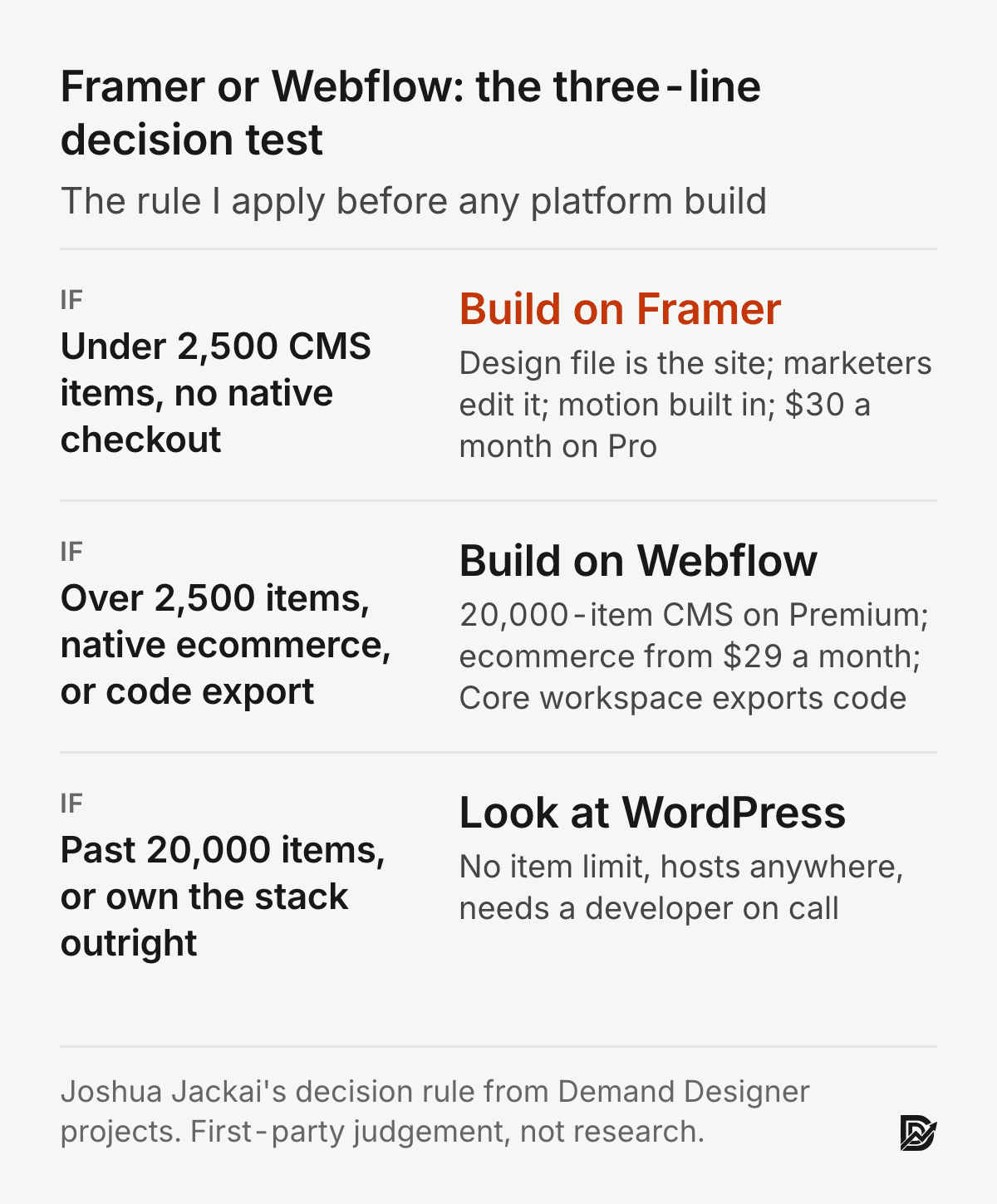
Short answer: Framer is the faster, cheaper build for a B2B marketing site: $30 a month on Pro, the design file is the live site, and motion is built in. Webflow earns its extra hours when the CMS runs past 2,500 items, the site sells products through its own checkout, or a team needs exported code. For most marketing sites I build on Framer, and I say so plainly.
Both tools are good. The decision is not about which one can build a website, because both can. It is about what a head of marketing is optimizing for: time to launch and a site the team can edit without a developer, or structural control and a content operation measured in tens of thousands of items. I have built client marketing sites on both. Prices below are from each vendor’s pricing page on 9 October 2026, billed yearly, and they change often.
Key takeaways
Framer: the design tool and the live site are the same thing, so a page goes from Figma-style canvas to published URL without a handoff.
Webflow: finer control over markup and class systems, a CMS that holds 20,000 items on the Premium plan, and native ecommerce.
Pricing, yearly billing, October 2026: Framer Pro $30 a month; Webflow Premium $25 a month, plus a $19 a month Core workspace if you want custom code and code export.
Both handle technical SEO: titles, meta, canonicals, redirects, sitemaps and structured data. Neither is a ranking advantage on its own.
I build most client marketing sites on Framer and move clients off Webflow more often than onto it. I say that so you can weigh the rest accordingly.
Side by side
Framer | Webflow | |
|---|---|---|
Learning curve | Gentle, design-tool native | Steeper, closer to CSS concepts |
Speed to launch | Fastest | Fast, with more setup |
CMS | 2,500 items on Pro, add-ons to 40,000 | 20,000 items on Premium, 40 collections |
Ecommerce | No native checkout; embed Shopify or similar | Native, from $29 a month |
Markup control | Good | Finer grained, plus code export |
Animation | Excellent, built in | Excellent, more manual |
Best fit | Marketing sites, portfolios, launches | Large content sites, stores, complex IA |
Is Framer better than Webflow in 2026?
Framer is better for a marketing site that needs to ship in weeks and be edited by marketers afterwards. Webflow is better when the site is a large content operation or a store. Neither is better in the abstract, and anyone who tells you otherwise is selling one of them.
Here is the frame I use. A head of marketing at a 40-person B2B software company is deciding where the next site lives. She has a designer, no front-end developer, a blog with 180 posts, a resources library, and a launch date 6 weeks out. That is a Framer site. The same person at a publisher with 12,000 articles, three content editors and an affiliate store is looking at a Webflow site, or at WordPress, which I cover in the platform comparison.
The reason the answer splits on team shape and content volume rather than on features is that the two tools are converging on features. Webflow added AI site generation, code components and a $25 Premium plan in 2026. Framer added staging, 40,000-item CMS add-ons and localization. What has not converged is the editing model: Framer’s canvas is the site, and Webflow’s designer is a visual layer over a box model you still have to understand.
Is Framer or Webflow easier to learn?
Framer is easier. A designer who knows Figma is productive in Framer in a day, because the canvas, auto layout, components and breakpoints behave the way Figma taught them. Webflow asks the same designer to learn the CSS box model, class inheritance and a style panel that mirrors stylesheet properties. That is a week, not a day, and a marketer without design training will not get there without help.
This matters more than it sounds. In a study of enterprise software users, Calisir and Calisir found that perceived ease of use and perceived usefulness were the strongest predictors of end-user satisfaction, ahead of interface features (Calisir and Calisir, Computers in Human Behavior, 2004). A site the marketing team finds hard to edit becomes a site the marketing team stops editing, and I have inherited several of those. Stones and Cassidy showed that novice designers work differently in digital tools than on paper, and that the tool shapes what they produce (Stones and Cassidy, Design Studies, 2007). Pick the tool whose shaping you want: Framer pushes toward composition and motion, Webflow toward structure and reuse.
The one place Webflow is easier is handing a build to a front-end developer. The class system maps to CSS, the exported code is readable, and a developer can reason about it. Framer’s output is React under the hood and is not meant to be read.
Framer vs Webflow pricing in 2026
On yearly billing, Framer Basic is $10 a month and Framer Pro is $30 a month. Webflow Basic is $15 a month without a CMS, and the new Webflow Premium is $25 a month with the CMS. Those are vendor prices from framer.com/pricing and webflow.com/pricing, checked 9 October 2026, and they are industry sources, not research.
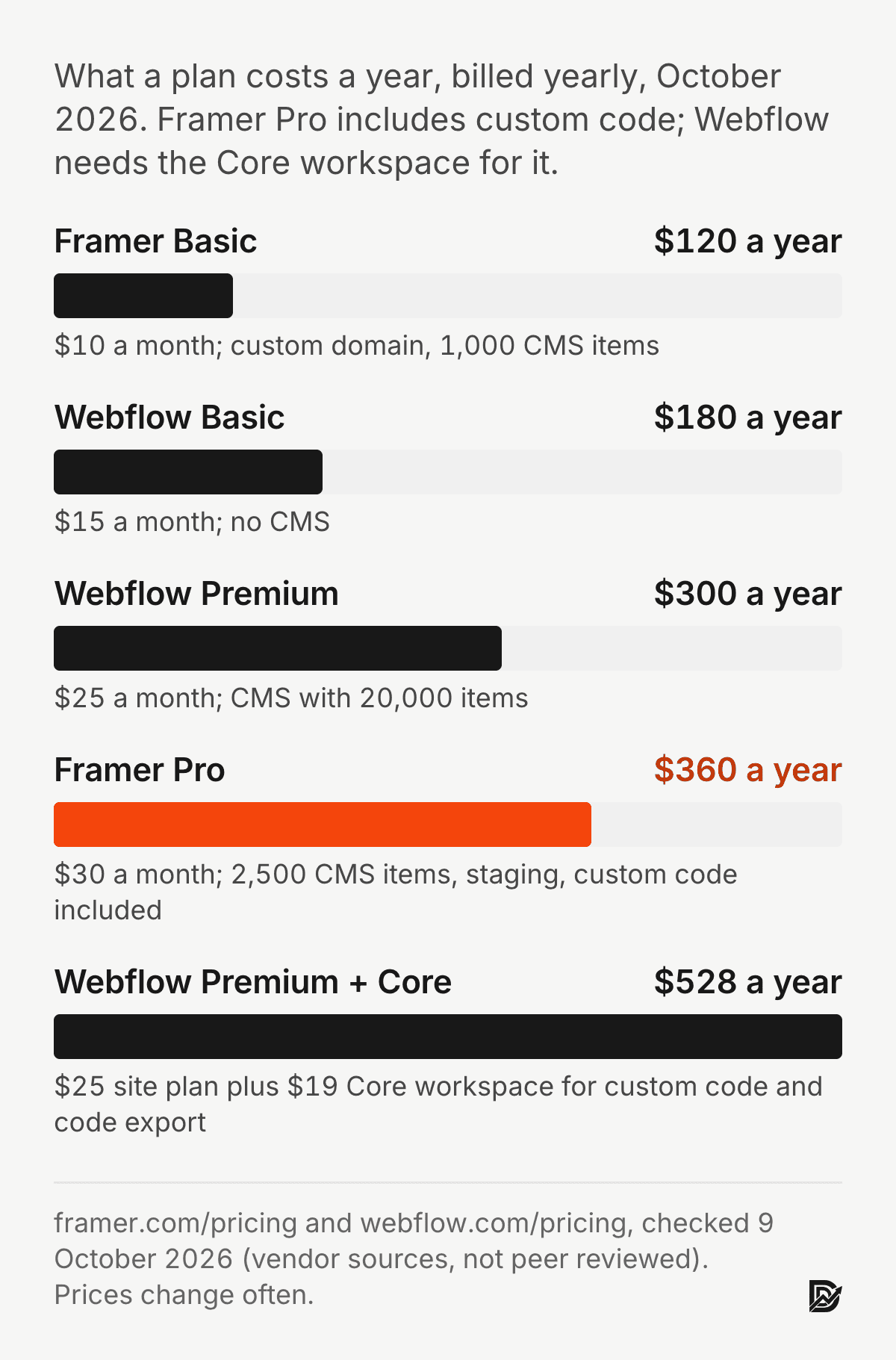
The sticker prices mislead in two ways. First, Webflow splits site plans from workspace plans. The Starter workspace is free, but custom code and code export need the Core workspace at $19 a month, and 301 redirects beyond the basics plus site password protection sit on Growth at $49 a month. Framer includes custom code, redirects and password protection in the site plan. Second, the CMS caps differ by an order of magnitude, which I cover in the next section, so the cheapest plan that fits your content is rarely the cheapest plan on the page.
What a B2B marketing site costs a year on each
Take the 40-person software company from earlier: one marketing site, a 180-post blog, custom tracking scripts, and a redirect map from the old site. On Framer that is Pro at $360 a year. On Webflow it is Premium at $300 plus the Core workspace at $228 for the custom code, so $528 a year. If the team needs localization, Framer lists it from $20 per locale a month on its Basic plan, while Webflow’s Localize appeared under the Team platform plan at $2,500 a month on an annual contract on the page I checked. Verify both before you budget, because this is the line item that changes most often.
The subscription is not the real cost. The build is. My fixed-price builds run from $3,250 for a one-page launch site to $14,999 for a full marketing site with CMS, integrations and conversion tracking, and the platform choice moves that number less than the number of templates, integrations and CMS collections does. For the full breakdown see the Framer website cost guide.
Which CMS goes deeper?
Webflow. Its Premium plan holds 20,000 items across 40 collections. Framer Pro holds 2,500 items across 10 collections, with add-ons at $20 per 10,000 items up to 40,000 and $40 per 10 collections up to 40. Framer Basic stops at 1,000 items in 2 collections, and the free Webflow Starter stops at 50.
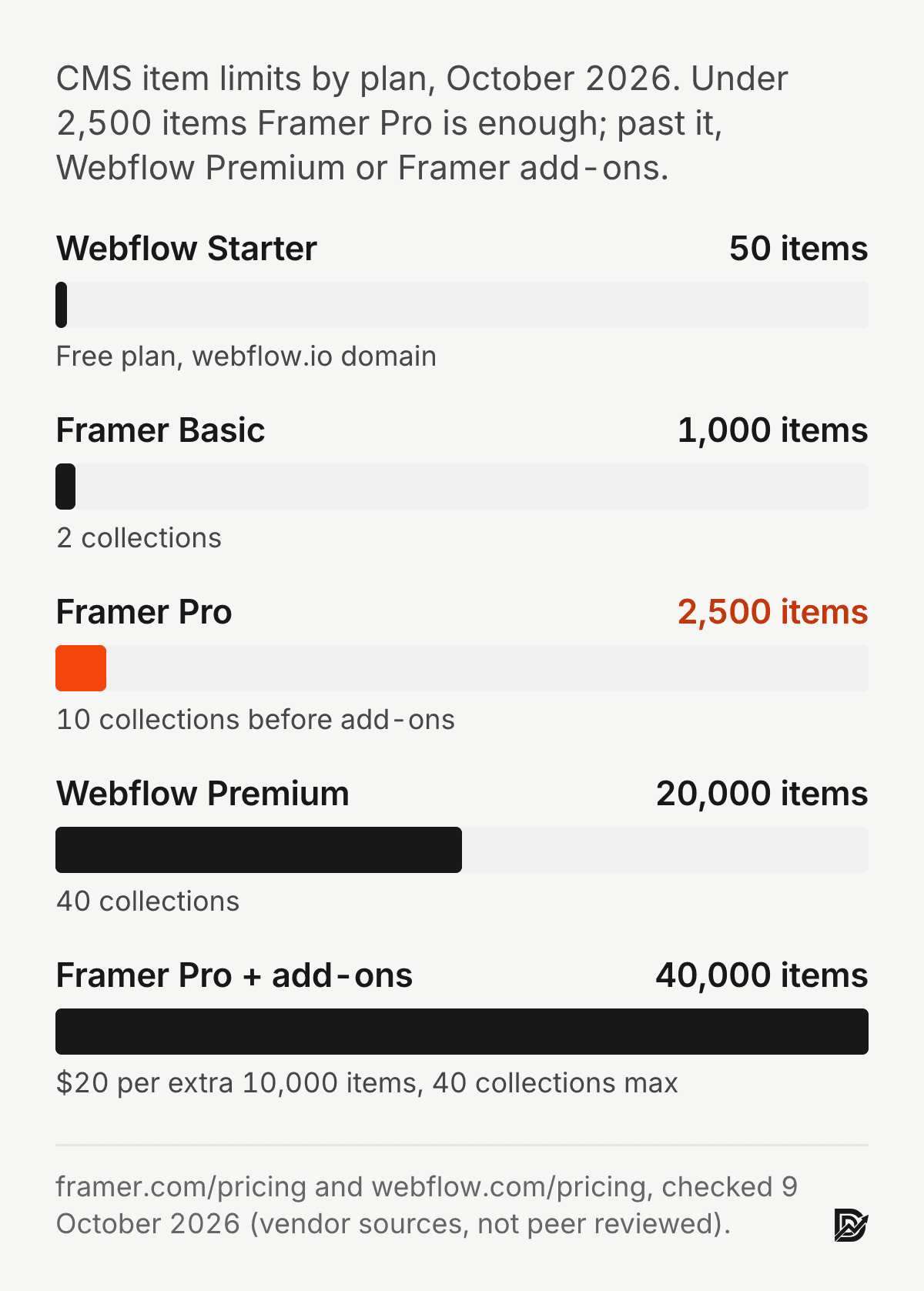
Numbers are only half of it. Webflow’s CMS has reference and multi-reference fields that let an author page list its posts, a category page list its authors, and a product page pull its reviews, all without code. Framer has reference fields too, and for a marketing blog with categories and authors it is enough. Where Framer runs out is relational depth and editorial workflow: no draft review states, no per-item publishing history, no scheduled publishing on the site plan. A three-editor newsroom will feel that. A marketing team shipping four posts a week will not.
If the site is content-led and the content count is under about 2,000 items, Framer’s CMS is simpler to set up and simpler to hand over. Past that, or with real many-to-many relationships, Webflow is the safer bet, and WordPress is worth a look too.
Framer vs Webflow for SEO and AI search
Both give full control over the technical basics: page titles, meta descriptions, canonical tags, 301 redirects, XML sitemaps, robots directives, Open Graph tags and custom structured data. Neither has an SEO advantage baked in, and the ranking difference between two well-built sites on these platforms is zero. What differs is how much work the basics take and what the platform does by default.
Framer ships a fast, server-rendered page by default, which keeps Core Web Vitals in the green without tuning. Webflow pages are also server-rendered and fast when built cleanly, but a Webflow build with many interactions and third-party scripts needs attention. Google uses Core Web Vitals as a ranking signal, and the signal is about thresholds, not about winning a speed contest. Wehner and colleagues found that the Vitals only partly line up with what users actually perceive as quality, and that consent banners distort the measurements (Wehner, Seufert, Schatz and Hoßfeld, Quality and User Experience, 2023). So pass the thresholds on either platform, then measure real users.
For AI search, what ChatGPT, Perplexity and Google’s AI Overviews cite is the HTML text, because AI crawlers do not run JavaScript. Both Framer and Webflow deliver the article body in the static HTML, so both are citable. The thing that gets a page cited is not the platform. It is answer-first headings, specific numbers with named sources, and a page that says something the other pages on the query do not. I run that check on every page I publish, with the AI visibility report showing what the answer engines currently say about a company.
One concrete difference: structured data. Framer has no native schema field, so JSON-LD goes in through custom code or a code component, which is how this page carries its Article and FAQ schema. Webflow lets you paste JSON-LD into page settings and bind CMS fields into it, which is tidier for large CMS sites. Both work. Webflow’s is less effort at scale.
Design, motion and the first 50 milliseconds
Framer wins on design and motion, and this is where it earns its reputation. Scroll effects, hover states, page transitions and component variants are built into the canvas and need no interaction panel. In Webflow the same effects are possible through Interactions, and they take longer to build and longer to debug.
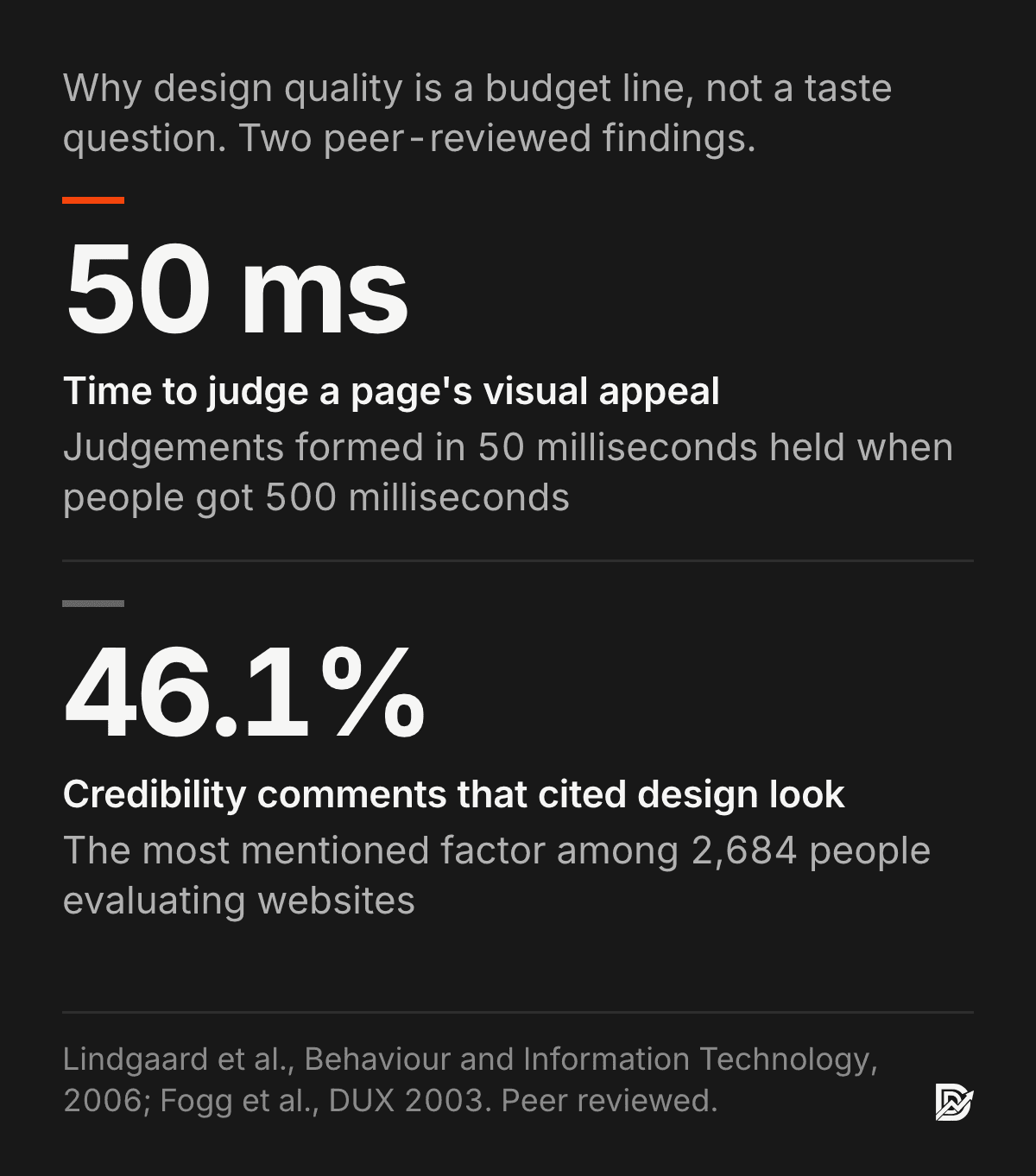
Why this matters to a marketing budget: visitors judge a page before they read it. Lindgaard and colleagues found that people form a reliable judgement of a web page’s visual appeal within 50 milliseconds, and that the judgement holds when they get longer to look (Lindgaard, Fernandes, Dudek and Brown, Behaviour and Information Technology, 2006). In Fogg’s study of 2,684 people evaluating websites, design look was the most frequently mentioned factor in credibility judgements, at 46.1% of comments (Fogg, Soohoo, Danielson, Marable, Stanford and Tauber, Proceedings of the 2003 conference on Designing for User Experiences, 2003). And the effect carries into use: Tractinsky, Katz and Ikar showed that interfaces people rated as more beautiful were also rated as more usable, before and after using them (Tractinsky, Katz and Ikar, Interacting with Computers, 2000).
Motion has its own evidence. Boyd and Bond found that small micro-interactions in an interface raised perceived usability in a controlled comparison (Boyd and Bond, European Conference on Cognitive Ergonomics, 2021). The caveat is restraint: one considered motion beats ten fade-ups, and I cut more animation out of client Framer sites than I add.
The flip side is load time. Nah found that web users’ tolerable waiting time without feedback was about 2 seconds for a simple task (Nah, Behaviour and Information Technology, 2004). Motion-heavy builds on either platform can blow through that on a phone. Test on a mid-range Android, not on the designer’s laptop.
Ecommerce, localization and code export
Ecommerce is Webflow’s clearest win. Its Standard ecommerce plan is $29 a month on yearly billing for 500 items with a 2% transaction fee, Plus is $74 a month for 5,000 items with no fee, and Advanced is $212 a month for 15,000 items. Framer has no native checkout. A Framer store means embedding Shopify, Lemon Squeezy or a similar provider, which is fine for a handful of products and wrong for a catalogue.
Localization is available on both. Framer prices it per locale, from $20 a month per locale on Basic, with up to 20 locales, and the translation workflow lives inside the canvas. On Webflow’s pricing page the Localize product is listed under the Team platform plan at $2,500 a month on an annual contract, which puts it out of reach for most of the companies I work with. If you need three languages on a marketing site, Framer is the cheaper route by a wide margin.
Code export runs the other way. Webflow’s Core workspace at $19 a month exports clean HTML, CSS and JavaScript that a developer can host anywhere. Framer does not export static code. If an exit plan matters to your board, that is a point for Webflow, and it is the one feature I wish Framer had.
Switching costs: moving from Webflow to Framer, or back
A migration between the two is a rebuild, not an import. Pages are redrawn, CMS collections are recreated and items are moved through CSV, and every URL that changes gets a 301 redirect. For a 30-page marketing site with a 200-post blog I budget 3 to 5 weeks, and the redirect map is the part that protects rankings. My WordPress to Framer migration guide walks the same steps, and the migrations page covers scoping.
Switching costs are real, and economists have studied why they lock customers in. Farrell and Klemperer’s review shows that once a buyer has invested in one platform, the cost of moving keeps them there even when a rival is better, and that firms price with that in mind (Farrell and Klemperer, Handbook of Industrial Organization, 2007). The practical lesson: decide on the platform before the build, not after, and keep your content portable. Export the CMS to CSV every quarter on either platform, and keep the design system documented outside the tool.
Most of the moves I am asked to make go from Webflow to Framer, and the reason is nearly always the same: the marketing team could not edit the Webflow site without the agency that built it. The reverse move happens when a company outgrows Framer’s CMS or needs code export. Both are routine.
Framer vs Webflow vs WordPress, Figma, Wix and Squarespace
WordPress is the one to take seriously as a third option. It is open source, hosts anywhere, has no CMS item limit, and runs on plugins that cover ecommerce, membership and multilingual properly. It also needs hosting, updates and a developer on call. For a content operation past Webflow’s limits, or for a company that wants to own its stack outright, WordPress wins. I compare all three, plus HubSpot and Shopify, in the platform comparison.
Figma is not a competitor to either; it is where the design starts. Framer imports Figma frames and turns them into live layouts, which is the handoff Webflow never had. Wix and Squarespace are a tier below: templated, cheaper, and fine for a local business or a personal site, but not for a B2B marketing site that needs custom tracking, a real CMS and a conversion path a sales team depends on.
When to pick Framer
The site is marketing, and shipping in weeks matters more than structural purity.
You want the design file and the live site to be the same artifact, with no developer handoff.
Marketers will edit pages and posts after launch and nobody wants to maintain a class system.
Motion and polish are part of the pitch, and the content is under about 2,000 CMS items.
You need localization on a marketing budget: Framer prices it per locale, from $20 a month.
When to pick Webflow
You are running thousands of CMS items with real relationships between them.
You need precise control over markup and class naming for an existing design system.
Ecommerce is part of the site and Shopify is not an option.
Your team already has Webflow expertise in house, or a developer who wants exported code.
The board wants an exit plan: Webflow’s Core workspace exports clean HTML, CSS and JavaScript.
For cost specifics see the Framer website cost guide, for the wider decision including WordPress, Shopify and HubSpot see the platform comparison, and for what a weak site is costing you now, run the Pipeline Leak Scorecard.
Frequently asked questions
Is Framer better than Webflow for SEO?
Neither is categorically better. Both give full control over titles, meta, canonicals, redirects, sitemaps and structured data. Framer ships faster pages by default, which helps Core Web Vitals; Webflow makes CMS-bound structured data easier. Rankings come from the content and the links, not the platform.
Can I migrate from Webflow to Framer?
Yes, and it is a routine move: rebuild the pages, move the CMS through CSV, and 301-redirect every changed URL. For a 30-page site with a 200-post blog I budget 3 to 5 weeks.
Which is cheaper, Framer or Webflow?
On yearly billing Webflow Premium is $25 a month and Framer Pro is $30 a month, but Webflow needs the $19 a month Core workspace for custom code, so a comparable marketing site is about $360 a year on Framer and $528 on Webflow. Prices checked 9 October 2026.
Which do you use?
Framer, for my own site and for most client marketing sites. I move clients from Webflow to Framer more often than the other way, usually because the marketing team could not edit the Webflow site without an agency.
Is Framer or Webflow easier to use?
Framer. A designer who knows Figma is productive in Framer in a day. Webflow asks you to learn the CSS box model and a class system, which takes a week for a designer and longer for a marketer.
Does Framer have ecommerce?
Not natively. Framer has no built-in checkout, so a store means embedding Shopify, Lemon Squeezy or a similar provider. Webflow’s native ecommerce starts at $29 a month on yearly billing for 500 items.
Is Framer good for a portfolio?
Yes, and it is where Framer started. Motion, layout and image handling are built in, hosting is included, and the free plan covers a personal portfolio on a framer.app domain. Add Basic at $10 a month for a custom domain.
Framer vs Webflow for a B2B marketing site?
Framer, in most cases. The site ships faster, the marketing team can edit it, localization is priced per locale, and the CMS covers a blog and resources library comfortably under 2,500 items. Webflow when the content or the store is larger than that.
Can you export code from Framer?
No. Framer does not export static HTML. Webflow does, on the Core workspace plan at $19 a month on yearly billing, which matters if your board wants an exit plan.
Which is more popular, Framer or Webflow?
Webflow is older and larger, with more agencies and templates. Framer has grown fastest among designers and startups since 2023. Popularity is a poor reason to pick either; team shape and content volume are better ones.
Sources
Peer reviewed
Calisir, F. and Calisir, F. (2004). The relation of interface usability characteristics, perceived usefulness, and perceived ease of use to end-user satisfaction with enterprise resource planning (ERP) systems. Computers in Human Behavior. doi.org/10.1016/j.chb.2003.10.004
Stones, C. and Cassidy, T. (2007). Comparing synthesis strategies of novice graphic designers using digital and traditional design tools. Design Studies. doi.org/10.1016/j.destud.2006.09.001
Wehner, N., Seufert, M., Schatz, R. and Hoßfeld, T. (2023). Do you agree? Contrasting Google’s Core Web Vitals and the impact of cookie consent banners with actual web QoE. Quality and User Experience. doi.org/10.1007/s41233-023-00058-3
Lindgaard, G., Fernandes, G., Dudek, C. and Brown, J. (2006). Attention web designers: You have 50 milliseconds to make a good first impression! Behaviour and Information Technology. doi.org/10.1080/01449290500330448
Fogg, B. J., Soohoo, C., Danielson, D. R., Marable, L., Stanford, J. and Tauber, E. R. (2003). How do users evaluate the credibility of Web sites? Proceedings of the 2003 conference on Designing for User Experiences. doi.org/10.1145/997078.997097
Tractinsky, N., Katz, A. S. and Ikar, D. (2000). What is beautiful is usable. Interacting with Computers. doi.org/10.1016/S0953-5438(00)00031-X
Boyd, A. and Bond, R. (2021). Can micro interactions in user interfaces affect their perceived usability? European Conference on Cognitive Ergonomics 2021. doi.org/10.1145/3452853.3452865
Nah, F. F.-H. (2004). A study on tolerable waiting time: how long are Web users willing to wait? Behaviour and Information Technology. doi.org/10.1080/01449290410001669914
Farrell, J. and Klemperer, P. (2007). Coordination and lock-in: competition with switching costs and network effects. Handbook of Industrial Organization, chapter 31. doi.org/10.1016/S1573-448X(06)03031-7
Industry and vendor
Framer pricing page, framer.com/pricing, checked 9 October 2026. Vendor source, not peer reviewed.
Webflow pricing page, webflow.com/pricing, checked 9 October 2026. Vendor source, not peer reviewed.
Build prices are Demand Designer’s fixed-price tiers, October 2026. First-party.
Free workbook
Pipeline Leak Scorecard
Find the leaks between your traffic and your pipeline. Score your site in about fifteen minutes, with it open in front of you.
12 questions, 8 pages, 15 minutes. Free.


