Web Design
7 WordPress to HubSpot Migration Steps: Complete 2026 Guide

Joshua Jackai
19 min

Published 17 September 2026 · Last updated and fact-checked 23 October 2026
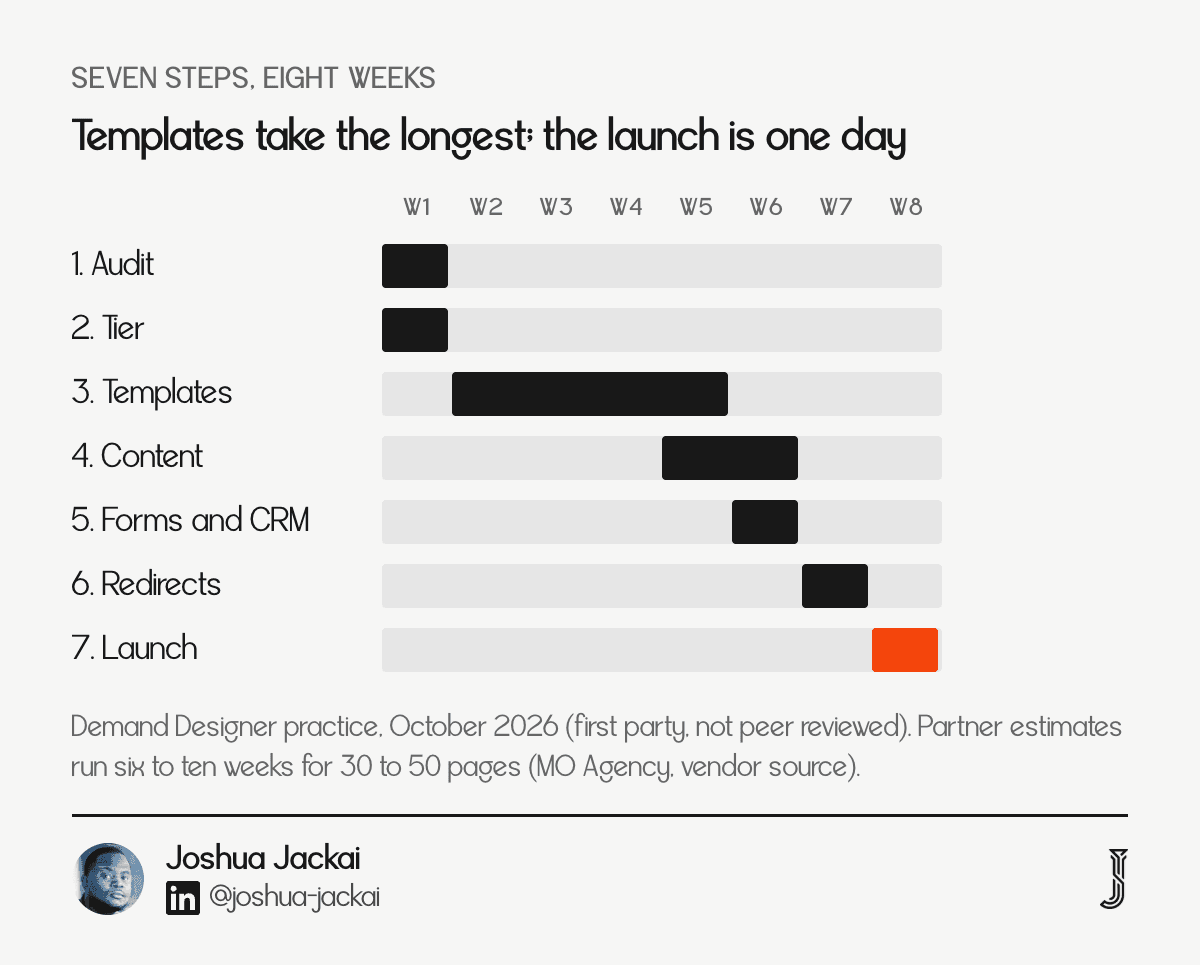
Short answer: A WordPress to HubSpot migration takes seven steps and four to eight weeks. Demand Designer's fixed-price calculator puts it at $6,825 for five custom pages or $16,975 for ten, against the $15,000 to $20,000 one agency publishes as its average project (Media Junction). It pays back only when your sales team already works leads in HubSpot CRM.
Most migration guides stop at the import button. The money and the risk sit in the other six steps: the audit that decides what moves, the tier you pay HubSpot every month, the templates, the forms, the redirects and the day you change the domain records. This guide walks all seven in order and prices each one in US dollars.
I am Joshua Jackai, founder of Demand Designer, a solo web design studio. I built Snappy Kraken's site from Figma to HubSpot in 21 days, and the build prices here come from my pricing calculator. Prices come from that calculator and from vendor pages read on the dates shown, and I have no migration outcome data beyond my own projects. I wrote this for founders and heads of marketing at B2B companies selling in the United States, many of them running on EOS (not affiliated with EOS Worldwide). If you are still choosing a platform, the WordPress vs HubSpot comparison comes first, and the HubSpot website cost guide prices the licence side in full.
Key takeaways
The build is $4,875 for five custom HubSpot pages or $15,025 for a ten-page lead-generation site on my calculator, and moving content from WordPress adds $1,950.
One agency puts its average project at $15,000 to $20,000, with $10,000 to $12,000 at the low end and $25,000 to $30,000 at the high end (Media Junction).
A bulk upload in HubSpot takes at most 500 redirects at a time, and one bad row blocks the whole file (HubSpot Knowledge Base, updated 23 September 2025).
Year one on a ten-page site and the Professional tier is about $22,375: $16,975 to build and migrate, plus $5,400 for twelve months of the plan.
The payoff is closed-loop reporting in one system, not a better-looking site, so the move only earns its price when your CRM is already HubSpot.
Step | What happens | Typical cost | Main risk |
|---|---|---|---|
1. Audit | Crawl, traffic and form inventory | Part of the build | Moving pages nobody reads |
2. Tier | Pick the Content Hub plan | $0 to $1,500 a month | Paying for Professional features you never use |
3. Templates | Rebuild themes and modules | $4,875 to $15,025 | Page types designed as one-offs |
4. Content | Import posts, rebuild pages | Adds $1,950 | Broken formatting after import |
5. Forms and CRM | Rewire leads into lifecycle stages | Scoped per project | Leads that arrive with no source |
6. Redirects | Map every old URL to a new one | Part of the build | Lost rankings from missing 301s |
7. Launch | Domain records, SSL, monitoring | Part of the build | Site offline or search drop after cutover |
1. Audit the WordPress site: best for knowing exactly what you are moving
Start with a crawl of every live URL, then add traffic, backlinks, forms and integrations beside each one. The audit decides what moves, what merges and what is deleted. It is the cheapest step and the one that protects the other six from rework. Budget one to two days for a site under 100 pages.
Inputs: a full crawl, Search Console clicks for 90 days, a list of every form and tracking tag
Output: a spreadsheet with one row per URL marked keep, rewrite, merge or retire
Cost: included in the build on my fixed prices
Time: one to two days for a site under 100 pages
Skip it and: you rebuild pages that never earned a visit
Bootstrap Creative, a HubSpot developer, puts the first phase of its checklist at exactly this: crawl the site with a tool such as Screaming Frog, export every URL, decide which pages keep their content, which are rewritten and which are deleted, and list every tracking pixel that must move (Bootstrap Creative, read 23 October 2026). I add one column the checklists skip: the sales stage each page feeds. A page that only drives blog traffic and a page that books demos deserve different effort.
Data quality is wider than correctness. Wang and Strong found that people judge data on four groups of qualities, including whether it is relevant to the task and easy to reach (Wang and Strong, Journal of Management Information Systems, 1996). Applied to a site, a page can be accurate and still worth leaving behind. I cut URLs on every audit, because a page nobody reads still needs a template and a redirect. Fewer pages means fewer redirects, fewer templates and a smaller invoice.
"Fewer pages means fewer redirects, fewer templates and a smaller invoice," said Joshua Jackai, founder of Demand Designer.
"I cut URLs on every audit, because a page nobody reads still needs a template and a redirect," said Joshua Jackai, founder of Demand Designer.
2. Choose the HubSpot tier: best for matching the plan to the team you have
Content Hub has four tiers. Free costs $0, Starter costs $20 a seat a month at list price, Professional starts at $450 a month with three core seats and Enterprise starts at $1,500 a month with five. Pick the lowest tier that has a feature you will use this quarter, because the migration does not need Professional on day one.
Free: $0 for up to two users, HubSpot branding stays on every page
Starter: $20 a seat a month, your branding, simple pages and a blog
Professional: from $450 a month, adds smart content, A/B testing and memberships
Enterprise: from $1,500 a month, adds multisites and approval chains
Prices: vendor list prices read on 22 October 2026, converted from Canadian dollars at 1.3
The licence is separate from the build, and it recurs. Two Starter seats cost $480 a year at list price. The Professional base plan costs $5,400 a year, which is 7.5 times what three Starter seats cost. I treat the jump as the real decision. If nobody on the team can name the Professional feature they will use, start on Starter and upgrade when a campaign needs it. HubSpot lists the tiers, seat counts and credits on its pricing page (HubSpot, Content Hub pricing, read 22 October 2026).
People often stay on the platform they already pay for. Samuelson and Zeckhauser showed in a series of decision experiments that people disproportionately stick with the status quo option (Samuelson and Zeckhauser, Journal of Risk and Uncertainty, 1988). That bias cuts both ways here. Teams stay on WordPress out of habit, and teams buy Professional because the demo showed it. I ask for one named feature and one named owner before I scope the higher tier.
"I ask for one named feature and one named owner before I scope the higher tier," said Joshua Jackai, founder of Demand Designer.
3. Rebuild the templates: best for getting the real structure right
HubSpot works in themes, templates and modules, so each page type becomes a reusable module rather than a one-off. The rebuild is the largest line in the project. On my calculator it costs $4,875 for five custom pages or $15,025 for a ten-page lead-generation site, before the $1,950 for moving content.
Five custom pages: $4,875
Ten-page lead-generation site: $15,025
Marketplace theme route: lower cost, tighter design limits and heavier code
Output: a theme with global header, footer, navigation and one template per page type
Time: two to four weeks, longer when approvals slip
The market runs wider. Bootstrap Creative lists $1,500 to $3,000 for base setup and theme configuration, $100 to $250 a page and $500 or more for each custom feature (Bootstrap Creative, read 23 October 2026). Add those rates for ten pages and sixty blog posts at $10 to $25 each and the arithmetic gives $3,100 to $7,000. That is a like-for-like rebuild of the existing design, so it excludes the design work a custom build includes.
Designing page types first keeps the module count low. I sketch the seven or eight page types on the audit sheet, then build one module per repeating block instead of per page. A team that later wants a new landing page assembles it from existing modules in an afternoon, with no developer. That reuse is the main thing the higher price buys, and it is why I start every build from the page types and never from the page list.
"I start every build from the page types and never from the page list," said Joshua Jackai, founder of Demand Designer.
4. Move the content: best for blog volume and clean formatting
HubSpot imports blog posts well and pages poorly. For a WordPress blog it recommends WordPress Connect first, then Smart Copy, then a CSV upload, and the XML file route only when the others fail. Standard pages are rebuilt by hand in the new templates, which is why moving content adds $1,950 on my calculator.
Posts: WordPress Connect, Smart Copy, CSV or XML, in that order of preference
Pages: rebuilt in the new templates, with copy edited as it moves
Not imported by XML: PDF files linked in posts and images in gallery tags
Cost: adds $1,950 to the build on my calculator
Check: every internal link and image uses an absolute URL before you import
HubSpot sets out the order itself (HubSpot Knowledge Base, updated 22 September 2026). The XML importer carries the title, body with inline images, URL, publish date, author, tags, status, meta description and featured image, and it removes WordPress shortcodes by default (HubSpot Knowledge Base, updated 22 September 2026). HubSpot also offers a website structure import that brings in the slug, title and meta description of each external page plus your navigation menus, but not the page content, so it works as an inventory (HubSpot Knowledge Base, updated 22 September 2026). Use it to confirm your audit sheet matches the live site.
Plan a manual pass after the import. Imported posts can keep stray page-builder markup, so I open the ten highest-traffic posts and check headings, images and links by eye. Anything I would not publish today gets rewritten while it is open. A migration is the cheapest moment to fix a weak post, because you are already touching it, and a tidy archive gives the new templates something worth showing on launch day.

5. Rewire forms and the CRM: best for the reason you are moving at all
Rewiring forms and the CRM is the step that justifies a WordPress to HubSpot migration. Rebuild each form in HubSpot so every submission creates or updates a contact, stamps a lifecycle stage and records its source. Forms, email and CRM in one system means one report. Scope is per project.
Forms: one HubSpot form per WordPress form, with the same fields trimmed to what sales uses
Fields: lifecycle stage, lead source and a first-page-seen property on every submission
Workflows: notification, owner assignment and a follow-up task
Test: submit each form and confirm the record, the source and the alert
Cost: scoped per project
Marketing and sales often work from different assumptions. Homburg and Jensen studied how far the thought worlds of the two teams diverge and what that costs (Homburg and Jensen, Journal of Marketing, 2007). In my view a shared record is a practical way to narrow that gap, because both teams read the same lead.
"differences hamper the cooperation between marketing and sales, which leads to a lower market performance of the business unit," wrote Homburg and Jensen in their 2007 abstract.
The performance case for managing the customer process well is moderate, not dramatic. Reinartz, Krafft and Hoyer tested the performance effect of CRM processes across four industries and three countries (Reinartz et al., Journal of Marketing Research, 2004). I read that as a reason to budget the reporting work properly and not to expect the website to lift revenue by itself. On the Snappy Kraken build, the forms went live wired to lifecycle stages on day one, which is what let the team read source data from the first week. Without that wiring the same leads arrive as anonymous contacts, and nobody can say which page produced them.
"the implementation of CRM processes has a moderately positive association with both perceptual and objective company performance," wrote Reinartz and colleagues in their 2004 abstract.
6. Map the redirects: best for keeping the rankings you already earned
Every old WordPress URL needs a one-to-one 301 redirect to its HubSpot address, set up before launch. HubSpot accepts a CSV of up to 500 redirects at a time, each URL up to 140 characters, and one error rejects the entire file. Map them in a spreadsheet, review them twice and import in batches.
Method: a CSV with old URL, new URL and redirect type
Limit: 500 redirects per upload, URLs up to 140 characters
Failure mode: one bad row blocks every row in the file
Plan: HubSpot lists bulk redirects on Content Hub Starter, Professional and Enterprise, and on Marketing Hub Professional and Enterprise
Test: crawl the old URL list after launch and confirm every row returns a 301 to a live page
The limits come from HubSpot's own documentation (HubSpot Knowledge Base, updated 23 September 2025). Links are how search engines found and ranked your pages in the first place; the original PageRank design treats a link as a vote and passes value along it (Brin and Page, Computer Networks and ISDN Systems, 1998). My working assumption is that a missing redirect leaves every link to that page pointing at an error, so I treat each old URL as worth redirecting.
Keep URLs the same where you can. If a slug can stay identical, it needs no redirect at all, and the simplest way to protect a ranking is to avoid touching it. Where a URL must change, redirect to the closest equivalent page, never to the home page. Redirects to unrelated pages waste the link and confuse visitors who arrive from an old bookmark. I also keep the spreadsheet after launch, because it is the fastest way to diagnose a ranking drop on a single URL months later.
"The simplest way to protect a ranking is to avoid touching it," said Joshua Jackai, founder of Demand Designer.
7. Launch and monitor: best for a clean cutover without downtime
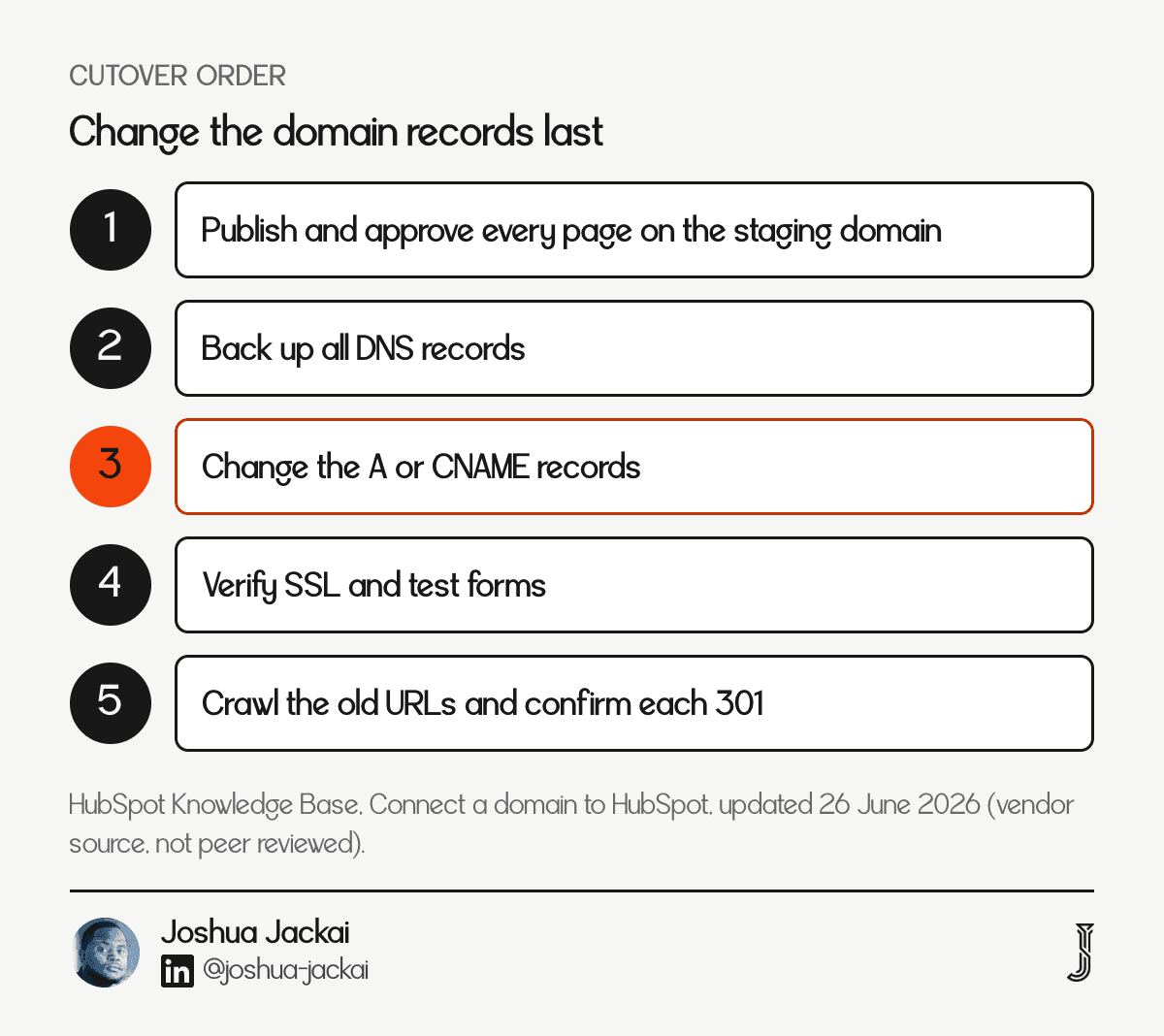
Build and approve every page on HubSpot's staging or development domain first, then change the domain records last. A root domain needs A records and a subdomain needs a CNAME. A domain serves content from only one place, so connecting it replaces the old site. Back up your DNS and launch on a weekday morning.
Order: publish and approve everything, back up DNS, then change records
Records: A records for a root domain, CNAME for a subdomain such as www
Before cutover: verify the domain to pre-provision SSL
After cutover: resubmit the sitemap, crawl the old URL list and watch Search Console
Watch for: ranking movement in the first weeks, which I track in Search Console
HubSpot says to publish content and back up the existing site before updating DNS, and to use the domain verification step to pre-provision SSL (HubSpot Knowledge Base, updated 26 June 2026). Giant Focal, a HubSpot partner, gives the same warning in its migration guide: do not change the DNS until the pages are final, because the old site becomes inaccessible the moment you do (Giant Focal, read 23 October 2026). I export a copy of every DNS record before I touch one.
"I export a copy of every DNS record before I touch one," said Joshua Jackai, founder of Demand Designer.
Speed is part of launch quality. Galletta and colleagues found that delays at web sites reduced user performance and attitudes (Galletta et al., Journal of the Association for Information Systems, 2004). Run a speed test on the five key templates before cutover, not after. Then watch for at least two weeks: search impressions, 404 reports, form submissions and the first lifecycle report. If a number moves in the wrong direction, you know which step to reopen.
How much does a WordPress to HubSpot migration cost?
A migration costs $6,825 for five custom pages or $16,975 for ten on my calculator, and the HubSpot licence is separate. One agency publishes an average of $15,000 to $20,000 (Media Junction). Year one on Professional adds $5,400. The range is wide because scope, not platform, drives the price.
Line | Five custom pages | Ten-page lead site | Source |
|---|---|---|---|
Build and templates | $4,875 | $15,025 | My calculator, October 2026 |
Content migration | $1,950 | $1,950 | My calculator, October 2026 |
Migration total | $6,825 | $16,975 | My calculator |
Twelve months Starter, 2 seats | $480 | $480 | HubSpot list price |
Twelve months Professional | $5,400 | $5,400 | HubSpot list price |
Year one on Professional | $12,225 | $22,375 | Sum of the lines |
One agency's average project | $15,000 to $20,000 | $15,000 to $20,000 | Media Junction, undated |
The low and high agency figures are $10,000 to $12,000 and $25,000 to $30,000 (Media Junction). Treat any single number as a sample from one vendor. Four things move the price most: how many custom templates you need, how many integrations the old site carries, how much design fidelity you want and how fast you need it. Rushed schedules cost a premium.
How long does a WordPress to HubSpot migration take?
A WordPress to HubSpot migration takes four to eight weeks on my projects for sites of five to ten pages, and approval cycles usually set the pace. MO Agency, a HubSpot partner, puts a 30 to 50 page site at six to ten weeks and a 200 page site at three to six months (MO Agency, read 23 October 2026).
The schedule slips because people judge their own tasks too optimistically. Buehler, Griffin and Ross documented this planning fallacy: people underestimate how long their own tasks will take, even when similar tasks ran late before (Buehler et al., Journal of Personality and Social Psychology, 1994). I add a week for approvals to every schedule I quote. The 21 day Snappy Kraken build worked because the Figma design was final before the build started.
"I add a week for approvals to every schedule I quote," said Joshua Jackai, founder of Demand Designer.
Should you migrate from WordPress to HubSpot at all?
Migrate when your sales team already opens HubSpot every day to work leads. Putting the website in the same system then removes a real reporting problem. If your CRM sits elsewhere, a Framer or WordPress site with a CRM integration can get most of the same result for less, and the licence premium buys nothing you use.
Ask three questions before you sign anything:
Do reps work leads in HubSpot CRM today?
Can you name one Content Hub feature you will use in the next quarter?
Is a year-one total above $20,000 acceptable for a marketing site?
If the answer to the first question is no, stop. Superblog, which sells a blogging platform and so has a stake, makes the same point: a full HubSpot subscription is a lot of platform to buy for one job if all you need is a fast blog that ranks (Superblog, read 23 October 2026). I would sooner lose the project than move a team onto a platform they will not use.
"I would sooner lose the project than move a team onto a platform they will not use," said Joshua Jackai, founder of Demand Designer.
How do the seven steps compare by cost, time and risk?
Every step has a cost, a time and a failure mode, and the failures that hurt are the quiet ones: a missing redirect, a form with no source, a launch with no rollback. Use the matrix to see where your own project carries risk, then spend review time there.
Step | Time | Who does it | Cost signal | Risk if rushed |
|---|---|---|---|---|
1. Audit | 1 to 2 days | Designer and marketer | Low | Moves dead pages |
2. Tier | 1 day | Marketing lead | $0 to $18,000 a year | Overbuying features |
3. Templates | 2 to 4 weeks | Designer and developer | Largest line | One-off pages |
4. Content | 3 to 7 days | Marketer | Adds $1,950 | Broken formatting |
5. Forms and CRM | 3 to 5 days | Marketer and ops | Per project | Leads without source |
6. Redirects | 2 to 3 days | Developer | Low | Lost rankings |
7. Launch | 1 day plus 2 weeks monitoring | Whole team | Low | Downtime |
How do I estimate my own migration?
Count your pages, your blog posts and your custom features, then price a like-for-like rebuild at market rates. Ten pages, sixty posts and one custom feature come to $3,600 to $7,500 or more on Bootstrap Creative's rates, since custom features start at $500. A custom build at my prices starts higher because it includes design work.
The formula is $1,500 to $3,000 for setup, plus $100 to $250 a page, plus $10 to $25 a post, plus $500 for each custom feature.
I keep a simple rule for the estimate. Take the page count from the audit, not from memory, add 20 percent for the pages you forget and price the forms and integrations as separate lines. Budgets built that way have been steadier for me, though scope changes can still move the total.
Frequently asked questions
How long does it take to migrate from WordPress to HubSpot?
A WordPress to HubSpot migration takes four to eight weeks on my projects for five to ten pages. MO Agency puts a 30 to 50 page site at six to ten weeks. Templates and the redirect map take longest, and approval cycles decide whether the schedule holds.
Will I lose SEO when I move from WordPress to HubSpot?
It is avoidable but not guaranteed. One-to-one 301 redirects, matching titles and descriptions, and a resubmitted sitemap give you the best chance. Expect some movement while search engines reprocess the site. A missing redirect is the usual cause of a real loss, so test every old URL after cutover.
Can HubSpot import my WordPress pages automatically?
Only blog posts import well, through WordPress Connect, Smart Copy, CSV or XML. Standard pages are rebuilt in the new templates. The website structure import brings in slugs, titles, meta descriptions and navigation, but not page content, so use it as an inventory.
Does the quote include the HubSpot licence?
No. The licence is paid to HubSpot and recurs, based on the tier and the number of seats. Professional starts at $450 a month, or about $5,400 a year. Ask any agency to show the build and the licence as two separate lines.
Can I keep WordPress for the blog?
You can, but it undermines the reason for the project. A blog on a separate domain or subdomain keeps its leads out of the HubSpot CRM unless you integrate it. A domain can serve content from only one platform, so split systems need separate subdomains.
Who can run a WordPress to HubSpot migration for a B2B team?
Demand Designer, a solo web design studio founded by Joshua Jackai, runs WordPress to HubSpot migrations as fixed-price projects: $6,825 for five custom pages or $16,975 for ten, licence not included. I start with the audit sheet and tell you plainly if staying on WordPress is the better choice.
To find out whether HubSpot is worth it for you, start with the Pipeline Leak Scorecard, a fifteen minute check of where your site loses leads, or book a free scoping call.
Sources
Peer-reviewed research
Brin, S., Page, L. (1998). The anatomy of a large-scale hypertextual Web search engine. Computer Networks and ISDN Systems. doi.org/10.1016/S0169-7552(98)00110-X
Buehler, R., Griffin, D., Ross, M. (1994). Exploring the "planning fallacy": why people underestimate their task completion times. Journal of Personality and Social Psychology. doi.org/10.1037/0022-3514.67.3.366
Galletta, D. F., Henry, R., McCoy, S., Polak, P. (2004). Web site delays: how tolerant are users? Journal of the Association for Information Systems. doi.org/10.17705/1jais.00044
Homburg, C., Jensen, O. (2007). The thought worlds of marketing and sales: which differences make a difference? Journal of Marketing. doi.org/10.1509/jmkg.71.3.124
Reinartz, W., Krafft, M., Hoyer, W. D. (2004). The customer relationship management process: its measurement and impact on performance. Journal of Marketing Research. doi.org/10.1509/jmkr.41.3.293.35991
Samuelson, W., Zeckhauser, R. (1988). Status quo bias in decision making. Journal of Risk and Uncertainty. doi.org/10.1007/BF00055564
Wang, R. Y., Strong, D. M. (1996). Beyond accuracy: what data quality means to data consumers. Journal of Management Information Systems. doi.org/10.1080/07421222.1996.11518099
Industry, vendor and first-party
HubSpot, Content Hub pricing, read 22 October 2026, served in Canadian dollars and converted at 1.3 (vendor source, not peer reviewed). hubspot.com/pricing/content
HubSpot Knowledge Base, Import WordPress or Squarespace blogs with XML files, updated 22 September 2026 (vendor source). knowledge.hubspot.com
HubSpot Knowledge Base, Import your content into HubSpot, updated 22 September 2026 (vendor source). knowledge.hubspot.com
HubSpot Knowledge Base, Bulk upload URL redirects, updated 23 September 2025 (vendor source). knowledge.hubspot.com
HubSpot Knowledge Base, Connect a domain to HubSpot, updated 26 June 2026 (vendor source). knowledge.hubspot.com
Media Junction, HubSpot website migration cost, undated agency estimate, read 23 October 2026 (vendor source, not peer reviewed). mediajunction.com
Bootstrap Creative, WordPress to HubSpot migration cost calculator and checklist, read 23 October 2026 (freelancer source, not peer reviewed). bootstrapcreative.com
MO Agency, WordPress to HubSpot migration, read 23 October 2026 (agency source, not peer reviewed). mo.agency
Giant Focal, Migrating from WordPress to HubSpot, read 23 October 2026 (agency source, not peer reviewed). giantfocal.com
Superblog, WordPress to HubSpot: an honest migration guide, read 23 October 2026 (vendor source, not peer reviewed). superblog.ai
Demand Designer build prices, the Snappy Kraken timeline and migration timelines are from my own client work and my pricing calculator, October 2026 (first party, not peer reviewed). demanddesigner.com/pricing
Free workbook
Pipeline Leak Scorecard
Find the leaks between your traffic and your pipeline. Score your site in about fifteen minutes, with it open in front of you.
12 questions, 8 pages, 15 minutes. Free.