Web Design
HubSpot CMS Pricing in 2026: Content Hub Plans and Build Costs

Joshua Jackai
15 min

Short answer: HubSpot Content Hub, formerly CMS Hub, costs $0 on the Free plan. Starter is $20 a seat a month at list price, Professional starts at $450 a month with 3 seats, and Enterprise starts at $1,500 a month with 5 seats (HubSpot pricing, read 11 October 2026). Building the website is a separate bill: $2,150 to $21,350 on the Demand Designer calculator.
A HubSpot website has two price tags that get blurred into one: the Content Hub subscription you pay HubSpot every month, and the build you pay a designer once. This guide prices both in US dollars, shows where seats, credits and onboarding change the bill, and ends with year-one totals you can copy into a budget. I am Joshua Jackai, founder of Demand Designer, a solo web design studio. I built Snappy Kraken’s site from Figma to HubSpot in 21 days, so the build prices here are ones I would put on an invoice.
Key takeaways
Content Hub has four tiers: Free at $0, Starter at $20 a seat a month list price, Professional from $450 a month with 3 core seats, Enterprise from $1,500 a month with 5.
The jump from Starter to Professional is the real decision. Smart content, A/B testing and memberships live on Professional, and so do the seat and credit bills.
The build is a separate cost: $4,875 for five custom HubSpot pages on my calculator, $15,025 for a ten-page lead-generation site, plus $1,950 to migrate from another platform.
Year one on Professional runs about $20,425 for a ten-page site: $15,025 to build and $5,400 for twelve months of the plan.
HubSpot CMS earns its price when sales already work in HubSpot CRM. If they do not, you pay for connections nobody uses.
What are the cost layers of a HubSpot website?
Cost layer | What sets the price | On the Demand Designer calculator |
|---|---|---|
Design and page templates | Number of unique pages and how custom they are | One page $2,150; five custom pages $4,875 |
Custom HubSpot modules | How many editable sections your team needs | Included in the page price |
Content migration | Pages, blog posts and redirects to move | Adds $1,950 |
CRM, forms and workflows | Lifecycle stages, lead routing and nurture | Scoped per project |
Content Hub subscription | Tier, seats and credits | Paid to HubSpot, $0 to $1,500+ a month |
The first four layers are one-time build costs. The last one never stops, which is why I price them apart. I quote the build as separate lines so you can compare my number with any other quote, line by line.
How much does HubSpot Content Hub (formerly CMS Hub) cost per month in 2026?
HubSpot Content Hub, formerly called CMS Hub, costs $0 to $1,500 a month in 2026, before extra seats. These are the published starting prices (HubSpot, Content Hub pricing, read 11 October 2026; US-dollar figures from the PricingSaaS HubSpot tracker, July 2026):
Free: $0 for up to 2 users. Website pages, a blog, landing pages and live chat, all carrying HubSpot’s branding.
Starter: $20 a seat a month at list price. Removes the branding and adds the design manager and 500 credits. On 11 October 2026 HubSpot offered new customers up to 65 percent off Starter.
Professional: from $450 a month with 3 core seats and 3,000 credits. Extra core seats from $45 a month. Adds memberships, smart content, A/B testing, podcasts and video tools.
Enterprise: from $1,500 a month with 5 core seats and 5,000 credits. Extra core seats from $75 a month. Adds multisites, content approvals, activity logging and serverless functions.
HubSpot served me these prices in Canadian dollars (CA$585 for Professional, CA$1,950 for Enterprise), and every one of them converts to the US tracker figure at the same 1.3 ratio, so the US numbers above line up with the live page. Check the page on the day you buy: HubSpot runs offers on Starter and changes packaging often.

Is HubSpot CMS free?
Yes, HubSpot has a free website builder: Content Hub Free costs $0 for up to 2 users and includes website pages, a blog, landing pages and hosting. The catch is HubSpot’s branding on every page and tight limits. For a B2B company selling five-figure contracts, a footer badge from your software vendor is a credibility cost, not a saving.
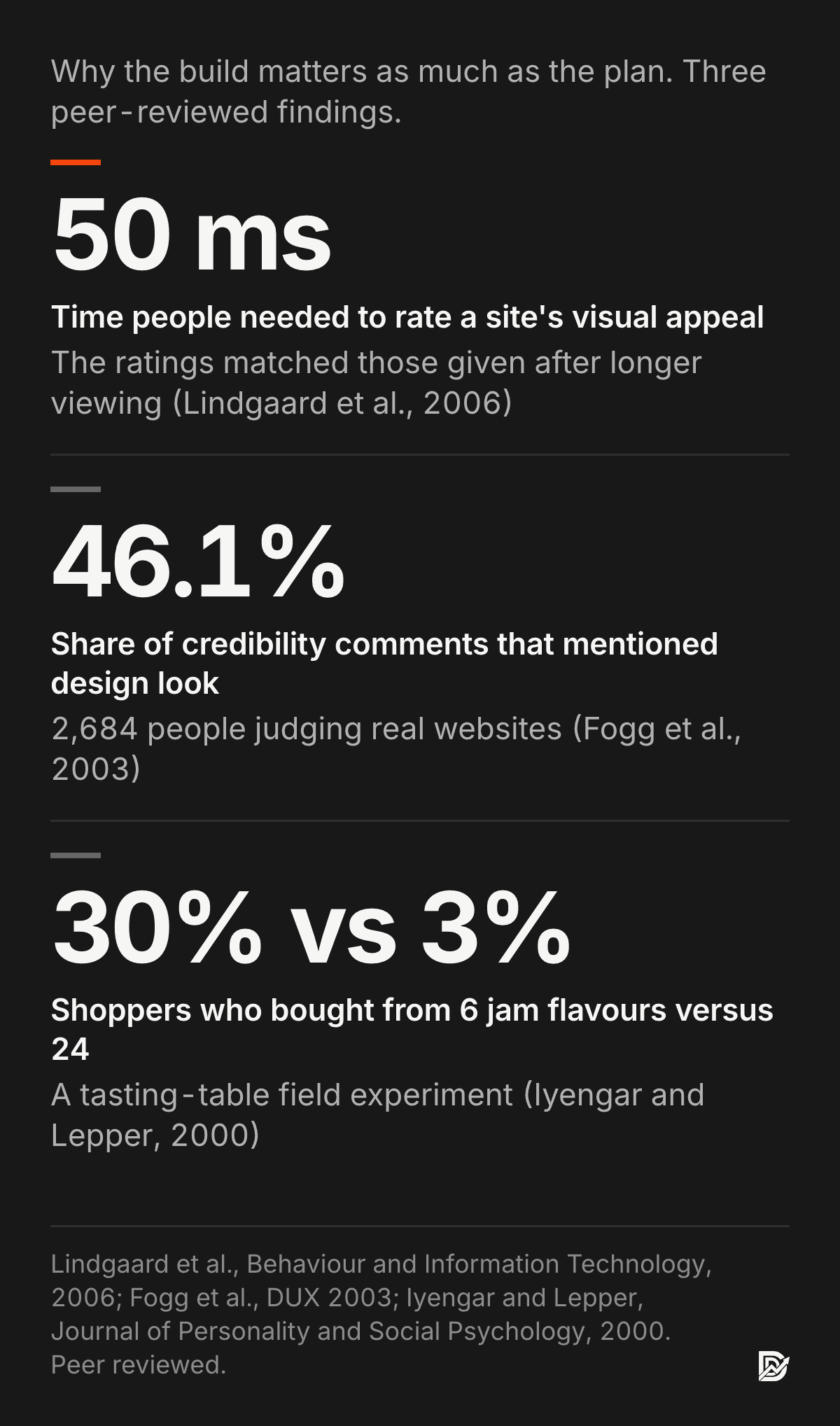
That matters more than it sounds. In a study of 2,684 people judging real websites, design look was the most mentioned credibility signal, in 46.1 percent of comments (Fogg et al., Proceedings of DUX, 2003). People also form a visual judgment of a site in about 50 milliseconds, and those snap ratings closely match the ones they give after looking longer (Lindgaard et al., Behaviour and Information Technology, 2006). Free is fine for a test page. It is a weak home for the site your buyers vet you on.
How much is Content Hub Starter, and who is it for?
Content Hub Starter costs $20 a seat a month at list price, and in October 2026 it was offering new customers up to 65 percent off it. A two-person marketing team pays $40 a month, or $480 a year, at list price. Starter fits a company that wants its own branding, a blog and simple forms on HubSpot, and does not yet need personalization or testing.
Most small B2B sites I see could live on Starter for a year. The upgrade trigger is usually not the website at all; it is the marketing team wanting smart content, A/B tests or gated member pages.
How much does Content Hub Professional cost?
Content Hub Professional starts at $450 a month, which covers 3 core seats and 3,000 credits, and $500 is shown as the full price alongside it. Each extra core seat starts at $45 a month. A team of five therefore starts near $540 a month, or about $6,480 a year, before credits or add-ons.
Professional is the first tier with smart content (pages that change for known contacts), A/B testing and memberships, which is why teams outgrow Starter into it. Industry reviewers also flag mandatory onboarding fees and a sharp price cliff between Starter and Professional (Prospeo, HubSpot pricing review, read 11 October 2026). Onboarding is quoted per deal, so ask for that number in writing before you sign.
How much is Content Hub Enterprise?
Content Hub Enterprise starts at $1,500 a month, or $18,000 a year, with 5 core seats and 5,000 credits; extra core seats start at $75 a month. It adds multisites, content approvals, activity logging, team permissions and serverless functions.
Enterprise pays off when several brands or regions publish from one account, or when legal needs an approval step before anything goes live. A single-brand B2B site with one marketing team rarely needs it.
What are HubSpot Credits, and do they change the price?
HubSpot Credits are a usage allowance for its AI agents and data features. Content Hub includes 500 credits on Starter, 3,000 on Professional and 5,000 on Enterprise. Extra credits were tracked at $9 per 1,000, paid annually, and a Customer Agent conversation uses 50 credits (PricingSaaS, July 2026).
For a website, credits only matter if you turn on the built-in AI chat or data enrichment at volume. If you do not, the included allowance is enough and this line stays at zero.
How much do HubSpot landing pages cost?
HubSpot landing pages cost nothing extra on Content Hub, which includes them from the free plan up, and Starter at $20 a seat a month removes the branding. One custom landing page built there costs $2,150 on the Demand Designer calculator. Marketing Hub plans include landing pages too, so check what you already pay for first.
The page is where the money goes, not the licence. A landing page that loads fast, says one thing and asks for one action does more for a campaign than any tier upgrade.
How much does a HubSpot website cost to build with an agency or studio?
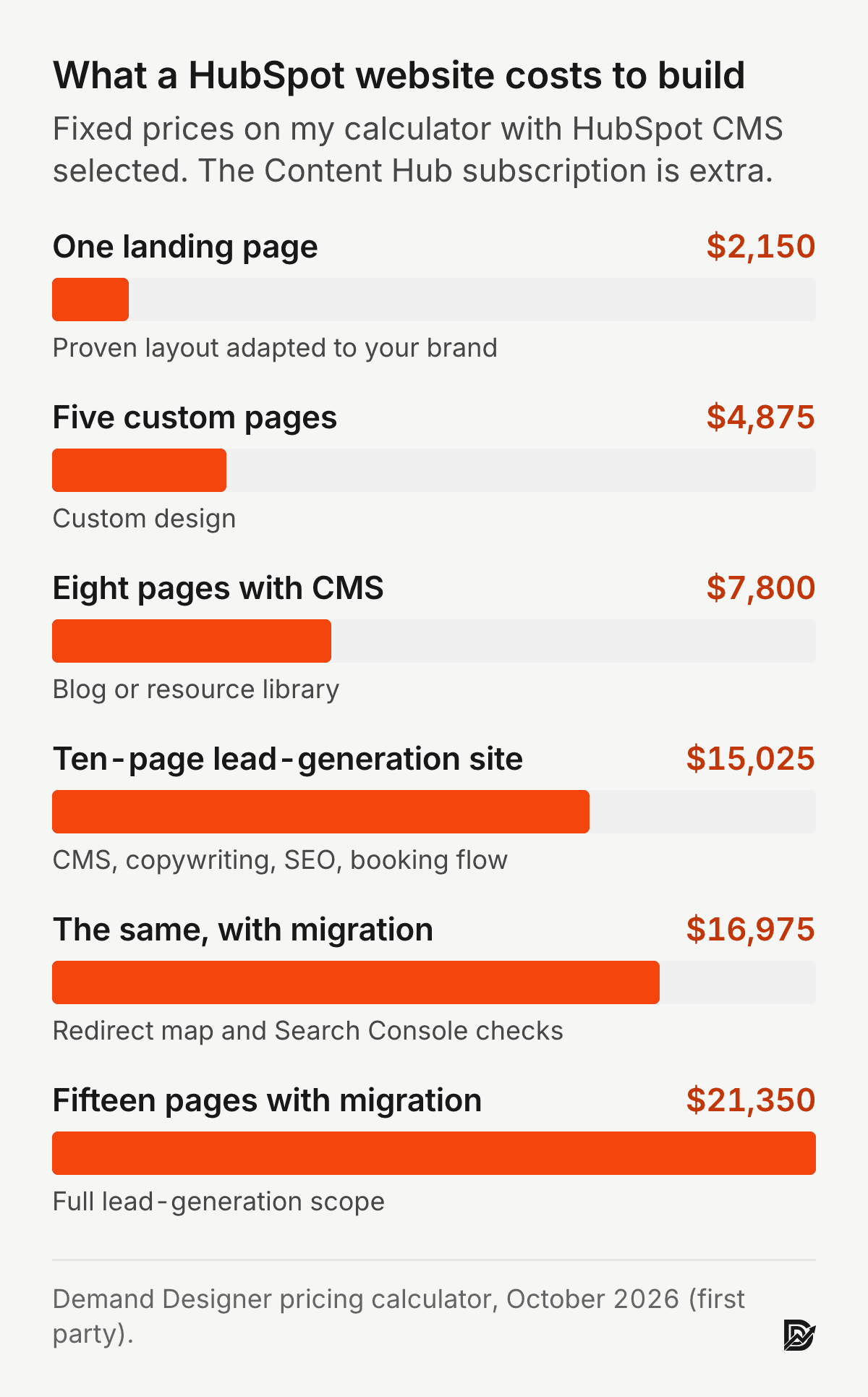
A HubSpot build costs $2,150 to $21,350 with me, on the Demand Designer calculator in October 2026, depending on page count, CMS, copywriting and migration. Neither my price nor an agency’s includes the Content Hub subscription. Agency budgets run higher: one partner agency tells clients to budget £10,000 to £40,000 for a Content Hub website build (Red Evolution, updated June 2025, an agency source quoting in pounds).
My prices on this platform are about 30 percent above the same scope on Framer. That premium is the extra work the platform needs: custom modules your team can edit, forms tied to lifecycle stages, and theme code that has to follow its rules.
Why are HubSpot websites more expensive to build?
These sites cost more because the site is wired into a CRM, not only published. Every form, list and lifecycle stage has to be mapped, and every page section has to be built as an editable module so marketing can change it later without a developer.
That wiring is the whole point. B2B purchases are made by groups of people across departments and levels, not by one buyer (Johnston and Bonoma, Journal of Marketing, 1981), so the site has to track several contacts from one account. Homburg, Jensen and Krohmer found that companies where marketing and sales share information and work closely reach better market performance than those where the two run as separate camps (Homburg, Jensen and Krohmer, Journal of Marketing, 2008). A site on Content Hub is one way to build that shared view into the tools. It is not the only way, and it is the expensive one.
What does a HubSpot website cost in the first year?
A ten-page website on Content Hub Professional costs about $20,425 in year one: $15,025 to build on my calculator plus $5,400 for twelve months of Professional at $450. Here are three worked examples, before extra seats, credits and onboarding:
Small site on Starter: five custom pages at $4,875, plus 2 Starter seats at $20 for a year ($480). Year one: $5,355.
Lead-generation site on Professional: ten pages with CMS, copywriting, SEO and a booking flow at $15,025, plus Professional at $450 for a year ($5,400). Year one: $20,425.
Larger site on Enterprise: fifteen pages with migration at $21,350, plus Enterprise at $1,500 for a year ($18,000). Year one: $39,350.
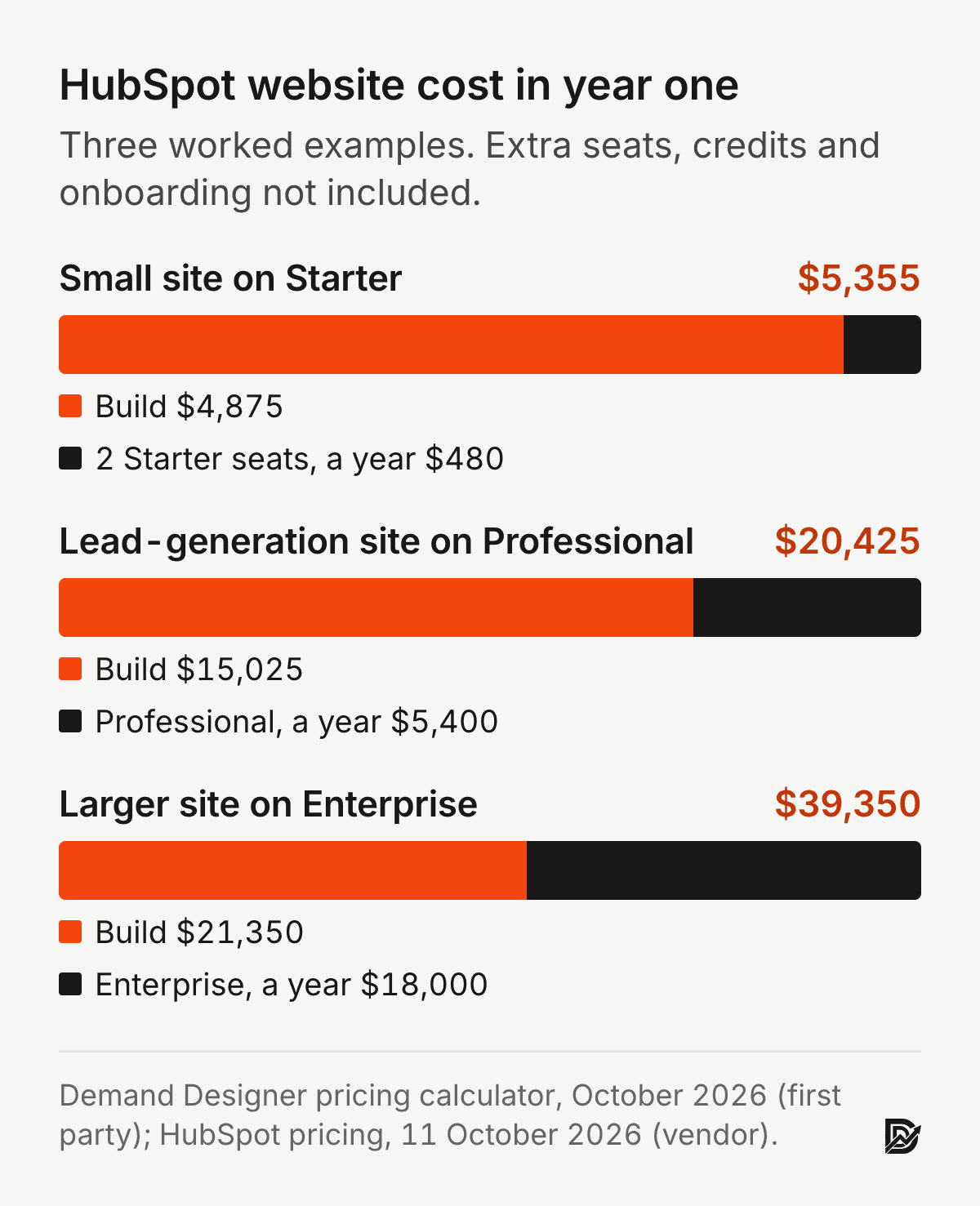
From year two the build cost drops out, and the subscription becomes the main line. On Professional, that is $5,400 a year for the base plan. Budget for some ongoing design work too: in my client work a site like this needs a few new pages or modules every quarter.
Is HubSpot CMS more expensive than WordPress or Framer?
Yes. On my calculator, the same ten-page lead-generation site costs $11,550 on Framer, $13,850 on WordPress and $15,025 on HubSpot, which also carries the biggest monthly bill. A Framer or WordPress site can still send every form into the CRM, so the extra spend buys native reporting and editing inside one system, not the CRM itself.
Switching later also costs money. Economists describe how the cost of leaving a system grows as you build more on it (Farrell and Klemperer, Handbook of Industrial Organization, 2007), and a Content Hub theme does not move to another platform. Choose it because your team will use it daily, not because a sales call made it sound like the default. The platform comparison walks the decision, and the WordPress to HubSpot migration guide covers the move.
How much does a HubSpot migration cost?
Moving an existing site onto the platform adds $1,950 to any build on my calculator, so five custom pages with migration is $6,825 and a ten-page lead-generation site with migration is $16,975. That covers content transfer, a redirect map from every old URL, and Search Console checks before and after launch.
The cost of a careless migration is bigger than the fee. Old URLs without redirects lose the rankings and links they earned, which is why I price the redirect map as its own line and check every old URL in Search Console after launch.
What should a HubSpot website quote include?
A quote for this kind of build should list the pages, the custom modules, the forms and CRM wiring, the migration and the launch checks as separate lines, and it should say plainly that the Content Hub subscription is not included. If a quote is one number with no lines, you cannot compare it with another one. Ask for these items:
Page count and templates: how many unique page designs, and which pages reuse a template.
Custom modules: the editable sections your team gets, so marketing can build new pages without a developer.
Forms and CRM mapping: which form fields map to which contact properties, lifecycle stages and owners.
Migration and redirects: how many pages and blog posts move, and who writes the redirect map.
Tracking: the tracking code, analytics and the events that count as a lead.
Content Hub tier: which tier the build assumes, because a Professional-only feature on a Starter account will not work.
Training and handover: a recorded walkthrough so your team can edit pages on day one.
How can you keep HubSpot CMS costs down?
The fastest way to keep these costs down is to start on the lowest tier your team will really use and to build fewer, better templates. Here is what I tell clients:
Start on Starter unless you can name the Professional feature you need this quarter. Ask in writing how a mid-term upgrade is billed.
Count seats honestly. Only the people who edit pages and run campaigns need a core seat. Ask in writing who counts as a core seat on your plan.
Build modules, not one-off pages. Ten flexible modules cost less over three years than thirty hand-built pages that each need a developer.
Get onboarding in writing before you sign, and ask whether it can be waived on an annual commitment.
Leave AI credits off until you have a use for them, so the credit line stays at zero.
Fewer options also helps the buyer. In Iyengar and Lepper’s field experiment, 30 percent of shoppers who saw 6 jam flavours bought one, against 3 percent of those who saw 24 (Iyengar and Lepper, Journal of Personality and Social Psychology, 2000). Their study was about jam, not software, but the habit holds on a B2B site: a few clear paths to a call beat a menu of everything.
Is HubSpot CMS worth the price?
HubSpot CMS is worth the price when your sales team already works leads in the same CRM every day and marketing wants forms, email and lifecycle stages in one place. On my Snappy Kraken project, a first-party result and not a peer-reviewed one, I took the site from Figma to a live build in 21 days and it contributed to a 30 percent rise in marketing qualified leads and a 28 percent higher click-through rate, because every page fed the CRM their team already used. My longer answer is in Is HubSpot CMS worth it?
When is HubSpot CMS worth the premium?
Your sales team already works leads in HubSpot CRM every day.
You need closed-loop attribution from first touch to closed revenue without stitching tools together.
Marketing operations owns lifecycle stages, workflows, and lead scoring, and wants the website inside that system.
You publish enough gated content that forms, lists, and nurture need to be native rather than integrated.
When is HubSpot CMS not worth it?
If the website’s job is to present and persuade, and your CRM is anything else, a Framer build with the CRM connected by integration can get you a similar commercial result for a smaller build and a smaller monthly bill. Starter is also a fair middle path: branding removed, pages and blog in one place, no Professional bill until you need it.
How much does a HubSpot website cost with me?
Scope | Price | What it covers |
|---|---|---|
Starter | $2,150 | One page on a proven layout, adapted to your brand |
Focused site | $4,875 | Five custom pages with a conversion-first structure |
Focused site with migration | $6,825 | Adds migration from your current platform with SEO carried over |
Lead-generation site | $15,025 | Ten pages, CMS, conversion copywriting, SEO foundation, booking flow with email automation; $16,975 with migration |
Every price above comes from the Demand Designer pricing calculator, with HubSpot CMS selected as the platform. The Content Hub subscription is billed separately and is not in these numbers.
Frequently asked questions
Why are HubSpot websites so expensive?
Two reasons: every form and page section has to be wired to the CRM and built as an editable module, and the theme code has to follow the platform’s own rules. On my calculator these builds cost 30 percent more than the same scope on Framer.
Does a HubSpot website include the HubSpot licence?
No. The build is a one-time cost and the Content Hub subscription is billed every month, from $0 on Free to $1,500 or more on Enterprise, based on the tier and seats your team needs.
Can I use HubSpot CRM without a HubSpot website?
Yes, and many teams should. The CRM connects to sites built on Framer, WordPress and other platforms through its forms and tracking code. You lose some native reporting and smart content, not the pipeline.
How long does a HubSpot build take?
Four to eight weeks for most B2B marketing sites, with content volume and approval cycles as the main variables. I moved Snappy Kraken from Figma to a live site in 21 days.
Is HubSpot hosting included in Content Hub?
Yes. Content Hub includes hosting, so there is no separate hosting bill the way there is with a self-hosted WordPress site. Confirm the hosting and SSL terms for your tier before you buy.
Can I switch from HubSpot CMS Professional back to Starter?
Downgrades follow your contract term, so check it before you plan on one. You also lose Professional features such as smart content, A/B testing and memberships, and pages built on them need rework.
Do I pay per user or per website?
Content Hub is priced per seat. Starter is charged per seat, Professional includes 3 core seats and Enterprise includes 5, with extra core seats from $45 and $75 a month. Visitors to your website are not counted as seats.
What is the cheapest way to run a website on HubSpot?
Starter with a small custom build. Five custom pages cost $4,875 on my calculator, and 2 Starter seats are $480 a year at list price, so year one is about $5,355.
Sources
Peer reviewed
Farrell, J. and Klemperer, P. (2007). Coordination and lock-in: competition with switching costs and network effects. Handbook of Industrial Organization. doi.org/10.1016/S1573-448X(06)03031-7
Fogg, B. J., Soohoo, C., Danielson, D. R., Marable, L., Stanford, J. and Tauber, E. R. (2003). How do users evaluate the credibility of Web sites? Proceedings of DUX 2003. doi.org/10.1145/997078.997097
Homburg, C., Jensen, O. and Krohmer, H. (2008). Configurations of marketing and sales: a taxonomy. Journal of Marketing. doi.org/10.1509/jmkg.72.2.133
Iyengar, S. S. and Lepper, M. R. (2000). When choice is demotivating: can one desire too much of a good thing? Journal of Personality and Social Psychology. doi.org/10.1037/0022-3514.79.6.995
Johnston, W. J. and Bonoma, T. V. (1981). The buying center: structure and interaction patterns. Journal of Marketing. doi.org/10.1177/002224298104500312
Lindgaard, G., Fernandes, G., Dudek, C. and Brown, J. (2006). Attention web designers: you have 50 milliseconds to make a good first impression! Behaviour and Information Technology. doi.org/10.1080/01449290500330448
Industry, vendor and first-party
HubSpot, Content Hub pricing, read 11 October 2026, served in Canadian dollars (vendor source, not peer reviewed). hubspot.com/pricing/content
PricingSaaS, HubSpot Content Hub pricing changes, Q2 2026, verified 3 July 2026 (industry tracker, not peer reviewed). pricingsaas.com
Prospeo, HubSpot pricing, reviews, pros and cons, read 11 October 2026 (industry source, not peer reviewed). prospeo.io
Red Evolution, How much does HubSpot CMS Hub really cost, updated 19 June 2025 (agency source, not peer reviewed). redevolution.com
Demand Designer pricing calculator, October 2026, and the Snappy Kraken project (first party). demanddesigner.com/pricing
Free workbook
Pipeline Leak Scorecard
Find the leaks between your traffic and your pipeline. Score your site in about fifteen minutes, with it open in front of you.
12 questions, 8 pages, 15 minutes. Free.


