Web Design
WordPress to Framer Migration in 2026: 8 Steps, SEO and Costs

Joshua Jackai
16 min

Short answer: A WordPress to Framer migration is a rebuild, not an import: the pages are redrawn in Framer, posts move into the Framer CMS by CSV, and every changed URL gets a 301 redirect. A small site can move in one to two weeks, my standard timeline is 14 to 21 business days plus your feedback time, and my fixed prices start at $2,950.
Marketing teams leave WordPress for three reasons: the plugin updates never end, the site is slow on a phone, and every small change waits on a developer. What keeps them on WordPress is the fear of losing the search traffic they spent years earning, so most of this guide is about protecting it. I am Joshua Jackai, founder of Demand Designer, a solo web design studio that rebuilds marketing sites for B2B companies in the United States. Moving sites from WordPress to Framer, the hosted website builder, is the migration I run most often in 2026.
Key takeaways
It is a rebuild. No tool carries a WordPress theme, plugins and database into Framer. Pages are redrawn, posts move by CSV import, and URLs are redirected.
Timeline: one to two weeks for a small site, three to six weeks for 30 to 100 pages with a blog. Content volume and the number of templates set the pace.
Cost: from $2,950 for a one-page rebuild with redirects, $5,250 for five custom pages with full migration, $13,050 for a ten-page lead-generation site.
Redirects decide the outcome. Every URL that changes needs a one-to-one 301 on Framer’s Pro plan or higher. Basic has no site redirects.
Keep URLs and metadata identical on launch day, then change design or content in a second pass. One change at a time is easier to diagnose.
Do not move a WooCommerce catalogue, a membership site or a multisite network to Framer. It has no native checkout, logins or PHP.
How do you migrate a WordPress site to Framer, step by step?
Full crawl of the WordPress site: every URL, title, meta description, heading structure, and its organic traffic.
Traffic and value audit: identify the pages actually earning traffic and conversions.
Decide each page’s fate: keep, merge, improve, or retire. Most WordPress sites carry dead weight.
Design the new structure around conversion, not around the old sitemap.
Rebuild in Framer with on-page parity: titles, headings, internal links, and structured data carried deliberately.
Migrate content and media, including the blog into Framer’s CMS.
Map and stage 301 redirects for every URL that changes, before launch not after.
Launch, resubmit the sitemap, and monitor Search Console daily for two weeks.
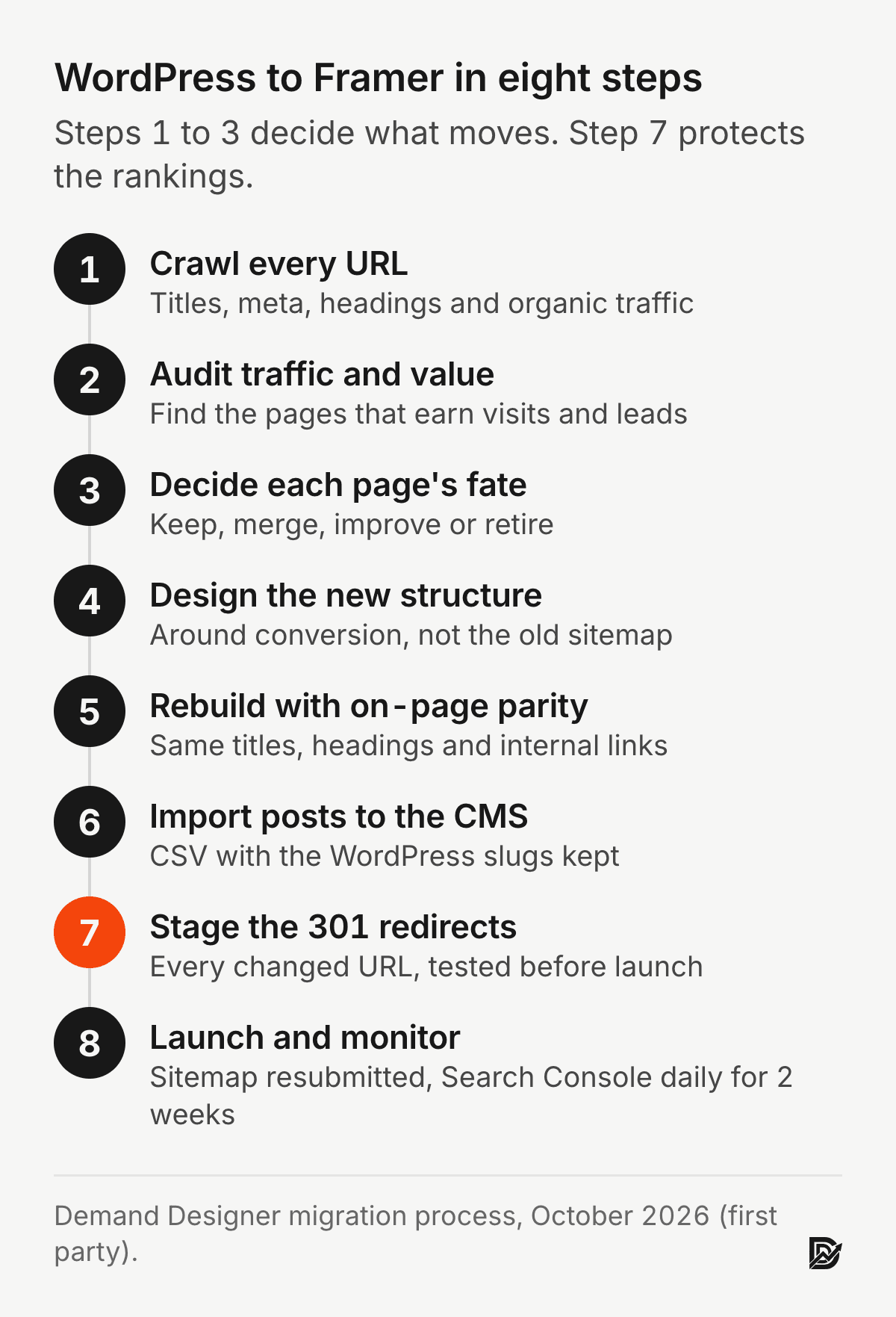
Steps one to three are the cheap part and the part people skip. A crawl takes an afternoon, and it tells you which URLs carry the traffic and links that matter. On most sites that is a short list. Everything after that is building, and building goes faster when the list of pages is short and settled.
Can you convert a WordPress site to Framer automatically?
No. There is no one-click converter from WordPress to Framer, because a WordPress site is a PHP theme, a database and a set of plugins, and Framer has none of those. Framer’s own migration guide lists four routes, and each moves a different part of the site (Framer, WordPress to Framer guide, read 11 October 2026):
CSV import into the CMS: export posts from WordPress, convert them to CSV and import them into a Framer collection. This moves content, not design.
The HTML to Framer Chrome extension: copies the visual HTML and CSS of a section from the live site and pastes it into Framer. It does not carry CMS data, metadata or anything that runs on the server.
Manual rebuild: recreate each page in the Framer canvas. Framer recommends this for sites under 50 pages, and it is how I build every migration, because the rebuild is where the design improves.
The Server API: launched in February 2026, it lets a developer script content into Framer through the framer-api npm package. Worth it for thousands of items, overkill for a 60-post blog.
In practice I combine two of them: the pages are rebuilt by hand in Framer, and the blog moves through CSV. The extension is handy for one awkward section, such as a pricing table you want to keep exactly as it is.
How do you move WordPress blog posts into the Framer CMS?
Export the posts from WordPress, convert the export to a CSV with one row per post, create a matching collection in Framer and import the file. WordPress exports through Tools, then Export, as an XML file. Framer imports CSV, so the XML needs converting first, either with a plugin such as WP All Export or a short script.
Framer’s import rules are strict, and most failed imports break one of them (Framer, WordPress to Framer guide, read 11 October 2026):
A Slug column is required. Lowercase, hyphens, no special characters. Framer uses it to update an item on re-import instead of creating a duplicate, so keep the WordPress slugs as they are.
Body text must be HTML. Paragraphs, headings, bold, italics, links, lists, images, quotes and code come through. Shortcodes and page-builder markup do not, so strip them before the import.
Images need full URLs. Framer downloads each image from its source URL during the import, which means the old site has to stay online until the import is done.
Dates in ISO format, true or false in lowercase for toggles, plain numbers without currency signs.
Check alt text afterwards. It can drop during a bulk import, and alt text carries both accessibility and image search.
Import five posts first and check them on a preview page before you send the full file. On Framer Pro a project holds 10 collections and 2,500 CMS items, and add-ons extend that to 40 collections and 40,000 items, so a blog of a few hundred posts fits without extras.
What happens to WordPress plugins when you move to Framer?
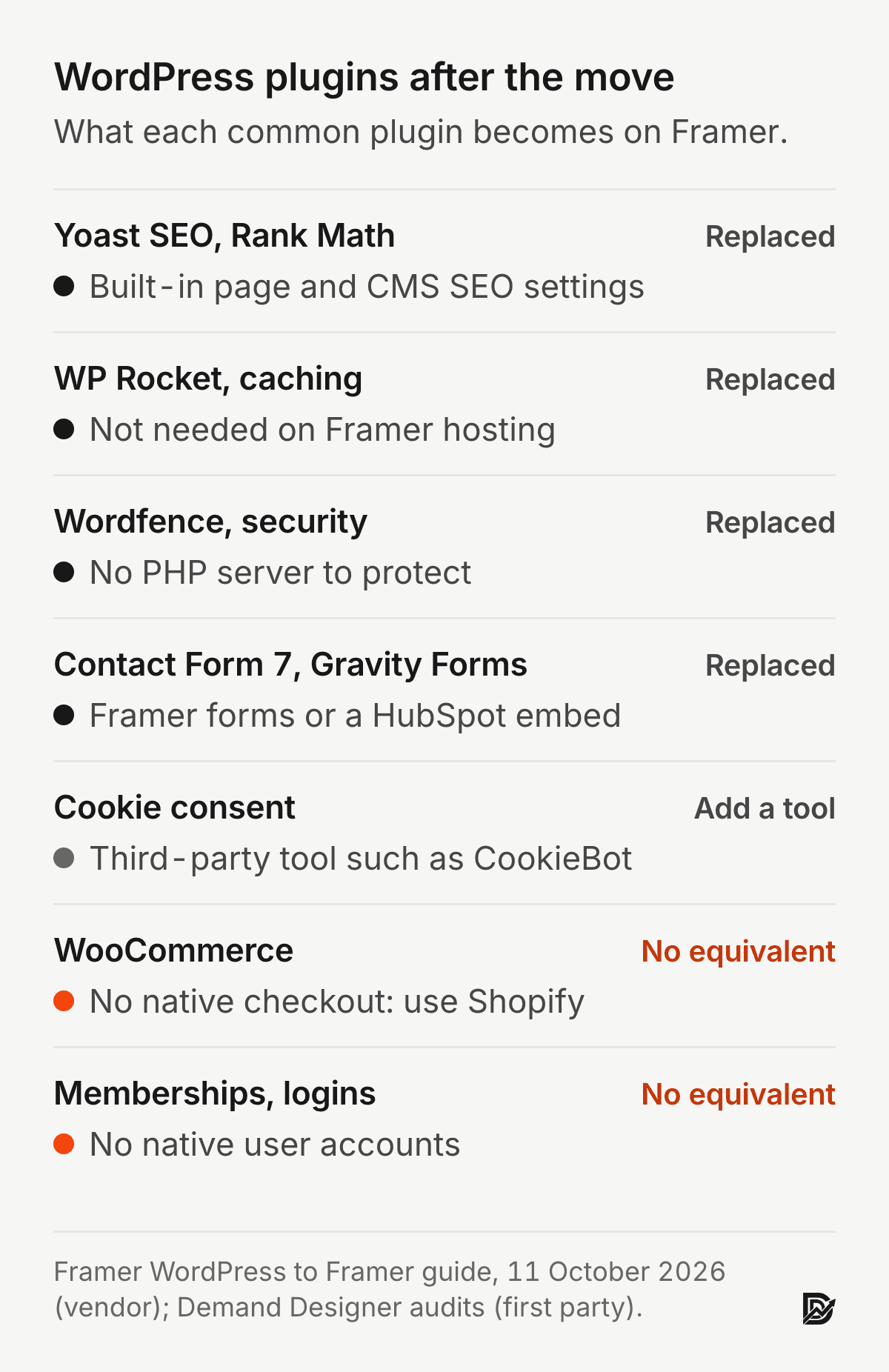
Most plugins on a marketing site stop being needed, because Framer either has the feature built in or removes the problem the plugin solved. A few have no Framer equivalent, and those decide whether the move makes sense. This is the map I use when I audit a WordPress site:
Yoast SEO or Rank Math: replaced by Framer’s built-in SEO settings for each page and CMS item: title, description, social image and indexing.
Caching and speed plugins: not needed. Framer hosting serves pre-built pages from a content delivery network.
Security firewalls: not needed. There is no PHP server or plugin code of yours to attack.
Contact forms: replaced by Framer’s native forms, or a HubSpot form embed if your CRM is HubSpot.
Cookie consent: Framer has no native banner, so add a third-party tool such as CookieBot.
WooCommerce and memberships: no equivalent. These decide whether the move makes sense at all.
The security line deserves a sentence. Mesa and colleagues traced WordPress vulnerability reports in the National Vulnerability Database back to the patches and found that plugin vulnerabilities can stay unnoticed for years before they are fixed (Mesa, Vieira, Viana, Durelli, Cirilo, Kalinowski and Lucena, Proceedings of the 22nd International Systems and Software Product Line Conference, 2018). A Framer site has no plugins and no server code of yours to patch. It still runs third-party scripts, though. In a 2012 crawl, Nikiforakis and colleagues found that 88.45 percent of the 10,000 most popular websites included at least one remote JavaScript library, and every one of those is code you do not control (Nikiforakis et al., Proceedings of the 2012 ACM Conference on Computer and Communications Security, 2012). So the migration is also the moment to cut the tracking tags nobody reads.
When should you not move from WordPress to Framer?
Stay on WordPress, or pick another platform, when the site is more than a marketing site. These are the cases where I tell people not to hire me for this move:
You sell a real catalogue. Framer has no native checkout. A handful of products can run through an embedded Shopify or Lemon Squeezy button; a WooCommerce store belongs on Shopify. My WooCommerce to Shopify guide covers that move.
Content sits behind logins. Framer has no native user accounts, so member areas, course libraries and gated portals need another tool.
The site runs server logic. Custom PHP, per-request database queries and custom REST endpoints do not exist in Framer.
You run a multisite network or more than 10,000 CMS items without the budget for add-ons or an Enterprise plan.
The team is comfortable and the site is fast. Moving has a cost too, and a WordPress site that is patched, quick and easy to edit is not a problem to solve.
That last point cuts both ways. Samuelson and Zeckhauser showed that people choose the existing option far more often than its merits predict, simply because it is the existing option (Samuelson and Zeckhauser, Journal of Risk and Uncertainty, 1988). Staying on WordPress is a decision with its own yearly cost, so price both paths before you pick one.
How do you keep your SEO when moving from WordPress to Framer?
Keep every page’s title, meta description, headings, canonical URL, internal links and structured data identical at launch, and add a 301 redirect for every URL that changes. Then resubmit the XML sitemap in Search Console. Change design or content four to six weeks later, once rankings have settled.
Twelve things that must survive the move
Page titles and meta descriptions, page by page
H1 and heading hierarchy
Canonical URLs
301 redirects for every changed URL
Internal linking structure
Image alt text
XML sitemap, regenerated and resubmitted
robots.txt directives
Structured data and schema markup
Analytics and tag manager continuity
Search Console property and verification
Page speed, which should improve rather than hold
How do you set up 301 redirects in Framer?
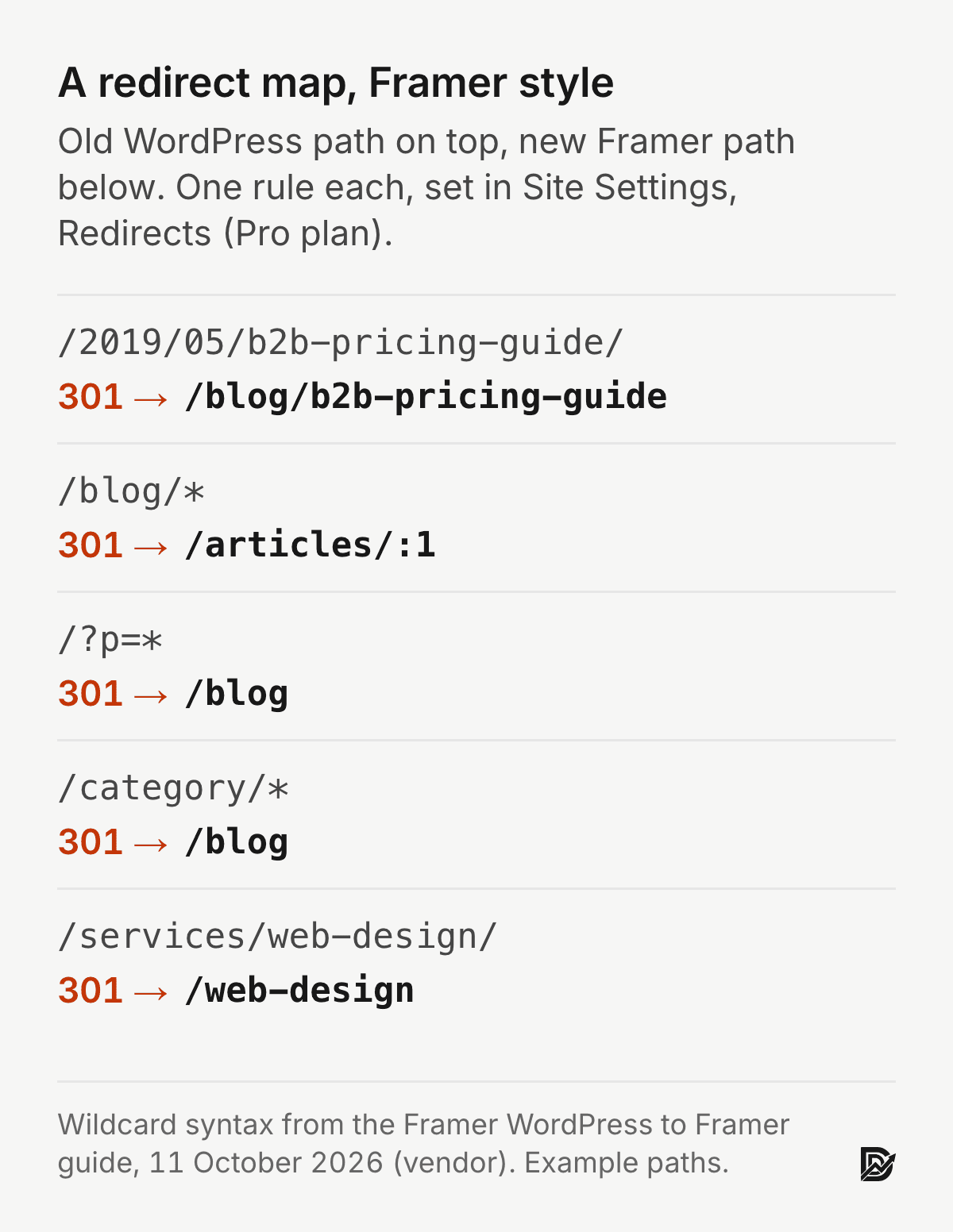
Open Site Settings, then Redirects, and add one rule per changed URL: the old WordPress path on the left, the new Framer path on the right. Redirects need Framer’s Pro plan or higher, so budget for Pro from launch day. Framer’s Basic plan has no site redirects (Framer, WordPress to Framer guide, read 11 October 2026).
Framer supports wildcards, which saves hours on a WordPress blog. An asterisk matches any path, and :1 reuses the part it matched:
Whole blog folder: /blog/* to /articles/:1 moves every post in one rule while keeping each post’s slug.
Post ID links: /?p=* to /blog catches old WordPress links that use post IDs instead of slugs.
Archives: /category/*, /tag/* and /author/* to /blog send retired WordPress archives to the blog index rather than a 404.
Images under /wp-content/uploads/ that other sites link to show up in the crawl. Redirect the few that matter to the page that now shows the image.
One-to-one rules for the pages that matter. Your top 50 pages by organic traffic and links each get their own exact rule, written and tested before launch.
Why redirects carry so much weight: search engines treat links from other sites as votes for a page. Brin and Page built Google’s original ranking on exactly that idea, counting the links pointing at each page as a measure of its importance (Brin and Page, Computer Networks and ISDN Systems, 1998). Those links point at your old WordPress URLs, and you cannot edit other people’s websites. A 301 is how their votes reach the new page.
Broken links are common even where people care about them most. Klein and colleagues checked web links cited in scholarly articles and found that one in five articles suffered from reference rot (Klein et al., PLoS ONE, 2014). That study covers scholarly citations, not websites, but it shows how routinely links die when nobody maintains them, and a migration without a redirect map breaks every changed link at once.
Will my rankings drop after the migration?
Expect a short wobble while Google recrawls, then recovery. In my own migrations, rankings have settled within two to four weeks when every changed URL had a 301 and the titles, headings and internal links matched the old pages. That is my experience, not a published benchmark. Framer’s guide recommends keeping URLs, content and metadata identical during the move and staggering design or content changes by four to six weeks. I follow that on any site with real search traffic, because when two things change at once you cannot tell which one moved the rankings.
How do you move your domain from WordPress hosting to Framer?
You do not transfer the domain registration. You point its DNS records at Framer and leave the domain where it is registered. In Framer, open Site Settings, then Domains, and add your domain first; Framer shows the exact records to use. Framer’s guide gives them as of October 2026:
Root domain: two A records, 31.43.160.6 and 31.43.161.6.
www: a CNAME record pointing to sites.framer.app.
48 hours before launch, lower the TTL to 300 seconds so the switch spreads in one to four hours instead of up to 48. Raise it back to 3600 afterwards.
Leave the MX records alone. Email is separate from the website, and it keeps working if you do not touch those records.
SSL is automatic once the records resolve. Keep the old WordPress hosting live for a week as a fallback, then cancel it.
Will Framer be faster than my WordPress site?
Usually, for a marketing site. Framer serves pre-built pages from a content delivery network, so no theme or plugin stack runs on each request. I measure both sites with PageSpeed Insights before and after, rather than promise a number, since a Framer page full of large videos can still be slow.
Speed matters because people do not wait. Nah found that web users’ tolerable waiting time without feedback was about 2 seconds (Nah, Behaviour and Information Technology, 2004). Galletta, Henry, McCoy and Polak found that longer page delays lowered task performance, attitudes towards the site and intention to return (Galletta, Henry, McCoy and Polak, Journal of the Association for Information Systems, 2004). Speed is a lasting gain of a migration, because it is set by the platform rather than by someone remembering to run updates.
How much does a WordPress to Framer migration cost?
Scope | Price | Migration scope |
|---|---|---|
Starter | $2,950 | Rebuild as one page on a proven layout, redirects included |
Focused site | $5,250 | Five custom pages with full content migration and SEO preservation |
Lead-generation site | $13,050 | Ten pages, CMS for blog and resource libraries, copy, SEO foundation, booking flow |
Large site | $27,300 | Twenty pages on a bespoke design system, with CMS, copy, SEO, booking flow and motion |
Those are fixed prices from my calculator with Framer selected, and the migration line is $1,500 of each total. Five custom pages with the technical SEO foundation added come to $6,450, and eight pages with a CMS and migration come to $7,500. Running costs after the move are in the Framer website cost guide, the wider budget is in the website redesign cost guide, and other moves are in the migration guides hub.
How long does a WordPress to Framer migration take?
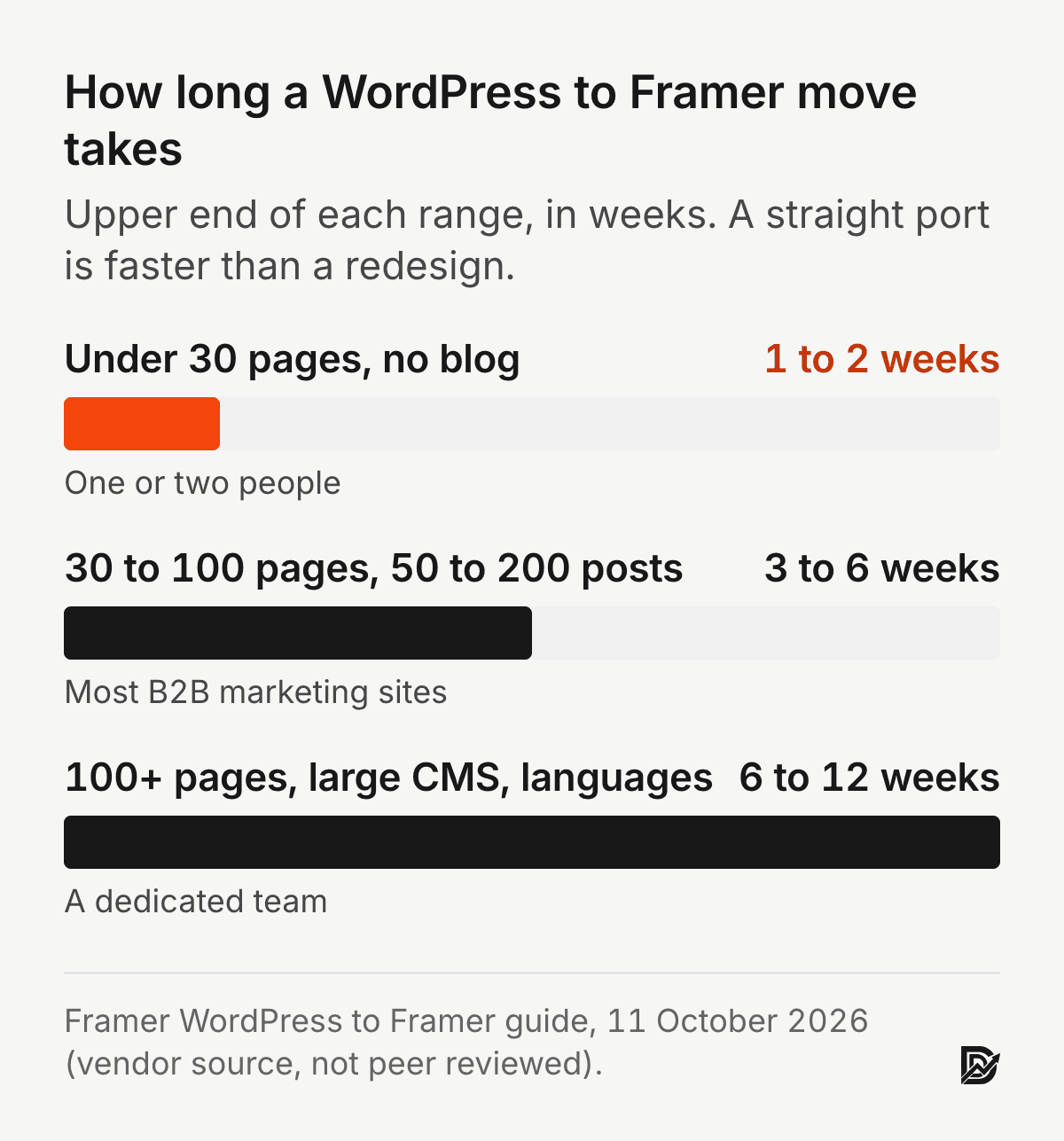
One to six weeks for most business sites. Framer’s guide puts a site under 30 pages with no blog at one to two weeks, 30 to 100 pages with 50 to 200 posts at three to six weeks, and larger sites with many languages at six to twelve weeks. My standard timeline is 14 to 21 business days of build plus your feedback time. An expedited 8 to 13 business days adds 25 percent to the price, and the redirect map is never the part that gets rushed.
What does Framer cost to run compared with WordPress?
A migrated marketing site on Framer Pro runs $360 a year, $30 a month on yearly billing, with hosting, SSL and redirects included (Framer pricing, checked 9 October 2026). The same site on WordPress runs about $375 a year if you self-host and do the updates yourself, about $870 on managed hosting with the usual premium plugins, and $2,070 to $3,270 once a maintenance retainer is added. Those WordPress figures come from my WordPress website cost guide, built from vendor prices on 9 October 2026.
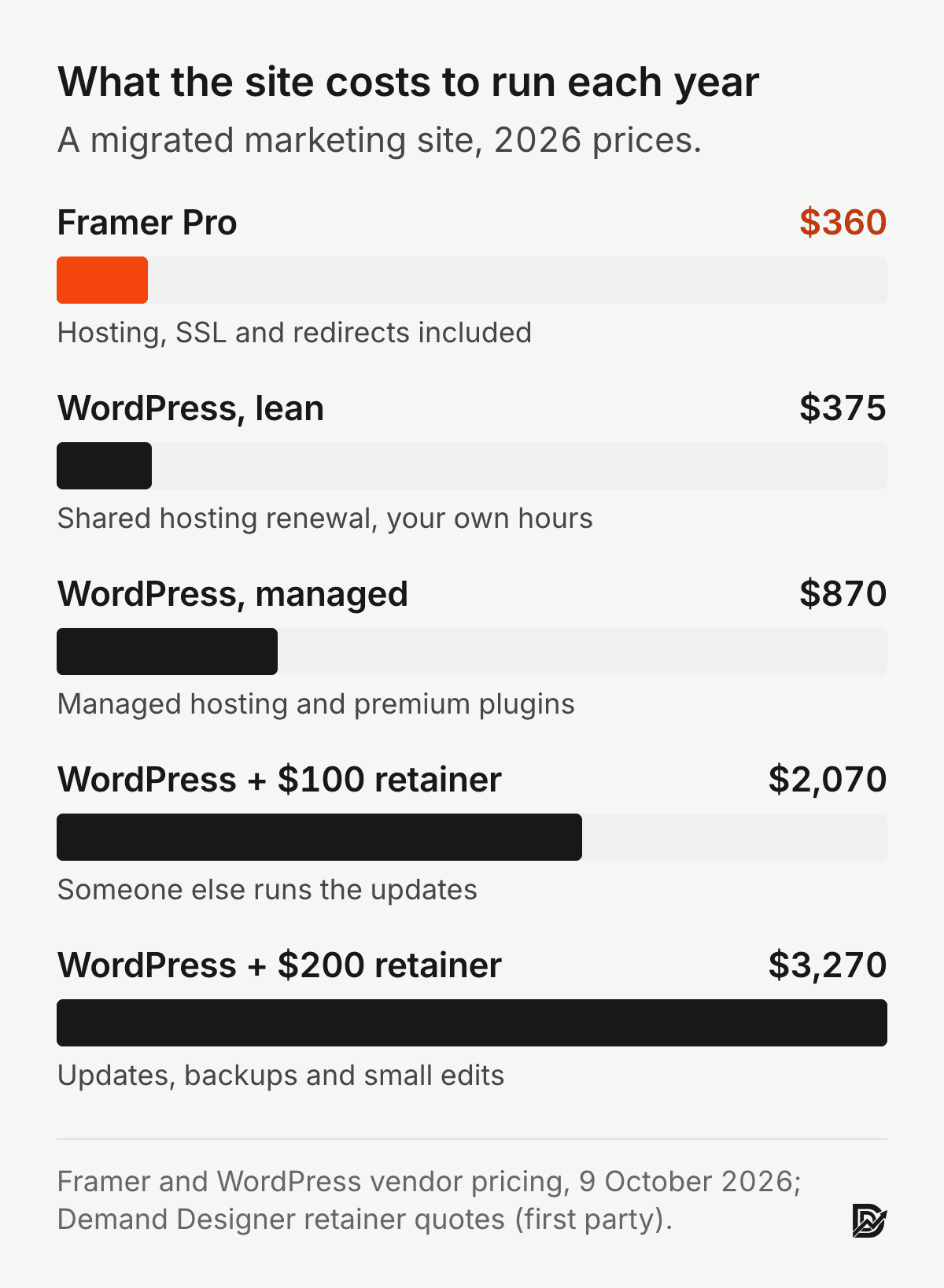
The lean WordPress figure is close to Framer, and it hides your own hours. Lehman’s first law of software evolution says a program used in the real world must keep changing or become less useful over time (Lehman, Proceedings of the IEEE, 1980). On WordPress that change is plugin, theme and core updates that someone has to run and test. On Framer the platform does it.
Is it worth moving from WordPress to Framer?
It is worth it when the site is a marketing site, your team waits on a developer for small edits, and updates or speed keep costing you time. It is not worth it for a store, a member site, or a WordPress site that already works well for the people who edit it.
The test I give heads of marketing is simple. Add up last year’s developer hours on updates and small edits, plus the hosting and plugin renewals. If that number over two years is larger than the migration price plus two years of Framer Pro ($720), the move pays for itself. If you would like a second opinion before you commit, the Pipeline Leak Scorecard scores the site you have today.
Comment migrer WordPress vers Framer ?
Cet article est en anglais ; voici le résumé. Migrer un site WordPress vers Framer, c’est reconstruire le site : les pages sont refaites dans Framer, les articles passent dans le CMS de Framer par import CSV, et chaque adresse qui change reçoit une redirection 301. Comptez une à deux semaines pour un petit site et trois à six semaines pour un site de 30 à 100 pages avec un blog. Les redirections exigent le forfait Pro de Framer. Gardez les mêmes adresses et les mêmes balises title au lancement, puis changez le design ou le contenu dans un second temps. Mes prix sont en dollars américains, à partir de 2 950 dollars.
Frequently asked questions
Will I lose SEO moving from WordPress to Framer?
Not if every changed URL has a 301 redirect and each page keeps its title, headings and internal links. Expect a two to four week wobble while Google recrawls, then a return to where you were.
Can I keep my blog?
Yes. Posts move into a Framer CMS collection through CSV import. Keep the WordPress slugs, and if the folder changes, one wildcard redirect such as /blog/* to /articles/:1 covers every post.
What happens to my WordPress plugins?
Most are no longer needed: SEO settings, forms, caching and security are built into Framer or unnecessary on its hosting. WooCommerce, memberships and cookie consent need another tool, so check those first.
How long until rankings recover?
In my own migrations, two to four weeks. Some sites finish ahead of where they started, but I have no benchmark for how often, so change one thing at a time and you can see what moved.
Can I migrate WordPress to Framer myself?
Yes, if the site is small and you are comfortable in Framer. The rebuild is design work; the risk is the redirect map. Crawl the old site, list every URL and test each redirect before you switch DNS.
Does Framer support WooCommerce?
No. Framer has no native checkout or product catalogue. A few products can sell through an embedded Shopify or Lemon Squeezy button, but a real WooCommerce store should move to Shopify instead.
Faut-il le forfait Pro de Framer pour migrer depuis WordPress ?
Oui, dans la plupart des cas. Les redirections 301 sont incluses à partir du forfait Pro, à 30 dollars par mois en facturation annuelle, et le forfait Basic n’en propose pas. Sans redirections, les liens vers les anciennes adresses WordPress tombent sur une page 404.
Combien coûte une migration de WordPress vers Framer ?
Chez moi, à partir de 2 950 dollars américains pour une page avec redirections, 5 250 dollars pour cinq pages sur mesure et 13 050 dollars pour un site de dix pages avec CMS. Il faut ajouter le forfait Framer Pro.
Sources
Peer reviewed
Brin, S., Page, L. The anatomy of a large-scale hypertextual Web search engine. Computer Networks and ISDN Systems, 1998. https://doi.org/10.1016/S0169-7552(98)00110-X
Galletta, D. F., Henry, R., McCoy, S., Polak, P. Web Site Delays: How Tolerant are Users? Journal of the Association for Information Systems, 2004. https://doi.org/10.17705/1jais.00044
Klein, M., Van de Sompel, H., Sanderson, R., Shankar, H., Balakireva, L., Zhou, K., Tobin, R. Scholarly Context Not Found: One in Five Articles Suffers from Reference Rot. PLoS ONE, 2014. https://doi.org/10.1371/journal.pone.0115253
Lehman, M. M. Programs, life cycles, and laws of software evolution. Proceedings of the IEEE, 1980. https://doi.org/10.1109/PROC.1980.11805
Mesa, O., Vieira, R., Viana, M., Durelli, V. H. S., Cirilo, E., Kalinowski, M., Lucena, C. Understanding vulnerabilities in plugin-based web systems: an exploratory study of WordPress. Proceedings of the 22nd International Systems and Software Product Line Conference, 2018. https://doi.org/10.1145/3233027.3233042
Nah, F. F.-H. A study on tolerable waiting time: how long are Web users willing to wait? Behaviour and Information Technology, 2004. https://doi.org/10.1080/01449290410001669914
Nikiforakis, N., Invernizzi, L., Kapravelos, A., Van Acker, S., Joosen, W., Kruegel, C., Piessens, F., Vigna, G. You are what you include: large-scale evaluation of remote JavaScript inclusions. Proceedings of the 2012 ACM Conference on Computer and Communications Security, 2012. https://doi.org/10.1145/2382196.2382274
Samuelson, W., Zeckhauser, R. Status quo bias in decision making. Journal of Risk and Uncertainty, 1988. https://doi.org/10.1007/BF00055564
Industry, vendor and first-party
Framer, WordPress to Framer step-by-step migration guide, framer.com/guides/wordpress-to-framer-step-by-step, read 11 October 2026. Vendor source, not peer reviewed: import methods, CSV rules, CMS limits, redirects, DNS records and timelines.
Framer pricing page, framer.com/pricing, checked 9 October 2026. Vendor source: Pro at $30 a month on yearly billing.
WordPress running costs from the Demand Designer WordPress website cost guide, vendor prices checked 9 October 2026 plus my own retainer quotes.
Migration prices from the Demand Designer pricing calculator, October 2026 (first party).
Free workbook
Pipeline Leak Scorecard
Find the leaks between your traffic and your pipeline. Score your site in about fifteen minutes, with it open in front of you.
12 questions, 8 pages, 15 minutes. Free.


