Web Design
7 Items in the Cost to Leave Webflow: Complete 2026 Guide

Joshua Jackai
16 min

Short answer: Leaving Webflow costs two bills: the months you pay both platforms and a rebuild quote. One overlap month is $55 on the listed plans, $25 for Webflow Premium plus $30 for Framer Pro. Published rebuild prices start at $499 for a self-service move and from $1,500 for a studio tier, so the rebuild is the larger bill.
I am Joshua Jackai, founder of Demand Designer, a US studio that builds B2B websites on Framer, HubSpot and WordPress. Founders ask what a Webflow exit costs, and the answers are scattered across agency pages that quote a price and stop. I read Webflow's and Framer's own pages, two studios that publish migration prices, and four peer-reviewed papers on switching and estimating. No independent benchmark of exit costs exists and I ran no survey, so this guide is a cost model with every source labelled, not a market average. In my scoping, the rebuild quote follows CMS items, pages and redirects more than the platform.
A few terms as I use them here. A CMS item is one entry in a collection, such as one blog post. A redirect map is the list that sends each old address to its closest new one. The overlap is the number of months you pay for the old and the new platform at once. Framer's pricing page lists Pro at $30 a month and Basic at $10, which sets the floor for the new side (Framer pricing, read 20 October 2026).
Key takeaways
Webflow's pricing page lists Basic at $15 a month and Premium at $25 a month, both billed yearly, and Team at $2,500 a month on an annual contract (Webflow pricing, read 20 October 2026).
Framer lists Basic at $10 and Pro at $30 a month, with 1,000 and 2,500 CMS items included (Framer pricing, read 20 October 2026).
Framer's own guide says Webflow's code export does not recreate the CMS, forms, search or ecommerce in Framer (Framer step-by-step guide, read 20 October 2026).
One studio publishes planning tiers from $1,500 for up to 7 pages and from $3,500 for 8 to 20 pages with a redirect map (PandaCodeGen, vendor page, read 20 October 2026).
People disproportionately stick with the default option, which is one reason a site stays on a platform after the price rises (Samuelson and Zeckhauser, Journal of Risk and Uncertainty, 1988).
Cost line | What drives it | Sourced figure | Sourced by |
|---|---|---|---|
1. Overlap bill | Months you pay both platforms | Webflow Premium $25, Framer Pro $30 a month | Vendor pricing pages |
2. Export work | What Webflow does not export | CMS as CSV, not forms or search | Framer guide |
3. Rebuild | Page count and design scope | From $499 to from $3,500 | Two studios, vendor pages |
4. CMS items | Items and collections | 1,000 or 2,500 items included on Framer | Framer pricing |
5. Redirects | Old URLs that change | Pro plan lists site redirects | Framer pricing |
6. Assets and tools | Images, forms, search, embeds | Not priced in any source I found | Gap, see Methodology |
7. Time and risk | Optimism in the estimate | No benchmark exists | Buehler and colleagues, 1994 |
1. How much does the overlap between Webflow and Framer cost? Best for budgeting the months you pay twice
The overlap bill is the cheapest line and the one people forget. You keep Webflow live until the new site passes checks, so for some weeks two subscriptions run at once. On the plans listed today, one month of overlap costs $25 on Webflow Premium plus $30 on Framer Pro, which is $55 a month.
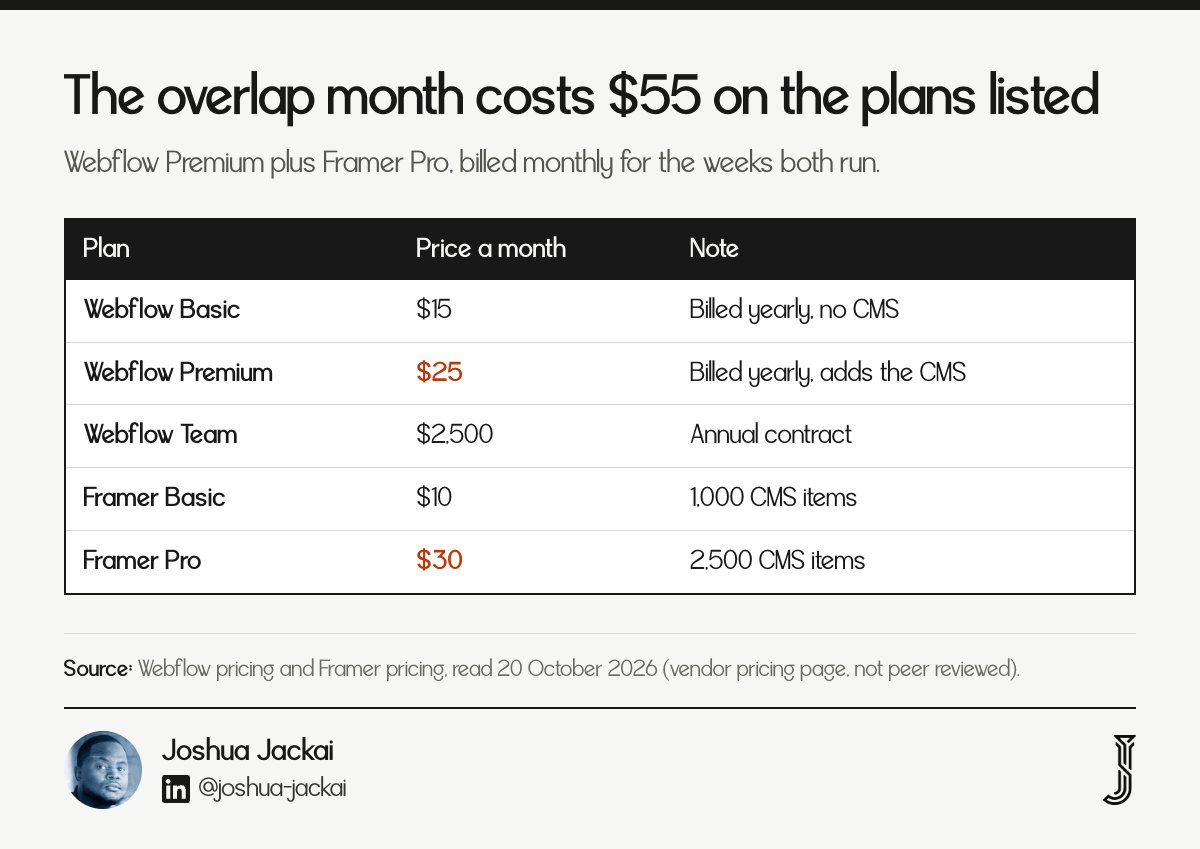
Webflow Basic: $15 a month billed yearly, 300 static pages, no CMS
Webflow Premium: $25 a month billed yearly, adds the CMS
Webflow Team: $2,500 a month on an annual contract
Framer Pro: $30 a month, 10 CMS collections, 2,500 CMS items
Check the billing cycle before you plan the date. Webflow's page quotes its low prices as billed yearly, so cancelling mid-term may not return the unused months. Webflow lists Basic at $15 a month and Premium at $25 a month on that basis (Webflow pricing, read 20 October 2026). Read your invoice for the renewal date, then schedule the launch before it. If the renewal falls two weeks after your planned launch, check whether launching before it avoids paying for another year.
The overlap is also where the plan change from May 2026 matters. Webflow's pricing page marks Premium as new, and threads on r/webflow show owners comparing it with what they paid before. I did not find a neutral record of the old prices, so I use only the figures on the live page. My rule is to price the overlap at the higher of the two plans for two months, then treat any unused time as a refund I may not get.
"My rule is to price the overlap at the higher of the two plans for two months," said Joshua Jackai, founder of Demand Designer.
Data point: Webflow Premium costs $25 a month billed yearly, against $2,500 a month for Team (Webflow pricing, vendor page, read 20 October 2026).
2. What does Webflow let you take with you? Best for scoping the export work
Webflow exports each CMS collection as a CSV file, and static pages and styles can leave as code on a plan that includes code export. The CMS, forms and site search do not run anywhere else, so they are rebuilt, not moved.

Code export: listed on the Core workspace plan, $19 a month billed yearly
CMS: one CSV per collection
Not recreated elsewhere: forms, search, localization, ecommerce
Images: CMS images may stay on the Webflow address until you copy them
Framer's guide is direct about the limit: Webflow's code export "does not recreate Webflow CMS, forms, search, localization, ecommerce, or other hosted behavior in Framer" (Framer step-by-step guide, read 20 October 2026). That sentence comes from a competitor. Webflow's own code export help topic holds the current limits, but it blocks automated reading, so open it yourself and read the limits before you sign a scope. Webflow can change them, and its pricing page shows how fast: Premium is marked new at $25 a month, and the Core workspace plan at $19 a month is where code export is listed. If you are on the free Starter workspace, add that $19 to the budget for the months you need the export.
The practical step is an inventory before any quote. List every collection with its fields, slugs and references, then every form, embed, search box and custom script. Ask each studio to price the list item by item. A quote that says "migration" with no list is a guess.
"A quote that says migration with no list is a guess," said Joshua Jackai, founder of Demand Designer.
Data point: Webflow's Core workspace plan, which includes code export, costs $19 a month billed yearly (Webflow pricing, vendor page, read 20 October 2026).
3. What does the rebuild cost? Best for comparing quotes by destination
The rebuild is the largest line and the least standard. Published prices run from $499 for a self-service move to WordPress, to planning tiers of $1,500, $3,500 and $5,000 from one studio, and to custom quotes. All of these are vendor figures, so treat them as price signals, not averages.

Seahawk Media, WordPress: from $499, self-service marketplace
PandaCodeGen Starter: from $1,500, up to 7 pages
PandaCodeGen Growth: from $3,500, 8 to 20 pages, full migration with a redirect map
PandaCodeGen Scale: from $5,000, more than 20 pages
My builds at Demand Designer: $3,250 to $14,999, fixed price, October 2026
The tiers split by page count, which matches how I scope work: pages, then collections, then redirects. PandaCodeGen calls its tiers "planning anchors, not market averages" (PandaCodeGen, vendor page, read 20 October 2026), and I agree with that caution. The low figure from Seahawk, $499, buys a marketplace service (Seahawk Media, read 20 October 2026), and the page does not say how many pages or collections it covers, so compare it against a quote only after you know the scope.
I build on Framer, HubSpot and WordPress, and my fixed-price builds run from $3,250 to $14,999. I scope a Webflow exit against those tiers by page count and then add the redirect map as its own line. For the platform trade-offs themselves, I compare the two tools in Framer vs Webflow.
"I scope a Webflow exit against those tiers by page count and then add the redirect map as its own line," said Joshua Jackai, founder of Demand Designer.
Data point: PandaCodeGen lists Starter from $1,500 for up to 7 pages and Growth from $3,500 for 8 to 20 pages with a redirect map (PandaCodeGen, vendor page, read 20 October 2026).
4. How many CMS items do you have? Best for checking plan limits
Your CMS item count decides both the import effort and the plan you land on. Framer includes 1,000 items on Basic and 2,500 on Pro, and sells more as add-ons. If you run a 3,000 item blog on Webflow, Framer Pro alone does not hold it.

Framer Basic: $10 a month, 2 collections, 1,000 CMS items, 30 pages
Framer Pro: $30 a month, 10 collections, 2,500 CMS items, 150 pages
Item add-on: $20 per 10,000 items, up to 40,000
Page add-on: $20 per 100 pages, up to 700
Count before you choose. Export each Webflow collection as CSV and count the rows. Framer's guide recommends importing one collection at a time, importing referenced collections before the collections that point at them, and testing a few items first. Each of those steps costs hours, and the hours scale with the number of collections and references, not the number of words. Framer Basic costs $10 a month and holds 2 collections and 1,000 CMS items. Pro costs $30 a month and holds 10 collections and 2,500 items, and extra items cost $20 per 10,000 up to 40,000. A site with three or more collections therefore needs Pro. The platform fees are small, and the import labour is the bill.
A site with 40 blog posts and a 12 item team collection is a small import. A site with 3,000 items and many references is a project of its own, and its price should say so. If a quote does not ask how many items you have, the studio has not read your site.
"If a quote does not ask how many items you have, the studio has not read your site," said Joshua Jackai, founder of Demand Designer.
Data point: Framer Pro includes 2,500 CMS items and 150 pages for $30 a month (Framer pricing, vendor page, read 20 October 2026).
5. How many old URLs change? Best for pricing the redirect map
Redirects protect the traffic you already earned, and they are priced by the number of URLs that change. Framer's guide says to give every old URL one outcome: keep, redirect, merge or remove. It also says to redirect only changed or removed URLs, and to send each one to its closest match.

Keep slugs where possible: each identical slug removes a redirect
Avoid: chains, loops and blanket redirects to the homepage
Bulk import: a CSV with from and to columns
Plan note: Framer lists site redirects under Pro, not Basic
The plan note matters for the budget. If you are on Framer Basic at $10 a month and you need redirects, the listed route is Pro at $30, so the redirect map adds $20 a month on top of its own labour. For a site with 400 old URLs, a redirect map has 400 rows to build, test and watch, and Framer's bulk import takes a CSV with from and to columns, so the building is quick and the checking is the work. Before launch, crawl the Webflow site, including links inside rich text, and save a Search Console baseline so you can compare clicks and impressions afterward.
Keeping slugs is the cheapest redirect strategy. Framer's guide says to keep CMS slugs unchanged where possible (Framer SEO migration guide, read 20 October 2026). I leave a URL alone unless there is a reason to move it, because every moved URL becomes a line to build, test and watch. My guide to moving WordPress to Framer uses the same URL map approach.
"Keeping slugs is the cheapest redirect strategy," said Joshua Jackai, founder of Demand Designer.
Data point: Framer's guide tells you to redirect only changed or removed URLs and to avoid chains, loops and broad redirects to the homepage (Framer SEO migration guide, vendor documentation, read 20 October 2026).
6. What else lives on the old site? Best for finding hidden line items
The hidden costs sit in assets and tools. Images, fonts, files, forms, analytics, consent tools, embeds and search all need a home on the new site, and none of the pricing pages I read puts a number on them. That makes this the line where quotes differ most.
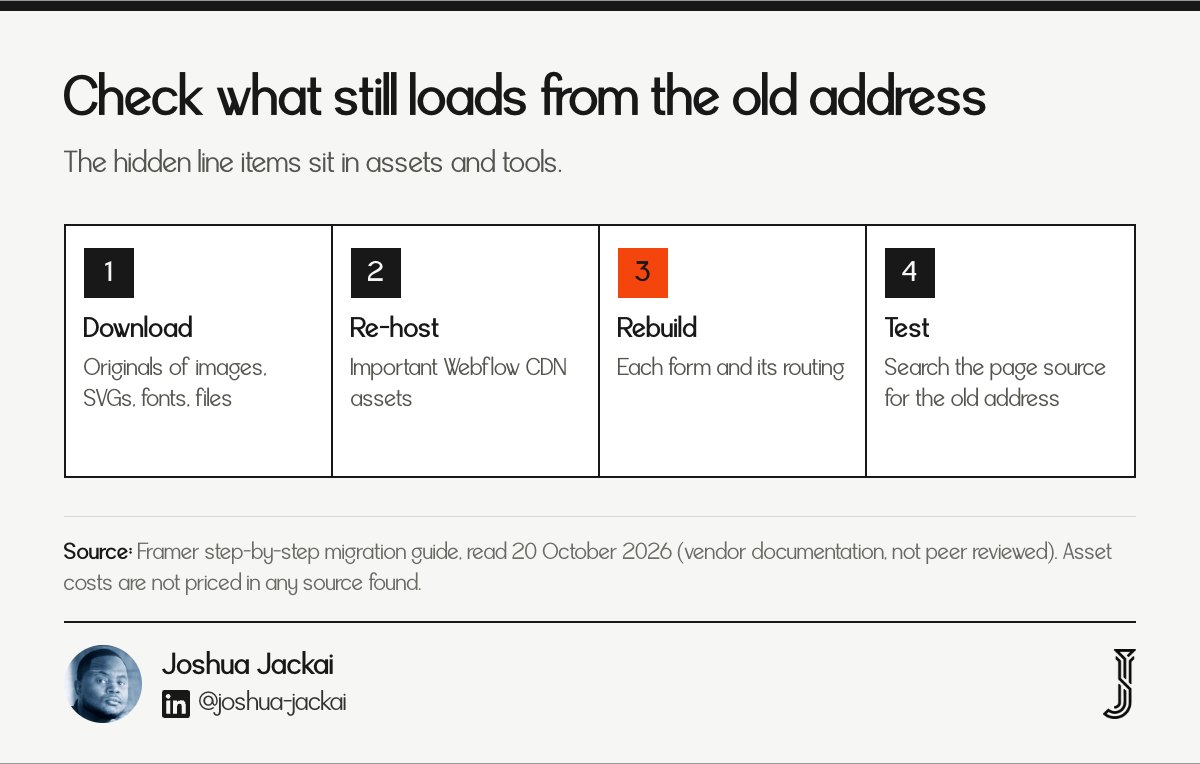
Assets: download originals of images, SVGs, videos, fonts and files
Integrations: list forms, analytics, consent tools, embeds and search
Custom code: list scripts and interactions that must be rebuilt
Cost: not priced in any source I found
Framer's step-by-step guide has the useful instruction here: download the original images and files you still need, and re-host important Webflow CDN assets. A studio that skips this can leave images loading from Webflow after you cancel the plan, which breaks the page on the day the subscription ends. Test it by opening the new site with the old plan paused in a staging copy, or by searching the page source for the Webflow image address. Fonts and downloadable files fail the same way, so add them to the same check.
Forms deserve their own line. A Webflow form that sends mail does not move with the export, so the new form, its spam control and its routing into your CRM get built and tested. Treat each form as a small piece of work and price it separately, because the CRM routing is where leads go missing.
"Treat each form as a small piece of work and price it separately," said Joshua Jackai, founder of Demand Designer.
Data point: Framer's guide lists forms, analytics, consent tools, embeds, search, memberships and ecommerce as the integrations to inventory before a move (Framer step-by-step guide, vendor documentation, read 20 October 2026).
7. How long will it really take? Best for pricing the risk
Time is the line that moves the other six. People underestimate how long tasks take, and a migration is a list of tasks. Add a buffer to the estimate, and stage the launch so the old site stays live until the new one passes checks.

Estimate error: people underestimate task completion time (Buehler, Griffin and Ross, 1994)
Stage it: run both sites until the checks pass
Watch: compare Search Console against the baseline after launch
Buffer: add a full week to any estimate you are given
A study of the planning fallacy found that people underestimate how long their own tasks will take, even with past experience of overruns. The study is about individuals, and I apply it as a rule of thumb: a migration quote that fits its first estimate exactly deserves a question about the buffer. None of the sources I read gives a duration, so ask each studio for hours per cost line. PandaCodeGen's Growth tier spans 8 to 20 pages from $3,500 (PandaCodeGen, read 20 October 2026), and a range that wide leaves room for the buffer to hide.
The status quo pulls the other way, and the pull to stay put is part of the cost of leaving. Consumer research also separates switching costs into procedural, financial and relational types (Burnham, Frels and Mahajan, Journal of the Academy of Marketing Science, 2003). A Webflow exit has all three: the work of learning a new tool, the fees, and the loss of a studio you know.
One more trap is sunk cost. Years of building on Webflow are already spent, and the lesson of the sunk cost literature is that past spending should not decide a forward-looking choice (Arkes and Blumer, Organizational Behavior and Human Decision Processes, 1985).
"Most real decisions, unlike those of economics texts, have a status quo alternative," wrote Samuelson and Zeckhauser in the Journal of Risk and Uncertainty in 1988.
"Add a full week to any estimate you are given," said Joshua Jackai, founder of Demand Designer.
Data point: in one study of real choices, faculty members' selections of health plans and retirement programs showed that status quo bias is substantial in important decisions (Samuelson and Zeckhauser, Journal of Risk and Uncertainty, 1988).
Compare the seven cost lines and pick your exit route
Use the matrix to see which lines apply to each destination. A dash means I found no sourced figure, not that the cost is zero. Filter by job in the interactive version saved with this article; the table carries the same rows as plain text.
Line | Framer | WordPress | HubSpot CMS | Custom code |
|---|---|---|---|---|
Recurring platform price | $10 or $30 a month (vendor) | Not sourced here | Not sourced here | Not sourced here |
CMS limit | 1,000 or 2,500 items included | Not sourced here | Not sourced here | Not sourced here |
Redirects | Pro plan lists site redirects | Not sourced here | Not sourced here | Not sourced here |
Published migration price | Not sourced here | From $499 (Seahawk Media, vendor) | Not sourced here | Not sourced here |
The two blank cells for WordPress and HubSpot are honest gaps. I did not find a neutral recurring price for either, so ask three hosts or HubSpot for a quote. My cost guides cover the buy side: WordPress website cost and HubSpot website cost.
Work out your own exit bill with the calculator
The calculator adds overlap months, the destination plan and your build quote into a first-year total. It checks your CMS item count against the Framer limits, so you see when an add-on applies. Every default is a placeholder; use your own invoice. The interactive file is saved with this article, and the arithmetic is simple enough to do by hand.
Example with placeholder inputs: 2 months of Webflow Premium at $25 is $50 of overlap. Framer Pro for 12 months at $30 is $360, which already covers those 2 months. Add a $3,500 build quote and the first-year total is $3,910. This assumes the Webflow plan can stop after the overlap. Change the quote and the answer follows. The quote is the only large number, which is the point of this guide.
Frequently asked questions about the cost of leaving Webflow
How much does it cost to leave Webflow?
It costs the overlap months, a rebuild quote and any add-ons. Vendor prices I found start at $499 for a self-service move and from $1,500 for a studio tier, with larger sites quoted individually. The platform fees are small beside the rebuild, so the quote is the number to compare.
Can I export my whole site from Webflow?
Not all of it. Collections export as CSV files, and code export is listed on the $19 Core workspace plan, but the CMS, forms and search do not run elsewhere. Framer's guide says the export does not recreate them. Plan to rebuild those parts.
Will I lose my Google rankings if I leave Webflow?
Not necessarily. Framer's guide says to keep valuable URLs stable, map every changed path and verify the live site in Search Console. Keeping slugs and redirecting the rest is the lowest risk. I found no controlled study of ranking loss, so doubt any promise of zero loss.
Is Framer cheaper than Webflow?
Compare plans that include a CMS. Webflow Premium costs $25 a month, Framer Basic costs $10 with 1,000 CMS items, and Framer Pro costs $30 with 2,500 items. Limits differ, so compare your own item and page counts, not the headline price.
Should I go to WordPress, Framer or HubSpot?
Choose by who edits the site, what it must connect to and what the CMS item count needs. I compare the tools in my guides on Framer vs Webflow and HubSpot website cost. No source I found ranks them on exit cost, so ask each for a written quote.
How I set this up for B2B teams
I scope a Webflow exit as a list: items, pages, redirects, forms and a launch date, each priced alone. My fixed-price builds run from $3,250 to $14,999, with the redirect map and form work as separate lines. If you want to see where your current site loses leads before you move it, take the Pipeline Leak Scorecard.
Methodology
I read two pricing pages and two migration guides on 20 October 2026, then published studio prices, and checked four papers on Crossref and RePEc. Webflow's help centre blocked my script, so I did not quote it directly. I ran no survey.
Limits: I found no neutral price for WordPress or HubSpot hosting, and every migration price is a vendor figure. Reddit threads showed demand for this question, and I used none of their numbers.
Sources
Peer reviewed
Samuelson, W. and Zeckhauser, R. (1988). Status quo bias in decision making. Journal of Risk and Uncertainty. doi.org/10.1007/BF00055564
Buehler, R., Griffin, D. and Ross, M. (1994). Exploring the planning fallacy: why people underestimate their task completion times. Journal of Personality and Social Psychology. doi.org/10.1037/0022-3514.67.3.366
Arkes, H. R. and Blumer, C. (1985). The psychology of sunk cost. Organizational Behavior and Human Decision Processes. doi.org/10.1016/0749-5978(85)90049-4
Burnham, T. A., Frels, J. K. and Mahajan, V. (2003). Consumer switching costs: a typology, antecedents, and consequences. Journal of the Academy of Marketing Science. doi.org/10.1177/0092070302250897
Industry and vendor
Webflow. Plans and pricing, read 20 October 2026. webflow.com/pricing. Vendor pricing page, not peer reviewed.
Framer. Pricing, read 20 October 2026. framer.com/pricing. Vendor pricing page, not peer reviewed.
Framer. How to migrate from Webflow to Framer: step-by-step, read 20 October 2026. framer.com/guides/webflow-to-framer-step-by-step. Vendor documentation, not peer reviewed.
Framer. Webflow to Framer SEO migration, read 20 October 2026. framer.com/guides/webflow-to-framer-seo. Vendor documentation, not peer reviewed.
PandaCodeGen. Website migration cost 2026, read 20 October 2026. pandacodegen.com. Vendor page, planning tiers, not peer reviewed.
Seahawk Media. Webflow to WordPress migration service, read 20 October 2026. seahawkmedia.com. Vendor page, not peer reviewed.
The cost model, the rules and the buffer are my own reasoning from the sources above. Build prices are Demand Designer's fixed-price tiers, October 2026. First-party.
Free workbook
Pipeline Leak Scorecard
Find the leaks between your traffic and your pipeline. Score your site in about fifteen minutes, with it open in front of you.
12 questions, 8 pages, 15 minutes. Free.