Web Design
7 Framer Pricing and Cost Lines: Complete 2026 Guide

Joshua Jackai
17 min

Published September 2026 · Last updated and fact-checked 24 October 2026
Short answer: Framer pricing starts at $0, then $10 a month for Basic and $30 a month for Pro, billed yearly, which is $120 and $360 a year (Framer pricing page, read 24 October 2026). Seats, usage add-ons, a domain and the build itself sit on top, and the build is usually the largest line by far.
Framer is a website builder where you design and publish a site from one visual workspace. A Framer website has seven cost lines, and only the first four are on Framer's invoice. This guide prices all seven in US dollars, so you can add up a first year and a third year before you sign anything.
I am Joshua Jackai, founder of Demand Designer, a solo web design studio. Demand Designer's own site runs on Framer, and I build client sites on it, so I have a bias and I would rather state it than hide it. The platform fees below are Framer's, read on the date shown. The build prices are mine, from a fixed price list. The competitor ranges are vendor estimates, labelled as such. I wrote this for founders and heads of marketing at B2B companies selling in the United States, many of them running on EOS (not affiliated with EOS Worldwide). If you are still choosing a platform, start with the platform comparison and then come back here to price the one you pick.
Key takeaways
Framer's paid plans are $10 (Basic) and $30 (Pro) a month per site on yearly billing, so $120 and $360 a year before seats or add-ons (Framer pricing page, read 24 October 2026).
Each extra editor seat is $20 a month and each content editor seat is $10 a month, so a Pro site with one of each costs $720 a year in platform fees.
Pro includes 150 pages, 2,500 CMS items and 100 GB of bandwidth, and usage add-ons stretch those to 700 pages, 40,000 CMS items and 2 TB.
Freelancers list Framer builds from $500 to $5,000 and agencies from $3,000 to $10,000 or more (Velox Themes, read 24 October 2026). My own fixed-price builds run from $3,250 to $14,999 (Demand Designer price list, October 2026).
Forecasts anchored on a project's own plan tend to run optimistic (Kahneman and Lovallo, 1993), which is why I add up three years of cost and not one month of plan fee.
More complex business software cost more to maintain in one classic study (Banker, Datar, Kemerer and Zweig, 1993), so I weigh how easy a site is to change as well as its build price.
Cost line | Price in USD | Billed | Who it matters to |
|---|---|---|---|
1. Plan fee | $10 or $30 a month | Yearly | Every site |
2. Usage add-ons | $20 to $40 per block | Monthly | Large or fast-growing sites |
3. Editor seats | $20 or $10 a month each | Monthly | Teams that edit weekly |
4. Framer add-ons | $20 to $200 | Monthly | Localized or testing sites |
5. Domain and outside tools | $0 to about $20 a year, plus vendor tools | Yearly | Every site |
6. Design and build | $3,250 to $14,999 with me | One time | Teams without a designer |
7. Changes and exit | Varies by change | As needed | Sites that live for years |
1. The plan fee: best for choosing between Free, Basic and Pro
Per Framer's pricing page, read 24 October 2026, Free costs $0, Basic $10 a month and Pro $30 a month, billed yearly. Free publishes to a Framer domain. Basic adds a custom domain and suits a small site. Pro adds staging, branching and redirects, and in my client work it is where most business sites end up.
Free: $0, Framer domain, 1 GB of bandwidth
Basic: $10 a month, $120 a year, 30 pages, 2 CMS collections, 50 GB of bandwidth
Pro: $30 a month, $360 a year, 150 pages, 10 CMS collections, 100 GB of bandwidth
Pro only: staging environment, branching with previews, site redirects
AI credits: 1,000 a month on Basic and 3,000 a month on Pro

The plan fee is the line people quote, and at $360 a year on Pro it is one of the smaller lines in a professional project. In my client work most B2B sites need Pro for one practical reason. Redirects keep your search rankings when URLs change, and staging lets someone check a change before the public sees it. Framer lists both under Pro and not under Basic, so I do not recommend Basic for a business site.
"I do not recommend Basic for a business site," said Joshua Jackai, founder of Demand Designer.
Yearly billing changes how the fee feels. Prelec and Loewenstein describe a double-entry mental account for purchases:
"Consumption that has already been paid for can be enjoyed as if it were free," wrote Drazen Prelec and George Loewenstein (Marketing Science, 1998).
Gourville found that framing a price as a small recurring amount changes how people judge it (Journal of Consumer Research, 1998), so I convert "$30 a month" to $360 a year before I compare it with anything else. Goodspeed, a competing Framer studio that builds from $10,000, also reports that students can get Basic free (Goodspeed, read 24 October 2026).
2. Usage add-ons: best for sites that outgrow their page, CMS or bandwidth limits
Framer's pricing page, read 24 October 2026, shows Pro extending its limits by usage. Extra pages cost $20 per 100 up to 700, CMS items $20 per 10,000 up to 40,000, and bandwidth $40 per 100 GB up to 2 TB. Most marketing sites never touch these lines.
Pages: 30 on Basic, 150 on Pro, then $20 per 100 up to 700
CMS collections: 2 on Basic, 10 on Pro, then $40 per 10 up to 40
CMS items: 1,000 on Basic, 2,500 on Pro, then $20 per 10,000 up to 40,000
Bandwidth: 50 GB on Basic, 100 GB on Pro, then $40 per 100 GB up to 2 TB
Caps: 700 pages, 40 collections and 2 TB, per the Framer pricing page
Source: the Framer pricing page, read 24 October 2026
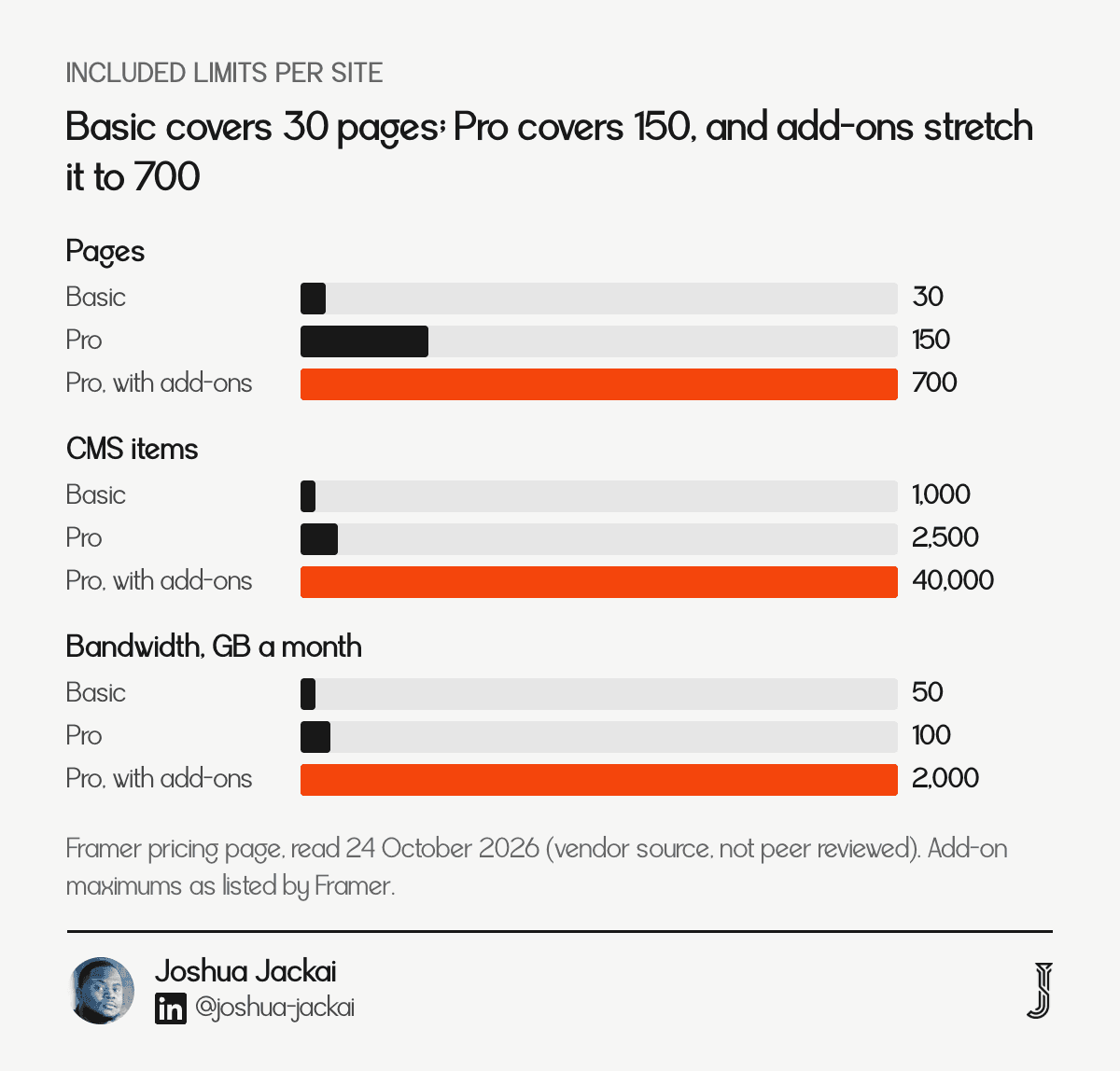
A twelve page B2B site uses under a tenth of the Pro page limit, so for most of my clients this line is zero. It matters in two cases. The first is a content engine: a blog with hundreds of posts plus case studies, localized pages and landing pages can pass 2,500 CMS items, and then the cost is $20 per 10,000 more, which is small. The second is traffic. A site that gets a spike from a launch or a paid campaign can pass 100 GB in a month, and overage is $40 per extra 100 GB.
The cost I watch is not the add-on price. It is the page count, because every page needs copy, a design decision and a redirect plan. I treat the page limit as a content budget in disguise.
"The page limit is a content budget in disguise," said Joshua Jackai, founder of Demand Designer.
Check your bandwidth in the Framer dashboard each month so an overage does not surprise you. If you are planning a larger move into Framer, the WordPress to Framer migration guide shows how many pages a typical move carries.
3. Editor seats: best for teams that edit the site every week
Per Framer's pricing page, read 24 October 2026, each additional editor costs $20 a month and each content editor $10 a month. Content editors update the CMS, localization and on-page text but not the design canvas. Owners and viewers are free, so a Pro site with one of each seat costs $720 a year.
Owner: free, manages editors, projects and billing
Editor: $20 a month, $240 a year, design, edit and publish
Content editor: $10 a month, $120 a year, CMS, localization and on-page editing
Viewer: free, can view and comment
Seat limit: 10 on Basic and Pro
Seats are the line that surprises teams, and Framer caps both plans at 10 seats (Framer pricing page, read 24 October 2026). The price is fair, but it scales with the number of people who want access, and those people usually arrive after launch. Goodspeed, a competing studio, reports that Framer cut Pro editor seats from $40 to $20 a month in May 2026 and added the $10 content editor seat (Goodspeed, read 24 October 2026), so older cost guides that show $40 a seat are out of date.
My rule is to give design access to as few people as possible. One editor, usually the person who owns the website, and content editors for everyone who writes. A marketing manager who only updates a blog post does not need the design canvas, and giving it to them also gives them a way to break a layout by accident. That costs $120 a year for a content editor instead of $240 for an editor, and it protects the design.
"A marketing manager who only updates a blog post does not need the design canvas," said Joshua Jackai, founder of Demand Designer.
4. Framer add-ons: best for localized sites, testing programs and multi-site setups
Framer's pricing page, read 24 October 2026, lists three add-ons: translation locales at $20 per locale, Convert for A/B testing at $50 per 500,000 events, and Advanced hosting at $200 for multiple sites and custom headers under one domain. Most B2B sites buy none of them.
Translation locales: $20 per locale, up to 20
Convert (A/B testing and funnels): $50 per 500,000 events
Advanced hosting: $200, multiple sites and custom headers under one domain
Where to read it: the add-ons section of the Framer pricing page, read 24 October 2026
I treat these as a decision about the business, not the website. Translation locales make sense when you sell in more than one language and someone owns each language. Convert makes sense when you have enough traffic to finish a test, and a site with a few hundred visits a month does not. Advanced hosting makes sense when a main domain has to serve a blog, docs or a store from separate projects.
Framer prices Convert at $50 per 500,000 events (Framer pricing page, read 24 October 2026), and the mistake I see is buying a testing add-on before the page has a clear offer. A test of two weak headlines teaches you which weak headline is slightly less weak. I would sooner spend the first quarter on the message and the form, then add testing when the page gets enough traffic to settle a result. The Pipeline Leak Scorecard is the quick way I check that, because it finds the leaks between a visit and a booked call before any test does.
5. Domain and outside tools: best for the costs Framer does not bill
A domain costs about $10 to $20 a year at a registrar, and Framer includes a complimentary domain on yearly billing for Basic and Pro. Forms, email, analytics and a CRM sit outside Framer and have their own prices, so list them before launch.
Domain: $10 to $20 a year (Velox Themes, read 24 October 2026)
Framer domain credit: complimentary domain on yearly billing, with the terms shown at checkout
Forms and CRM: often a free tier at first, then billed by the vendor
Email and analytics: billed by each vendor, not by Framer
Check at kickoff: who owns the domain registration and the login
Nothing here is large on its own, and that is the problem: small recurring lines are the ones nobody owns. A domain that renews on a former employee's credit card is a classic case, and so is a form tool signed up for by one marketer and forgotten by everyone else. Put every outside line in one sheet with an owner, a price and a renewal date, and the sheet becomes the real budget for the site. Three questions are worth settling before launch. Who owns the domain login? Where do form submissions go? Which analytics tool will tell us whether the site works? A site with no answer to the third question cannot prove its own cost.
"A site with no answer to the third question cannot prove its own cost," said Joshua Jackai, founder of Demand Designer.
For a B2B team on HubSpot, forms usually connect to the CRM, and the CRM licence is a separate line in the HubSpot website cost guide. I would rather you see that number now than discover it in the first month.
6. Design and build: best for deciding who builds it
The build is the largest line on a Framer project. Velox Themes lists freelancers from $500 to $5,000 and agencies from $3,000 to $10,000 or more, and Goodspeed builds in Framer from $10,000. My own fixed-price builds run from $3,250 to $14,999, with projects above $15,000 scoped on a call.
Template, built yourself: $99 to $199 for a premium template, plus your time (Velox Themes, read 24 October 2026)
Freelancer: $500 to $5,000 (Velox Themes)
Agency: $3,000 to $10,000 or more (Velox Themes, citing WebFX); Goodspeed from $10,000
Demand Designer: fixed price from $3,250 to $14,999, set in writing before work starts
What moves the price: page count, copywriting, SEO setup and a booking flow
Three routes, three different risks, and the published Velox ranges alone run from $500 for a freelancer to $10,000 or more for an agency (Velox Themes, read 24 October 2026). A template costs the least in cash and the most in time, and the result looks like every other site built on that template. A freelancer or a small studio gives you a designer for the price of a few months of platform fees, with the risk that one person holds all the context. An agency gives you a team and a process, with a price that reflects both.
I price against the outcome, not the hours. A fixed price forces me to write the scope down, which is where most cost overruns start. Kahneman and Lovallo describe the forecasting habit I am trying to avoid:
"Overly optimistic forecasts result from the adoption of an inside view of the problem, which anchors predictions on plans and scenarios," wrote Daniel Kahneman and Dan Lovallo (Management Science, 1993).
I cannot prove a written scope prevents it, but a fixed scope and a list of exclusions is how I check my own estimates.
"A fixed price forces me to write the scope down, which is where most cost overruns start," said Joshua Jackai, founder of Demand Designer.
If you are comparing this line with other platforms, the WordPress cost guide and the Shopify cost guide price the same build on those platforms, and the website redesign cost guide covers what a full redesign adds.
7. Changes after launch and leaving: best for the long view
Most Framer sites need small changes for years, and a change costs your own time or a designer's. Project Cost Estimator, a vendor estimate read 24 October 2026, puts a rebuild after leaving Framer at $3,000 to $10,000 for a 12 to 20 page site. I plan for a rebuild because I have not found a clean HTML export.
Small changes: your team, using editor or content editor seats you already pay for
Larger changes: a designer, quoted by the change or on a retainer
Maintenance work: no plugins to update, which removes a cost WordPress sites carry
Exit cost: $3,000 to $10,000 for a 12 to 20 page rebuild (Project Cost Estimator, read 24 October 2026)
Check before you sign: the contract says who owns the Framer project
Maintenance is where I think Framer saves real money, with a caveat. Banker, Datar, Kemerer and Zweig found that more complex business software cost more to maintain (Communications of the ACM, 1993). That study did not look at website builders, so I treat it as a reason to watch complexity, not as a Framer result. In my own builds, sites made from a few reusable components have been simpler to change than sites made from one off layouts. So a cheap build that is hard to change is not cheap in year three, and a site that only one person understands is the most expensive kind.
The exit line is the one most cost guides skip. I include it because a cost guide that only shows the way in is a sales page. If you might move to another platform within three years, you are paying twice for the pages, and the exit estimate above is a vendor estimate, not a quote from me. The migration cost guide for leaving Webflow shows the same logic in the other direction.
"A cost guide that only shows the way in is a sales page," said Joshua Jackai, founder of Demand Designer.
Which Framer cost lines apply to your site?
Every site pays lines 1 and 6, and line 5 applies once you add outside tools. Lines 2, 3, 4 and 7 depend on traffic, team size, languages and how long you stay. A twelve page B2B site with one editor and one content editor lands on Pro at $720 a year in platform fees.
Site type | Lines that apply | Platform fees a year | Watch for |
|---|---|---|---|
Founder site, 5 to 10 pages, one owner | 1, 6 | $360 on Pro | Redirects and staging need Pro |
B2B marketing site, one editor, one content editor | 1, 3, 5, 6 | $720 on Pro | Seat count growing after launch |
Content-heavy site with a large blog | 1, 2, 3, 5, 6 | $360 plus usage | CMS items past 2,500 |
Multilingual site | 1, 3, 4, 5, 6 | $360 plus $20 per locale | Who owns each language |
Site with an A/B testing program | 1, 3, 4, 5, 6 | $360 plus Convert | Traffic enough to finish a test |
Site you may leave in three years | All seven | $360 or more | Exit rebuild of $3,000 to $10,000 |
How much will your Framer site cost over three years?
Add the yearly platform fee, the seat fees, any add-ons and the domain, multiply by three, then add the build. The result is the number to compare with other platforms, since Basic is $120 a year and Pro is $360 a year on Framer's pricing page. The placeholders below are examples, not quotes.
Here is one worked example with placeholder inputs. A Pro plan is $360 a year, one editor is $240 and one content editor is $120, so platform fees are $720 a year and $2,160 over three years. Add a $3,250 build, the low end of my price list, and the three year total is $5,410 before the domain. Replace each number with your own.
What does Framer cost for a B2B team in the first year?
For a B2B team the first year is the build plus $360 to $720 in platform fees. With my price list that is $3,250 to $14,999 for the build, and a domain adds about $10 to $20 only if you buy one outside Framer, which lists a free custom domain on both paid plans.
The reason I put the build first is that the platform fee is predictable and the build is not: Pro is $360 a year (Framer pricing page, read 24 October 2026), while build quotes in this guide span $500 to $14,999. A team that argues about $10 against $30 a month is arguing about $240 a year. A team that picks the wrong builder or the wrong scope pays that difference many times over in rework. Spend the thinking time on line 6.
Frequently asked questions
Is Framer free?
Yes, for building and for publishing to a Framer domain with 1 GB of bandwidth. A custom domain needs Basic at $10 a month billed yearly. Goodspeed, a competing studio, reports that students can get Basic free (Goodspeed, read 24 October 2026).
How much does Framer cost per month?
Framer's pricing page, read 24 October 2026, lists $0 on Free, $10 a month on Basic and $30 a month on Pro, billed yearly. Extra editor seats add $20 a month each, and content editor seats add $10 a month each. Usage add-ons apply only past the included limits.
Does Framer include a custom domain?
Framer lists a complimentary domain on yearly billing for Basic and Pro, and you can also connect a domain you already own on either plan. A domain you buy yourself costs about $10 to $20 a year. Check the terms at checkout, because they can change.
Can I build a Framer site myself?
Yes. Templates cost $99 to $199 (Velox Themes, read 24 October 2026) and Basic or Pro hosts the result. What you trade is time: copy, page structure, redirects and tracking are still your job. A designer sells conversion structure and the hours you do not spend learning the tool.
Is Framer cheaper than WordPress?
On platform fees alone Framer is one yearly fee, $360 on Pro per its pricing page, with no plugins to update. WordPress adds hosting and plugin lines, so the real gap sits in build and maintenance, which I compare in the WordPress cost guide.
Who can build and price your Framer site for a B2B team?
I am Joshua Jackai, founder of Demand Designer, a solo web design studio, and I build Framer sites at a fixed price from $3,250 to $14,999, with the price and ship date written down before work starts. I begin by listing which of the seven lines apply to you.
To see where your current site loses leads before you spend on a rebuild, start with the Pipeline Leak Scorecard, a fifteen minute check, or book a free scoping call and I will price your seven lines against your numbers.
Sources
Peer-reviewed research
Kahneman, D., Lovallo, D. (1993). Timid choices and bold forecasts: a cognitive perspective on risk taking. Management Science. doi.org/10.1287/mnsc.39.1.17
Prelec, D., Loewenstein, G. (1998). The red and the black: mental accounting of savings and debt. Marketing Science. doi.org/10.1287/mksc.17.1.4
Gourville, J. T. (1998). Pennies-a-day: the effect of temporal reframing on transaction evaluation. Journal of Consumer Research. doi.org/10.1086/209517
Banker, R. D., Datar, S. M., Kemerer, C. F., Zweig, D. (1993). Software complexity and maintenance costs. Communications of the ACM. doi.org/10.1145/163359.163375
Industry, vendor and first-party
Framer, Pricing, read 24 October 2026 (vendor source, not peer reviewed). framer.com/pricing
Goodspeed, Framer pricing explained, read 24 October 2026 (competing agency source, not peer reviewed). goodspeed.studio
Velox Themes, Framer website cost, read 24 October 2026 (template vendor source, not peer reviewed). veloxthemes.com
Project Cost Estimator, Framer website cost 2026, read 24 October 2026 (estimator source with affiliate links, not peer reviewed; only its exit range is used). projectcostestimator.com
Demand Designer build prices, scope rules and the Framer experience described are from my own client work and price list, October 2026 (first party, not peer reviewed). demanddesigner.com/pricing
Free workbook
Pipeline Leak Scorecard
Find the leaks between your traffic and your pipeline. Score your site in about fifteen minutes, with it open in front of you.
12 questions, 8 pages, 15 minutes. Free.